VectorPaint
VectorPaint Обзор приложения
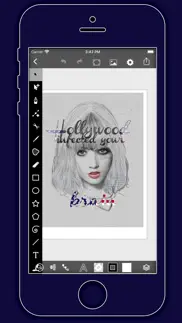
Что такое приложение vectorpaint? VectorPaint is a vector illustration app designed for IOS inspired by desktop class illustrator programms and powered by Metal, so Render times are up to 10x faster.
[Gallery]
The Gallery displays a thumbnail for each of your drawings. Tap a thumbnail to open it for viewing or editing. Tap the title below the thumbnail to enter a new title.
Tap the + button in the upper right corner of the screen to create a new drawing.
[Exporting]
Tap Select to enter selection mode.
In selection mode, tap on thumbnails to select them (or deselect them). When one or more drawings are selected, tap Email to email them.
Tap the Trash button to delete the selected drawings.
Tap Done to exit selection mode.
[Drawing]
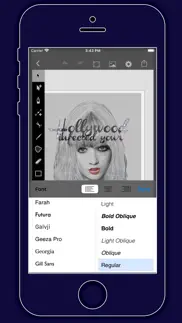
Use the Edit menu to cut, copy, paste, delete, and alter the selection.
Use the Arrange menu to move objects backwards and forwards in the stack, group and ungroup objects, distribute objects, and align objects.
Use the Path menu to add anchors, remove anchors, outline strokes, join paths, combine paths, make masks, and place text on a path.
[Settings]
Use the Settings panel to turn the grid on and off, control the grid spacing, and indicate whether you want drawn objects to snap to the grid, snap to points in existing paths, or snap to the edges of existing paths. You can also turn rulers on and off, change the units of your drawing, and modify the dimensions of your drawing.
When Isolate Active Layer is enabled, you can only edit the active layer. The other layers in your drawing will be partially hidden. This makes it easy to edit the content of one layer without accidentally touching something in another layer.
When Outline Mode is enabled, you can only see the outlines of the objects in your drawing. This makes it easier to select objects that are obscured by other objects. It also significantly reduces rendering time for complex drawings.
[Zooming]
Use the standard iOS pinch gesture to zoom in and out. Once you’ve started a pinch gesture, you can lift one finger to move the canvas around without zooming.
If your drawing units are set to pixels, VectorPaint displays the drawing at actual pixel size when the zoom level is 100% (as indicated in the navigation bar).
If you’re using units that map to a physical measurement (inches, centimeters, etc.), VectorPaint displays the drawing at print size when the zoom level is 100%.
[Tools]
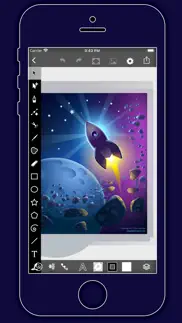
Tool PaletteVectorPaint provides a number of tools for creating and modifying your drawing.
The tool palette floats above the canvas. Drag it to move it around the screen. Flick it out of your way if necessary.
You can modify the behavior of many tools by holding down a second finger on the canvas after you start dragging. If you apply the second touch before you start dragging, you will zoom the canvas.
VectorPaint provides a number of tools for creating and modifying your drawing.
The tool palette floats above the canvas. Drag it to move it around the screen. Flick it out of your way if necessary.
[Layers]
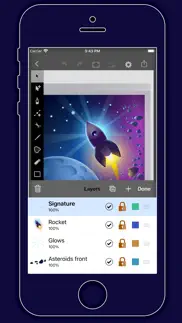
VectorPaint upports an unlimited number of layers. Layers are useful for organizing complex drawings. Each component of the drawing can be on its own layer, making it much easier to edit.
You can delete, duplicate, rearrange, rename, lock, and hide layers. You can also control the transparency of each layer.
Tap the Layers button in the toolbar to view the layers in your drawing.
[Masks]
A mask is a path, compound path, or text object that clips the contents of other drawing elements.
To create a mask, select the objects that you want to mask and the path or text object that you want to use as the mask (the masking object must be the topmost selected object). Choose Mask from the Path menu.
To unmask objects, select the masked object and choose Unmask from the Path menu.
A masking path can have a fill and stroke just like any normal path.
👋 Если вам нравится VectorPaint, можете ли вы поделиться им с друзьями?


| Имя приложения | VectorPaint |
| Категория | Графика и дизайн |
| Pазработчик | Anyi County Bingzhiyi Trading Co., Ltd. |
| Дата выпуска | воскресенье, 17 октября 2021 г. |
| Обновлять | пятница, 19 сентября 2025 г. |
| Размер файла | 6.15 МБ |
VectorPaint Комментарии на
Мы переводим деньги более 4 миллиардов евро каждый месяц. Мы позволяем индивидуальным и корпоративным счетам сэкономить 4 миллиона евро на комиссиях за банковские переводы. Хотите бесплатно отправить деньги за границу или перевести деньги за границу бесплатно? Бесплатные международные денежные переводы!
Знаете ли вы, что вы можете заработать 25 долларов США на нашем сайте, просто зарегистрировавшись? Получите $25 бесплатно, присоединившись к Payoneer!

Пожалуйста, подождите! VectorPaint Загрузка комментариев uygulama...
VectorPaint обслуживание клиентов
Что вы думаете об VectorPaint? Можете ли вы поделиться своими жалобами, опытом или мыслями о приложении с Anyi County Bingzhiyi Trading Co., Ltd. и другими людьми?



VectorPaint Uygulaması Снимок экрана и изображения
VectorPaint айфон, айпад, яблочные часы и яблоко тв скриншоты, картинки.
| язык | русский |
| Цена | 199 RUB |
| Возрастное ограничение | 4+ лет и старше |
| Последняя версия | 1.0.5 |
| Магазин игр | com.bzy.illustration |
| Совместимость | IOS 12.0 и выше |
VectorPaint (версия 1.0.5) Загрузите и установите приложение
Приложения VectorPaint были опубликованы в категории Графика и дизайн воскресенье, 17 октября 2021 г. и разработаны Anyi County Bingzhiyi Trading Co., Ltd. [ID разработчика: 1544707793]. Размер этого приложения составляет 6.15 МБ. Это приложение создано пользователем 17 Он был оценен и получил 1 из 5. VectorPaint - игры, опубликованные пятница, 19 сентября 2025 г., текущая версия 1.0.5 и хорошо работает на IOS 12.0 и более высоких версиях. Идентификационный номер магазина Гугл игры: com.bzy.illustration. Языки, поддерживаемые приложением:
EN FR DE IT JA PT ZH ES TR Скачайте и установите приложение!| Имя приложения | Счет | Комментарии | Цена |
| Book Isle | 4 | 1 | 15 |
| Yearn - Ретро Игровой Эмулятор | 1 | Без комментариев | 449 |
| ArtPics | 1 | Без комментариев | 99 |
| IChat - Ai assistant | 1 | Без комментариев | Бесплатно |
| Aquarell | 1 | Без комментариев | 349 |
VectorPaint Version 1.0.5 Update - Full iOS 26 Adaptation, Enhanced Creative Experience Dear VectorPaint User, We are thrilled to announce the release of the new VectorPaint version 1.0.5! The key highlight of this version is the full adaptation to the latest iOS 26 system, ensuring a seamless and smooth vector drawing experience on your iPad. Whether you are a professional illustrator or a creative enthusiast, VectorPaint continues to provide efficient creative tools with its desktop-class features and Metal-accelerated rendering technology. Core Update: Perfect iOS 26 Adaptation System Compatibility Optimization: Fully adapted to iOS 26's latest APIs and performance frameworks, ensuring stable operation and seamless integration in the iOS 26 environment. Experience faster launch times and lower power consumption on your iPad Pro, iPad Air, or any other device supporting iOS 26. Performance Boost: Leveraging iOS 26's graphics rendering optimizations, the Metal engine rendering speed is further increased by up to 10x, making drawing and editing complex vector graphics incredibly smooth. Maintain zero lag even when working with multi-layered, high-resolution illustrations. Interface & Interaction Improvements: Adapted to iOS 26's new gestures and multitasking features, supporting smarter dragging and hiding of the floating tool panel, enhancing productivity in multi-window workflows. Enhancements and Optimizations Based on Existing Features VectorPaint remains focused on professional vector drawing as its core. In this version, we have further refined the core features to make your creative process more efficient and intuitive. Here are the highlights based on the application's existing powerful toolset: Unlimited Layer Management: Continues to support an unlimited layer system. You can easily delete, copy, reorder, name, lock, hide layers, and precisely control transparency. New iOS 26-exclusive Isolate Active Layer mode allows for more focused editing in complex drawings, avoiding distractions. Professional Drawing Tools: The floating tool panel can be freely dragged or quickly dismissed. Supports cutting, copying, pasting, deleting, and modifying selections. Path tools are further optimized, including adding/removing anchor points, stroking paths, joining/combining paths, creating masks, and placing text on a path. Outline Mode helps you view and edit vector outlines more clearly. Object Arrangement & Editing: Enhanced object arrangement functions, supporting moving backward/forward, grouping/ungrouping, distributing, and aligning objects. iOS 26 gesture support makes these operations more precisely responsive. Gallery & Export: The gallery view is cleaner, supporting quick creation of new drawings, selecting, emailing exports, or deleting existing works. Export formats are compatible with iOS 26's sharing ecosystem, ensuring your work is easily transferred to other apps or devices. Custom Settings: Comprehensive optimization of grid controls (on/off, spacing, snap options), rulers, drawing units, and size settings. Supports 100% zoom view at actual pixel size or print size, combined with iOS 26's pinch gesture for infinite, lossless zooming. Masks & Advanced Features: Masking functionality for paths, compound paths, or text objects is more powerful, allowing easy clipping of drawing elements and supporting quick toggling of mask/unmask, ideal for complex illustration design. These updates are based on VectorPaint's core design philosophy – bringing a desktop-class vector drawing experience to iPad users. We have listened to user feedback to further improve the application's stability and user-friendliness, ensuring every creator can focus on inspiration rather than technical obstacles. Update now and open a new era of vector creation with iOS 26!
| Имя приложения | Pазработчик |
| Prêt à Template | Prêt-à-Template |
| WallPics -Живые обои 4K | IgKnight Technologies Ltd |
| PortraAI: Themes & Wallpapers | THREE PANDA DIGITAL LIMITED |
| Figma | Figma Inc. |
| Делать приглашения | Hangzhou Lemi Network Technology Co., Ltd |
Проверяете ли вы результаты своей SEO-работы? Или вы просто смотрите на рейтинг ваших ключевых слов в Google? Если вы не можете правильно прочитать данные из вашей работы SEO, вы теряете много!
| Имя приложения | Pазработчик |
| IErase | Kitamura hira |
| Camera Lucida™: AR Drawing | Camera Lucida |
| PaintHi | Anyi County Bingzhiyi Trading Co., Ltd. |
| Ibis Paint | Ibis inc. |
| Inspire | SnowCanoe |
Узнайте, как работают определенные криптовалюты, и получите понемногу каждую криптовалюту, чтобы опробовать ее на себе. Coinbase — самое простое место для покупки и продажи криптовалюты. Зарегистрируйтесь и начните сегодня.
| Имя приложения | Pазработчик |
| Sota Connect: Secure Network | Cat Connect |
| CapCut: редактор видео и фото | Bytedance Pte. Ltd |
| ВПН - VPN f3 VPN 2026 | Skyline Quantum Data Systems Limited |
| Яндекс Карты и Навигатор | Direct Cursus Computer Systems Trading |
| BiP Мессенджер | Turkcell Iletisim Hizmetleri A.S. |
Jasper — это генерирующая платформа искусственного интеллекта для бизнеса, которая помогает вашей команде создавать контент, адаптированный для вашего бренда, в 10 раз быстрее, где бы вы ни работали в Интернете.
| Имя приложения | Pазработчик |
| 还有么 - AI生活管家与家庭物品库存管理 | 梓涵 张 |
| KX Tracker | Kwizda Agro |
| Mark Baaijens Personaltraining | Mark Baaijens Personal Training |
| Traumdeutung & AI | Dragan Stanojkovic |
| RedFlag | Yann Burger |
Каждая капсула содержит чистые, высокоэффективные ноотропные питательные вещества. Никаких бессмысленных добавок. Просто 100% естественная сила мозга. Независимая проверка и проверка в рамках проекта Clean Label Project.
Adsterra — наиболее предпочтительная рекламная сеть для тех, кто ищет альтернативу AdSense. Adsterra — идеальный выбор для новых сайтов с низкой дневной посещаемостью. Для размещения рекламы на сайте в Adsterra, как и в других рекламных сетях, требуется определенный лимит трафика, возраст домена и т.д. Строгих правил нет.