Paint with Steps recorder
Paint with Steps recorder App Análisis
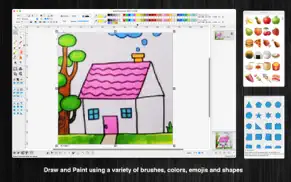
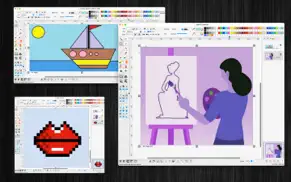
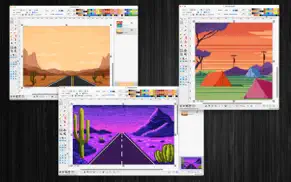
¿Qué es la aplicación paint with steps recorder? "Paint raster" is an user-friendly raster editing application with screen-step-recording function.
(* The image size, the number of recorded images per session is limited. You can upgrade to the Pro version to remove this limitation. *)
Key Features:
+ Pain/raster drawing Tools:
The application offers a variety of basic drawing tools, including:
Brush, pencil, eraser, fill color, color picker, and more.
Magic wand selection, rectangular selection, oval selection, and other selection tools.
+ Allow users to edit each pixel of the painting
+ Precise Step Recording:
The application records each step every time you left-click the mouse on the screen or within other application windows. This feature is invaluable for users who need a thorough and accurate representation of their actions, whether for troubleshooting, instructional purposes, or collaborative projects.
+ New feature: Merge multi images, pdf to a single PDF/TIFF file
+ New feature: Batch convert multi images to another format
+ New feature: Replace image files in the selected folder with a different format and quality to save memory space
+ Annotation Shapes:
Choose from over 100 basic annotation shapes to enhance your drawings. You can add or edit text within these shapes and merge them into the background to apply color filters if necessary.
+ Emoji:
Access a collection of over 1,200 colorful emoji objects to add a fun and expressive touch to your work.
+ Drag and Drop:
Easily drag and drop image files directly from Finder into the current editing window to incorporate them into your document.
+ Image Enhancement:
Enhance specific areas of your images with various filter effects, such as:
Keeping only one color
Grayscale
Inverting colors
Adjusting Red, Green, and Blue levels
Adjusting Hue and Saturation
Applying Texture Masks
Crystallizing images
Blurring
Glass distortion
Adding Gloom or Bloom effects
Applying comic effects
And more...
+ Open/Save to “*.paintsr” File:
If your drawing contains independent annotation objects, save it as a paintsr file type (“*.paintsr”) so you can edit these objects later.
+ Export to Report File:
Press “CMD-E” to export your current document as an multi-pages format file in HTML, PDF, TIFF, PNG, JPEG, or other supported formats.
+ Copy/Paste:
The application supports copy/paste functions for shapes. You can copy shapes or lines from the current canvas window and paste them into another window or application.
Example:
Select an area on the canvas, then press “CMD-C” to capture the image. Open the Preview application, press “CMD-N” to paste the captured image for viewing or saving as an image file. You can also paste the image into Excel, Word, or other applications.
👋 ¿Te encanta la aplicación Paint with Steps recorder? ¡Por favor comparte tus amigos!


| Nombre de la Aplicación | Paint with Steps recorder |
| Categoría | Diseño gráfico |
| Desarrollador | Tien Thinh Vu |
| Fecha de Lanzamiento | sábado, 24 de agosto de 2024 |
| Fecha de Actualización | miércoles, 18 de diciembre de 2024 |
| Tamaño | 23.17 MB |
Paint with Steps recorder Comentarios & Crítica
¿Sabías que puedes ganar $25 desde nuestro sitio con solo registrarte? ¡Obtenga $25 gratis uniéndose a Payoneer!

¡Por favor espera! Paint with Steps recorder app cargando comentarios de Facebook...
Paint with Steps recorder Servicio al Cliente
¿Qué opinas sobre la aplicación Paint with Steps recorder? ¿Puede compartir sus quejas, experiencias o pensamientos sobre la aplicación con la empresa y la gente de Tien Thinh Vu?

Paint with Steps recorder Apps Capturas de Pantalla & e Imágenes
Paint with Steps recorder aplicación iphone, ipad, apple watch ve apple tv solicitud imágenes.
| Idioma | Español |
| Precio | Gratis |
| Limite de edad | 4+ años y mayores |
| Versión Actual | 2.1 |
| Play Store | com.vutienthinh.macos.brushDraw.rasterPaint2 |
| Compatibilidad | IOS 11.0 o después |
Paint with Steps recorder (Versión 2.1) Descargue e Instale la Aplicación
La aplicación Paint with Steps recorder ios fue desarrollada por Tien Thinh Vu [ID del desarrollador: 393568128] y se lanzó en la categoría Diseño gráfico el sábado, 24 de agosto de 2024. El tamaño del archivo de la aplicación es 23.17 MB. Esta aplicación ha sido calificada por 17 usuarios y tiene una calificación de 1 sobre 5. Paint with Steps recorder es la última versión 2.1 lanzada el miércoles, 18 de diciembre de 2024. Funciona sin problemas en software IOS 11.0 mínimo y superior. Google Play ID: com.vutienthinh.macos.brushDraw.rasterPaint2. Idiomas admitidos por la aplicación:
CS DA NL EN FI FR DE IT JA KO NB PL PT RU ZH ES SV TH ZH TR VI Descargar e Instalar!| Nombre de la Aplicación | Valoración | Reseñas | Precio |
| CompareMerge | 1 | Sin comentarios | 14.99 |
| VisualDesigner | 1 | Sin comentarios | Gratis |
| SimpleCAD2 | 1 | Sin comentarios | Gratis |
| SaveSpace2 | 1 | Sin comentarios | Gratis |
| Paint raster | 1 | Sin comentarios | Gratis |
- New feature: merge multi images, pdf to a single PDF/TIFF file - New feature: batch convert multi images to another format - New feature: Replace image files in the selected folder with a different format and quality to save memory space - Improve UI - Fix bugs
| Nombre de la Aplicación | Desarrollador |
| Home AI - AI Interior Design | HUBX |
| Tattoo AI - Tattoo Design | HUBX |
| DaVinci - Arte Generado por IA | HUBX |
| AI Video - AI Video Generator | HUBX |
| Recraft | Recraft |
¿Comprueba los resultados de su trabajo de SEO? ¿O simplemente mira el ranking de palabras clave en Google? Si no puede leer los datos correctamente de su trabajo de SEO, ¡está perdiendo mucho!
| Nombre de la Aplicación | Desarrollador |
| SceneShot | Ubicolor Ltd |
| Color Harmony by Powsty | Wojciech Walczyszyn |
| Editor de Cocina 3D | Sergii Melnyk |
| SvgTrace Pro | SvgTrace |
| Abdz.do | Steale LLC |
Descubra cómo funcionan las diferentes criptomonedas y gane una pequeña cantidad de cada cripto para probarlo usted mismo. Coinbase es el lugar más fácil para comprar y vender criptomonedas. Regístrese, comience ahora.
| Nombre de la Aplicación | Desarrollador |
| Google Meet | |
| Documentos de Google | |
| Importass Seguridad Social | Secretaría de Estado de la Seguridad Social. Ministerio de Empleo y Seguridad Social |
| Google Maps |
Jasper es el creador de inteligencia artificial que te ayuda a ti y a tu equipo a superar las barreras creativas para crear contenido sorprendente y original 10 veces más rápido.
| Nombre de la Aplicación | Desarrollador |
| B.W.C. Betonwerk | B.W.C. Betonwerk GmbH & Co. Kommanditgesellschaft |
| Boyfriend For Hire | Future Web Ventures Inc |
| Bowling Cegielnia | Restaumatic s.r.o. |
| Campbell Fitness | Campbell Fitness llc |
| Ancient Egypt Pair | Mahmud el Nasur |
Mind Lab Pro ® es un medicamento científico que mejora el rendimiento laboral y la productividad con nootrópicos para la concentración, el estrés, la multitarea, la resolución creativa de problemas y más. ¡Haz que tu cerebro funcione al 100%!
Adsterra es la red publicitaria preferida por aquellos que buscan una alternativa a AdSense. Adsterra es la opción ideal para sitios nuevos con poco tráfico diario. Para anunciarse en el sitio de Adsterra, al igual que otras redes publicitarias, se requiere cierto límite de tráfico, antigüedad del dominio, etc. No hay reglas estrictas.