Py Editor for Python
Py Editor for Python App Análisis
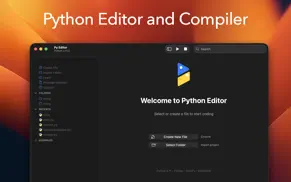
¿Qué es la aplicación py editor for python? Python Editor is a native macOS application that lets you write and run Python code instantly, with no installation or configuration required. Python 3.11 is embedded directly in the app, along with essential data science packages.
INSTANT PYTHON DEVELOPMENT
Start coding immediately with Python 3.11 built right into the app. No need to install Python, manage virtual environments, or configure paths. Everything works out of the box.
PRE-INSTALLED PACKAGES
We've included the most popular Python packages so you can start building real projects immediately:
- NumPy 2.3.5 for numerical computing and arrays
- Pandas 2.3.3 for data analysis and DataFrames
- Matplotlib 3.10.7 for data visualization
- Requests 2.32.5 for HTTP and API calls
- BeautifulSoup 4.14.2 for web scraping
- Pillow 12.0.0 for image processing
All packages are properly configured and code-signed for macOS.
PROFESSIONAL CODE EDITOR
Built on the industry-standard Ace editor with support for 150+ programming languages. Features include:
- Syntax highlighting for Python, JavaScript, HTML, CSS, Java, Swift, and 145+ more
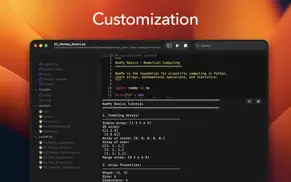
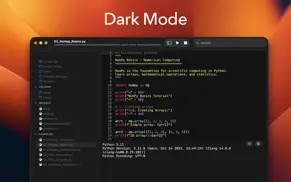
- Multiple color themes with automatic dark mode support
- Customizable fonts and sizes
- Line numbers and code folding
- Auto-completion and smart indentation
- Find and replace functionality
- Soft wrap and invisible character display
INTEGRATED PACKAGE MANAGER
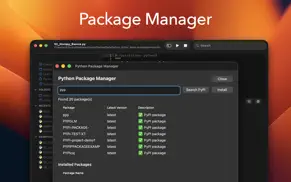
Install additional pure-Python packages directly from PyPI using the built-in Package Manager. Search thousands of packages and install them with a single click. No terminal required.
LEARN WITH BUILT-IN TUTORIALS
Six comprehensive tutorial files included with 800+ lines of example code:
1. Getting Started - Python fundamentals, variables, loops, and functions
2. NumPy Basics - Arrays, mathematical operations, and statistics
3. Pandas DataFrames - Data manipulation, filtering, and CSV operations
4. Web Requests - HTTP calls, JSON APIs, and error handling
5. Web Scraping - BeautifulSoup fundamentals and HTML parsing
6. Installing Packages - Using pip and the Package Manager
THREE-PANEL LAYOUT
Left panel shows your files organized into sections: Actions for creating and importing files, Folders for your projects, Recents for quick access, and Examples for tutorials.
Center panel features the code editor on top and a Python console below for viewing output and errors.
Right panel provides live preview for Markdown, HTML, and SVG files.
SMART FILE MANAGEMENT
- Security-scoped bookmarks for reliable file access
- Import external folders into your workspace
- Recent files for quick access
- Auto-save option when switching documents
- QuickLook preview for images and PDFs
- Support for 150+ file formats
NATIVE macOS EXPERIENCE
Built with Swift and AppKit for optimal performance on both Apple Silicon and Intel Macs. Follows macOS design guidelines with proper sandbox compliance and Gatekeeper signing.
WHAT YOU CAN BUILD
Data Analysis - Work with CSV files, perform calculations, create visualizations
Web Development - Make API calls, parse HTML, build web scrapers
Automation - Write scripts to process files and automate tasks
Learning - Perfect for students and beginners with built-in tutorials
Prototyping - Quick scripts without heavy IDE overhead
RECENT IMPROVEMENTS
- Fixed critical file access issues on macOS Sequoia
- Improved dark mode text visibility
- Enhanced Package Manager with double-click installation
- Better keyboard shortcuts (ESC and Cmd+W to close windows)
- Improved security-scoped file bookmarks
- Auto-save preferences
After a 3-day free trial, a subscription unlocks the complete experience:
- Editor customization
- Beautiful themes
- Complete Python guidebook
- Python learning resources
Privacy Policy: https://www.iubenda.com/privacy-policy/85758827
Terms of Service: https://www.apple.com/legal/internet-services/itunes/dev/stdeula
👋 ¿Te encanta la aplicación Py Editor for Python? ¡Por favor comparte tus amigos!


| Nombre de la Aplicación | Py Editor for Python |
| Categoría | Para desarrolladores |
| Desarrollador | Andromeda Corp LTD |
| Fecha de Lanzamiento | viernes, 13 de octubre de 2023 |
| Fecha de Actualización | martes, 3 de febrero de 2026 |
| Tamaño | 37.67 MB |
Py Editor for Python Comentarios & Crítica
¿Sabías que puedes ganar $25 desde nuestro sitio con solo registrarte? ¡Obtenga $25 gratis uniéndose a Payoneer!

¡Por favor espera! Py Editor for Python app cargando comentarios de Facebook...
Py Editor for Python Servicio al Cliente
¿Qué opinas sobre la aplicación Py Editor for Python? ¿Puede compartir sus quejas, experiencias o pensamientos sobre la aplicación con la empresa y la gente de Andromeda Corp LTD?
Py Editor for Python Apps Capturas de Pantalla & e Imágenes
Py Editor for Python aplicación iphone, ipad, apple watch ve apple tv solicitud imágenes.
| Idioma | Español |
| Precio | Gratis |
| Limite de edad | 4+ años y mayores |
| Versión Actual | 26.0.1 |
| Play Store | com.python.editor.macOS |
| Compatibilidad | IOS 13.0 o después |
Py Editor for Python (Versión 26.0.1) Descargue e Instale la Aplicación
La aplicación Py Editor for Python ios fue desarrollada por Andromeda Corp LTD [ID del desarrollador: 1745089768] y se lanzó en la categoría Para desarrolladores el viernes, 13 de octubre de 2023. El tamaño del archivo de la aplicación es 37.67 MB. Esta aplicación ha sido calificada por 17 usuarios y tiene una calificación de 1 sobre 5. Py Editor for Python es la última versión 26.0.1 lanzada el martes, 3 de febrero de 2026. Funciona sin problemas en software IOS 13.0 mínimo y superior. Google Play ID: com.python.editor.macOS. Idiomas admitidos por la aplicación:
AR DA NL EN FI FR DE EL HE HI IT JA KO NB PT ZH ES SV ZH Descargar e Instalar!| Nombre de la Aplicación | Valoración | Reseñas | Precio |
| Python Editor App | 4.0 | 297 | Gratis |
- Bugfix
| Nombre de la Aplicación | Desarrollador |
| Carnets - Jupyter | Nicolas Holzschuch |
| Koder Code Editor | Reny Mustika |
| Python Editor App | Andromeda Corp LTD |
| Asistente de Bluetooth | 杭州橘汁科技有限公司 |
| HTML Editor | Intrepid |
¿Comprueba los resultados de su trabajo de SEO? ¿O simplemente mira el ranking de palabras clave en Google? Si no puede leer los datos correctamente de su trabajo de SEO, ¡está perdiendo mucho!
| Nombre de la Aplicación | Desarrollador |
| Inspect Browser | Parallax Dynamics Inc. |
| Smart NFC | Alec O'Connor |
| Nmap Handbook | Basel AbuTaleb |
| Programming Notebook LITE | Ryan Rudes |
| AirTerminal - BLE Terminal | 晓忠 马 |
Descubra cómo funcionan las diferentes criptomonedas y gane una pequeña cantidad de cada cripto para probarlo usted mismo. Coinbase es el lugar más fácil para comprar y vender criptomonedas. Regístrese, comience ahora.
| Nombre de la Aplicación | Desarrollador |
| Threads | Instagram, Inc. |
| Google Meet | |
| Duolingo - Aprende idiomas | Duolingo |
| Google Maps | |
| Uber - Viajes asequibles | Uber Technologies, Inc. |
Jasper es el creador de inteligencia artificial que te ayuda a ti y a tu equipo a superar las barreras creativas para crear contenido sorprendente y original 10 veces más rápido.
| Nombre de la Aplicación | Desarrollador |
| Camtrade Pass | RealMeds Solutions Private Limited |
| CASADIO | Cimbali Group SPA |
| Bhargavi Arts | TagMango Inc |
| AKX Cronos | AKX Studio |
| BrickHouse Spin | BrickHouse Spin LLC |
Mind Lab Pro ® es un medicamento científico que mejora el rendimiento laboral y la productividad con nootrópicos para la concentración, el estrés, la multitarea, la resolución creativa de problemas y más. ¡Haz que tu cerebro funcione al 100%!
Adsterra es la red publicitaria preferida por aquellos que buscan una alternativa a AdSense. Adsterra es la opción ideal para sitios nuevos con poco tráfico diario. Para anunciarse en el sitio de Adsterra, al igual que otras redes publicitarias, se requiere cierto límite de tráfico, antigüedad del dominio, etc. No hay reglas estrictas.