Folder Peek
Folder Peek App Análisis
¿Qué es la aplicación folder peek? Quickly access documents, files, folders, and apps from the menu bar.
Think of it as an alternative to Dock folders, just more powerful and customizable.
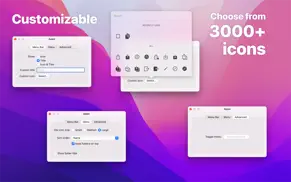
Each folder you add gets its own menu bar icon that you can customize and move around (drag the menu bar item while holding the Command key).
You can click on a file or folder in the menu to open it.
If you have little menu bar space, you can also show multiple folders in a single menu bar item. See the first FAQ.
Example use-cases:
- Access files relating to your current project
- Use it as an app launcher
- Add your home folder to quickly access anything
- View your most recent screenshots (see FAQ)
- Use it to select which Photos library to open
By taking advantage of Finder aliases, you can create a folder that contains aliases to other folders and files, making it possible to completely customize what's shown in a folder menu. See the FAQ for more.
■ Features
- Add multiple folders to the menu bar
- Each folder can be individually customized
- File preview
- View and copy image & video dimensions
- Drag & drop from the file submenu.
- Global keyboard shortcut to show/hide each folder menu (optionally opens at cursor position)
- Open a folder in a specific app
- Follows aliases and symlinks
- Shortcuts support
■ FAQ
‣ How can I show specific files and folders from various places?
You can create a folder that contains aliases to the files and folders you want to be included in the menu.
Create a folder to put aliases in and add that folder to the app. Make aliases for the files and folders you want in the menu and move the aliases into the folder you just made.
‣ What is an alias?
An alias is a shortcut to an app, file, or folder that you can keep anywhere on your Mac. Right-click an item in Finder and select “Make Alias” to make one.
‣ How can I use this as an app launcher?
Yes. Just add the “Applications” folder to the app. If you want to show only specific apps, follow the first FAQ.
‣ How can I show multiple directories at the top level in a single menu?
Follow the first FAQ.
‣ How can I have a menu bar folder with my most recent screenshots?
Make a folder to hold the screenshots and add it to the app. Open the Screenshot app, click “Options”, then “Other Location”, and choose the folder you just made. In Folder Peek, open the folder config, and change the sort order to “Date Created” and set “Max Items” to something like 20.
You can find more info on the app's website.
■ Support
You can contact me through the feedback button in the app.
👋 ¿Te encanta la aplicación Folder Peek? ¡Por favor comparte tus amigos!


| Nombre de la Aplicación | Folder Peek |
| Categoría | Utilidades |
| Desarrollador | Sindre Sorhus |
| Fecha de Lanzamiento | lunes, 4 de abril de 2022 |
| Fecha de Actualización | martes, 12 de mayo de 2026 |
| Tamaño | 5.03 MB |
Folder Peek Comentarios & Crítica
¿Sabías que puedes ganar $25 desde nuestro sitio con solo registrarte? ¡Obtenga $25 gratis uniéndose a Payoneer!

¡Por favor espera! Folder Peek app cargando comentarios de Facebook...
Folder Peek Servicio al Cliente
¿Qué opinas sobre la aplicación Folder Peek? ¿Puede compartir sus quejas, experiencias o pensamientos sobre la aplicación con la empresa y la gente de Sindre Sorhus?



Folder Peek Apps Capturas de Pantalla & e Imágenes
Folder Peek aplicación iphone, ipad, apple watch ve apple tv solicitud imágenes.
| Idioma | Español |
| Precio | 7 EUR |
| Limite de edad | 4+ años y mayores |
| Versión Actual | 1.13.2 |
| Play Store | com.sindresorhus.Folder-Peek |
| Compatibilidad | IOS 26.0 o después |
Folder Peek (Versión 1.13.2) Descargue e Instale la Aplicación
La aplicación Folder Peek ios fue desarrollada por Sindre Sorhus [ID del desarrollador: 328077650] y se lanzó en la categoría Utilidades el lunes, 4 de abril de 2022. El tamaño del archivo de la aplicación es 5.03 MB. Esta aplicación ha sido calificada por 17 usuarios y tiene una calificación de 1 sobre 5. Folder Peek es la última versión 1.13.2 lanzada el martes, 12 de mayo de 2026. Funciona sin problemas en software IOS 26.0 mínimo y superior. Google Play ID: com.sindresorhus.Folder-Peek. Idiomas admitidos por la aplicación:
EN Descargar e Instalar!| Nombre de la Aplicación | Valoración | Reseñas | Precio |
| One Task | 1 | Sin comentarios | 4 |
| Aiko | 4.4 | 20 | 29 |
| DS_Store Inspector | 1 | Sin comentarios | Gratis |
| Blear | 5 | 5 | Gratis |
| Online Check | 1 | Sin comentarios | 6 |
- Bug fixes.
| Nombre de la Aplicación | Desarrollador |
| DNI Wallet | DNIWallet, SL. |
| Cecotec | Cecotec innovaciones S.L. |
| Tuya Smart | Tuya Smart Inc. |
| Amazon Fire TV | AMZN Mobile LLC |
| Google Authenticator |
¿Comprueba los resultados de su trabajo de SEO? ¿O simplemente mira el ranking de palabras clave en Google? Si no puede leer los datos correctamente de su trabajo de SEO, ¡está perdiendo mucho!
| Nombre de la Aplicación | Desarrollador |
| IVerify Basic | IVerify |
| VESC Tool | Jeffrey Friesen |
| Wipr 2 | Kaylee Calderolla |
| ExifEraser - Exif Clean | 袁杰 张 |
| Multi Foscam FC | Kevin Siml |
Descubra cómo funcionan las diferentes criptomonedas y gane una pequeña cantidad de cada cripto para probarlo usted mismo. Coinbase es el lugar más fácil para comprar y vender criptomonedas. Regístrese, comience ahora.
| Nombre de la Aplicación | Desarrollador |
| Duolingo - Aprende idiomas | Duolingo |
| Google Chrome | |
| ChatGPT | OpenAI |
| Tattoo AI - Tattoo Design | HUBX |
| Wallapop - Vende y compra | WALLAPOP SL |
Jasper es el creador de inteligencia artificial que te ayuda a ti y a tu equipo a superar las barreras creativas para crear contenido sorprendente y original 10 veces más rápido.
| Nombre de la Aplicación | Desarrollador |
| BSNowyTarg mobileNet | Bank Spółdzielczy w Nowym Targu |
| Backpain Online Therapy | Emily Sudduth |
| Baby Drummer Stickers | Paul Scott |
| CC Centurions | BallFrog.com, LLC |
| Biologist - Ask to AI Expert | Jasmatbhai Satashiya |
Mind Lab Pro ® es un medicamento científico que mejora el rendimiento laboral y la productividad con nootrópicos para la concentración, el estrés, la multitarea, la resolución creativa de problemas y más. ¡Haz que tu cerebro funcione al 100%!
Adsterra es la red publicitaria preferida por aquellos que buscan una alternativa a AdSense. Adsterra es la opción ideal para sitios nuevos con poco tráfico diario. Para anunciarse en el sitio de Adsterra, al igual que otras redes publicitarias, se requiere cierto límite de tráfico, antigüedad del dominio, etc. No hay reglas estrictas.