FloorDesign2
FloorDesign2 App Análisis
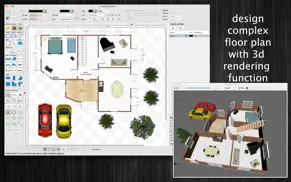
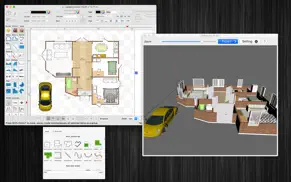
¿Qué es la aplicación floordesign2? FloorDesign2 is an 3d interior design application (floor plan) that allows you to easily design your home plan in 2D, render in 3D, as well as change the color or the texture of each room, and drag - drop furniture, doors, windows... onto the room from a catalog organized by categories.
(* Number of objects/shapes added to each document is limited, you could upgrade to Pro-Version to remove this limitation. *)
Main Functions of the application:
- SUPPORT MULTI-LANGUAGES:
English
Deutsch
Français
日本語
한국어
Español
Português
Čeština
Dansk
Suomi
Italiano
Nederlands
Norsk
Polski
Русский
Svenska
ไทย
Türkçe
Tiếng Việt
中文(中国)
中文(台灣)
- Customizable Room:
Drag (create new) room object into the draw view, double click on it to edit all information of the room (walls, intersection points. measure information....)
- 3D rendering: View your house from 3d view
- Import custom 3d model (in COLLADA-dae or Wavefront-obj format)
- Add custom items to Template list:
Right click on a group of objects then select "Add to template list" to save them so that you can reuse it later.
Use this function to create your own interior item from many basic shapes.
- Pre-Defined Interior objects:
There are many predefined nice 3d Interior objects for you to add to the design: door, window, stair, chair, sofa....
- Basic shape :
There are many shapes to add to the design, including text box, round box, line connector, callouts....
- Over 3000 Beautiful Symbols:
More than that, there are over 3000 beautiful symbols to add the view.
Please press the "Smile icon" button on the left to add and select any symbol you want.
- Drag/Drop Image from Finder (or press Cmd-V to paste image from current Clipboard):
The application allows users to drag/drop many image files directly from Finder to current editing window.
- Allow to make curved wall inside Room object
- User could save edited room object to templates list to reused later
- When edit room object , right click on wall line to show menu with following actions : select / deselect all walls, show / hide measure arrow information, change line to curved style....
Other functions:
- Unlimited Undo/Redo (shortcut key: Cmd-Z / Shift-Cmd-Z)
- Copy / Paste (shortcut key: Cmd-C / Cmd-V)
- Duplicate select items (shortcut key: Cmd-D)
- Group / Ungroup Items (shortcut key: Cmd-G / Shift-Cmd-G)
- Lock/Unlock items position (shortcut key: Cmd-L / Shift-Cmd-L)
- Rotate left, rotate right (shortcut key: Cmd-J / Cmd-K)
- Trim room wall
- Scale size of select items
- Flip select items
- Customizable Color / Font / Size / Line Type
- Shadow supported
- Snap to Grid
- Auto Align with another object when resize or move
- Change display order
- Export to png, jpeg, tiff, pdf image file (shortcut key: Cmd-E)
- Print supported (shortcut key: Cmd-P)
👋 ¿Te encanta la aplicación FloorDesign2? ¡Por favor comparte tus amigos!


| Nombre de la Aplicación | FloorDesign2 |
| Categoría | Diseño gráfico |
| Desarrollador | Tien Thinh Vu |
| Fecha de Lanzamiento | sábado, 14 de marzo de 2020 |
| Fecha de Actualización | lunes, 12 de enero de 2026 |
| Tamaño | 303.37 MB |
FloorDesign2 Comentarios & Crítica
¿Sabías que puedes ganar $25 desde nuestro sitio con solo registrarte? ¡Obtenga $25 gratis uniéndose a Payoneer!

¡Por favor espera! FloorDesign2 app cargando comentarios de Facebook...
FloorDesign2 Servicio al Cliente
¿Qué opinas sobre la aplicación FloorDesign2? ¿Puede compartir sus quejas, experiencias o pensamientos sobre la aplicación con la empresa y la gente de Tien Thinh Vu?


FloorDesign2 Apps Capturas de Pantalla & e Imágenes
FloorDesign2 aplicación iphone, ipad, apple watch ve apple tv solicitud imágenes.
| Idioma | Español |
| Precio | Gratis |
| Limite de edad | 4+ años y mayores |
| Versión Actual | 3.2.15 |
| Play Store | com.vutienthinh.macos.floordesign2020 |
| Compatibilidad | IOS 11.0 o después |
FloorDesign2 (Versión 3.2.15) Descargue e Instale la Aplicación
La aplicación FloorDesign2 ios fue desarrollada por Tien Thinh Vu [ID del desarrollador: 393568128] y se lanzó en la categoría Diseño gráfico el sábado, 14 de marzo de 2020. El tamaño del archivo de la aplicación es 303.37 MB. Esta aplicación ha sido calificada por 17 usuarios y tiene una calificación de 1 sobre 5. FloorDesign2 es la última versión 3.2.15 lanzada el lunes, 12 de enero de 2026. Funciona sin problemas en software IOS 11.0 mínimo y superior. Google Play ID: com.vutienthinh.macos.floordesign2020. Idiomas admitidos por la aplicación:
CS DA NL EN FI FR DE IT JA KO NB PL PT RU ZH ES SV TH ZH TR VI Descargar e Instalar!| Nombre de la Aplicación | Valoración | Reseñas | Precio |
| SimpleCAD2 | 1 | Sin comentarios | Gratis |
| JapanDict2 | 1 | Sin comentarios | Gratis |
| XDiagram | 1 | Sin comentarios | 14.99 |
| SimpleClient for FTP SFTP | 1 | Sin comentarios | Gratis |
| FloorDesign | 1 | Sin comentarios | 14.99 |
- Fix bugs - Improve UI - Floor / Wall support arc path - Support material in 2 sides of wall - Allow to edit shape of vertical wall (add hole, change shape...) Previous update: - Allow to customize bottom taskbar/left, right inspector view - Double-click on an object to edit text directly on the canvas - Allow to change visible, printable properties of objects - Show objects in Layer's tree view - Add modify function: Trim floor/Trim wall - Add modify function: Add/Edit text - Add modify function: Edit connection point - Star polygon objects: Allow to customize edge size - Allow user to edit connection dots of any shape, box - Support find/replace string - Support save to iCloud - Add Template selection dialog - Add North Arrow, Scale Bar shapes into MoreShape dialog - Allow user to input Absolute coordinates, Relative coordinates, Polar coordinates for creating objects, walls - Add Explode wall, Join wall modify functions - "CMD-9" to change zoom to fit to canvas size - Add modify functions: Apply Gradient fill to multi objects - Add modify functions: Copy/Paste properties - Allow to change theme color of all items inside current document - Allow to resize canvas from all directions - Improve app's performance - Improve Grid setting, Snap setting (add minor step setting...) - Support fill setting: Pattern - Support multi-canvas (multi-tabs) for each document - Unit setting for each document: each document support different unit setting - User can move, resize object to outside of canvas's printable area
| Nombre de la Aplicación | Desarrollador |
| Picsart Color Pintar | PicsArt, Inc. |
| Borrar Objetos | TAPUNIVERSE LLC |
| DaVinci - Arte Generado por IA | HUBX |
| Live Activities - To Do Widget | FugaPiyo Inc. |
| Figma | Figma Inc. |
¿Comprueba los resultados de su trabajo de SEO? ¿O simplemente mira el ranking de palabras clave en Google? Si no puede leer los datos correctamente de su trabajo de SEO, ¡está perdiendo mucho!
| Nombre de la Aplicación | Desarrollador |
| SvgTrace Pro | SvgTrace |
| Nomad Sculpt | Hexanomad |
| Usted Doodle Pro-Image Editor | Digital Ruby, LLC |
| Lux Meter for professional | Byungil Park |
| Ibis Paint | Ibis inc. |
Descubra cómo funcionan las diferentes criptomonedas y gane una pequeña cantidad de cada cripto para probarlo usted mismo. Coinbase es el lugar más fácil para comprar y vender criptomonedas. Regístrese, comience ahora.
| Nombre de la Aplicación | Desarrollador |
| Gmail - El correo de Google | |
| Instagram, Inc. | |
| Amazon Prime Video | AMZN Mobile LLC |
| Booksy para clientes | Booksy |
Jasper es el creador de inteligencia artificial que te ayuda a ti y a tu equipo a superar las barreras creativas para crear contenido sorprendente y original 10 veces más rápido.
| Nombre de la Aplicación | Desarrollador |
| B.W.C. Betonwerk | B.W.C. Betonwerk GmbH & Co. Kommanditgesellschaft |
| Atomic Spectrum | MUSTAFA OZDAMAR |
| Block Flow | Harry GOODWIN |
| Celion Hub | Miguel Angel Cabanas aguilar |
| Boyfriend For Hire | Future Web Ventures Inc |
Mind Lab Pro ® es un medicamento científico que mejora el rendimiento laboral y la productividad con nootrópicos para la concentración, el estrés, la multitarea, la resolución creativa de problemas y más. ¡Haz que tu cerebro funcione al 100%!
Adsterra es la red publicitaria preferida por aquellos que buscan una alternativa a AdSense. Adsterra es la opción ideal para sitios nuevos con poco tráfico diario. Para anunciarse en el sitio de Adsterra, al igual que otras redes publicitarias, se requiere cierto límite de tráfico, antigüedad del dominio, etc. No hay reglas estrictas.