KORG GEC5 Controller
KORG GEC5 Controller App Análisis
¿Qué es la aplicación korg gec5 controller? GEC5 Lab System Controller
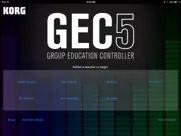
The Korg Group Education Controller (GEC5) represents the most advanced system in group instruction technology. With an intuitive, easy-to-use software user interface, multiple practice and instruction modes, fully-digital stereo sound - the Korg GEC5 Lab System will take any music, language or technology lab to a new level of high efficiency and create a superior classroom experience.
The advanced, yet easy-to-use audio routing in the GEC5 is compatible with any digital audio signal, so get creative and build a room with any combination of electronic instruments including digital pianos, guitars, synthesizers, and even MIDI-controlled software instruments. Want to do even more? Integrate computers with your lab and take learning to a new level of excitement and capability. Unlike other systems, the Korg GEC5 is completely open and allows you to use any curriculum that suits your classroom best. The sky is the limit!
For over 20 years Korg has worked extensively with educators all over the world with overwhelming success in thousands of music, language and technology labs. This expertise in educational technology has led to the development of the Korg GEC5 Lab System - the most user-friendly, flexible and powerful lab control system available.
Software Control Application
MULTIPLE MODES MEAN FLEXIBILITY
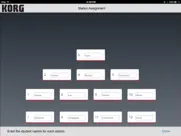
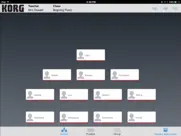
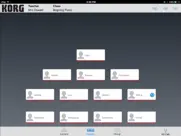
There are three main modes of GEC5 operation. Each of these can be selected within the software interface at the teacher’s station:
Lecture Mode:
Present material and instruction in a lecture format. All students hear the teacher’s microphone and instrument or computer allowing for a captive and quiet audience.
- Tap the Student Instrument/Student Stations button and allow the students to play along.
- Tap and hold to exclude a student from the lecture for independent work.
- Double tap to bring a student into the lecture for comments or questions.
Practice Mode:
Practice mode is used when the students are working independently. Each student hears only his or her own instrument or computer. In Practice Mode, the teacher has the option of “eavesdropping” on the student and initiating 2 way communication with the student for individualized instruction.
- Double-tap to eavesdrop, double-tap again to talk
- Tap All Call to call attention to the group
- Single tap to clear eavesdrop
- Performance Mode allows the teacher to hear all of the students and their instruments at the same time while each student can only hear themselves, their instrument and the teacher’s audio.
Group Mode:
This mode is used when students are working together in groups (two or more student workstations in any conceivable configuration). Each student in a group can hear his or her own instrument as well as the instruments or computer and microphone of the other members of their group.
- Tap and hold to select students to put in a group, then select New Group
- Recall Auto Group Presets
- Make your own custom presets for each class
*This app must be used with the GEC5 hardware system available from an authorized Korg Dealer.
http://www.korg.com/us/products/audio/gec5/index.php
👋 ¿Te encanta la aplicación KORG GEC5 Controller? ¡Por favor comparte tus amigos!


| Nombre de la Aplicación | KORG GEC5 Controller |
| Categoría | Educación |
| Desarrollador | KORG INC. |
| Fecha de Lanzamiento | viernes, 20 de enero de 2017 |
| Fecha de Actualización | jueves, 13 de julio de 2023 |
| Tamaño | 22.22 MB |
KORG GEC5 Controller Comentarios & Crítica
¿Sabías que puedes ganar $25 desde nuestro sitio con solo registrarte? ¡Obtenga $25 gratis uniéndose a Payoneer!

¡Por favor espera! KORG GEC5 Controller app cargando comentarios de Facebook...
KORG GEC5 Controller Servicio al Cliente
¿Qué opinas sobre la aplicación KORG GEC5 Controller? ¿Puede compartir sus quejas, experiencias o pensamientos sobre la aplicación con la empresa y la gente de KORG INC.?
KORG GEC5 Controller Apps Capturas de Pantalla & e Imágenes
KORG GEC5 Controller aplicación iphone, ipad, apple watch ve apple tv solicitud imágenes.
| Idioma | Español |
| Precio | Gratis |
| Limite de edad | 4+ años y mayores |
| Versión Actual | 1.7 |
| Play Store | com.korg.gec5 |
| Compatibilidad | IOS 11.0 o después |
KORG GEC5 Controller (Versión 1.7) Descargue e Instale la Aplicación
La aplicación KORG GEC5 Controller ios fue desarrollada por KORG INC. [ID del desarrollador: 363714046] y se lanzó en la categoría Educación el viernes, 20 de enero de 2017. El tamaño del archivo de la aplicación es 22.22 MB. Esta aplicación ha sido calificada por 17 usuarios y tiene una calificación de 1 sobre 5. KORG GEC5 Controller es la última versión 1.7 lanzada el jueves, 13 de julio de 2023. Funciona sin problemas en software IOS 11.0 mínimo y superior. Google Play ID: com.korg.gec5. Idiomas admitidos por la aplicación:
Descargar e Instalar!| Nombre de la Aplicación | Valoración | Reseñas | Precio |
| KORG Module | 3.9 | 52 | Gratis |
| KORG Gadget 3 | 4.6 | 142 | 22.99 |
| KORG Gadget 2 Le | 4.2 | 19 | Gratis |
| Tone Room | 2.3 | 16 | Gratis |
| KORG KONNECT Upgrade Tool | 1 | 1 | Gratis |
Bug fixes allow users of iOS 12-16.5 to control the KORG GEC5 hardware with this control app.
| Nombre de la Aplicación | Desarrollador |
| Hotmart | Launch Pad Tecnologia e Servicos S/A |
| SM Educamos Familias | Educamos |
| Alexia Familia | Educaria Euro SLU |
| Roble | Comunidad de Madrid |
| IQ Masters - Juegos Mentales | Codeway Dijital Hizmetler Anonim Sirketi |
¿Comprueba los resultados de su trabajo de SEO? ¿O simplemente mira el ranking de palabras clave en Google? Si no puede leer los datos correctamente de su trabajo de SEO, ¡está perdiendo mucho!
| Nombre de la Aplicación | Desarrollador |
| NoteWorks for iPhone | Azati Corporation |
| DictAPP | CROMBEZ Emmanuel |
| Mozart 2 Pro | RoGame Software |
| DELE A2 Spanish | Helder vega |
| AnkiMobile Flashcards | Ankitects Pty Ltd |
Descubra cómo funcionan las diferentes criptomonedas y gane una pequeña cantidad de cada cripto para probarlo usted mismo. Coinbase es el lugar más fácil para comprar y vender criptomonedas. Regístrese, comience ahora.
| Nombre de la Aplicación | Desarrollador |
| Certificado digital FNMT | FABRICA NACIONAL DE MONEDA Y TIMBRE |
| Documentos de Google | |
| Uber - Viajes asequibles | Uber Technologies, Inc. |
| Booksy para clientes | Booksy |
| Telegram Messenger | Telegram FZ-LLC |
Jasper es el creador de inteligencia artificial que te ayuda a ti y a tu equipo a superar las barreras creativas para crear contenido sorprendente y original 10 veces más rápido.
| Nombre de la Aplicación | Desarrollador |
| Amaatra | Hemakumar Raminni |
| BrickHouse Spin | BrickHouse Spin LLC |
| Buzz Outreach | Buzz Outreach Limited |
| Alianza Grupo Inmobiliario | 109 Apps SAS |
| Camtrade Pass | RealMeds Solutions Private Limited |
Mind Lab Pro ® es un medicamento científico que mejora el rendimiento laboral y la productividad con nootrópicos para la concentración, el estrés, la multitarea, la resolución creativa de problemas y más. ¡Haz que tu cerebro funcione al 100%!
Adsterra es la red publicitaria preferida por aquellos que buscan una alternativa a AdSense. Adsterra es la opción ideal para sitios nuevos con poco tráfico diario. Para anunciarse en el sitio de Adsterra, al igual que otras redes publicitarias, se requiere cierto límite de tráfico, antigüedad del dominio, etc. No hay reglas estrictas.