1Writer - Markdown Text Editor Bewertung
1Writer - Markdown Text Editor App Beschreibung und Prüfung
Was ist die 1writer - markdown text editor-app? 1Writer combines all the basic text editing features you would expect with all the advanced features you will ever need. Use 1Writer to write, research, revise, and share your ideas with maximum efficiency.
- - - - - - - - - -
"The only Dropbox- and Markdown-enabled text editor for iPhone that’s clicked with me has been 1Writer. It’s simple, looks great, and gets the job done." - TheSweetSetup.com
"Really great app, really recommend it." - Federico Viticci, MacStories.net
"The app interface is beautiful and distraction-free, with loads of other awesome features lurking beneath its simple exterior. It's now my go-to iPhone text editor." - Chris Gonzales, ToolsandToys.net
"For users that want a great visual experience paired with great support for custom actions and third party apps, 1Writer is an excellent choice." - iMore.com
"1Writer is the most powerful text editor available for iPhone." - Phillip Gruneich
- - - - - - - - - -
CREATE
- Write :: generate and edit plain text or Markdown files.
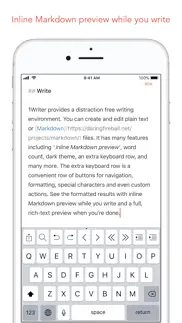
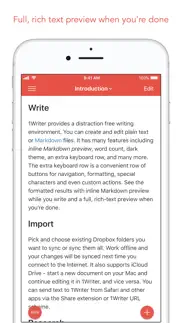
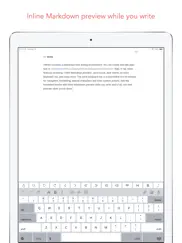
- Preview :: see the formatted results with Markdown syntax highlighting while you write and a full, rich-text preview when you're done.
- Extended keyboard :: a convenient row of buttons for navigation, formatting, special characters (customizable--pick the characters you use the most).
- Insert photo :: pick a photo or take a new one, and 1Writer will upload it to Dropbox and generate the Markdown-syntax to add it to your document--all in a single action!
- Snippets :: TextExpander Touch support.
- Custom URL actions :: insert a document template, encode a selection and replace the original text, look up synonyms and much more.
- JavaScript :: create even more powerful custom actions using JavaScript—text manipulation, perform a find & replace, interact with the clipboard—the possibilities are endless.
IMPORT
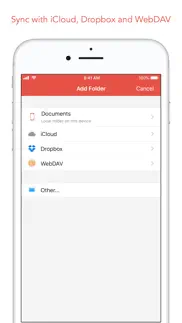
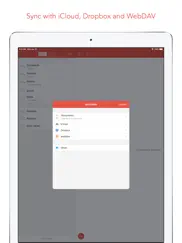
- Sync with iCloud, Dropbox and WebDAV.
- Share extension :: send text to 1Writer from other apps. In Safari, the extension uses the current URL, page title and selected text to create a new document.
- Create, append, prepend, or replace text directly from other apps using the 1Writer URL scheme.
EXPORT
- CloudApp and Dropbox :: generate a link to share your document in plain text or PDF.
- Evernote :: pick your notebook, add tags and turn a text selection or the entire document into a new, rich-text note.
- Copy HTML :: put the formatted text for your document directly on the clipboard.
- Custom actions :: open a web search, tweet a selection, save a series of items in a list and much more.
PERSONALIZE
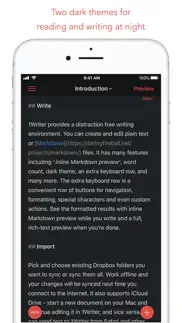
- Support Dark Mode on iOS 13.
- 2 dark themes for more comfortable reading and writing at night.
- Choose from 20 different fonts.
- Bookmark and sync the Dropbox/WebDAV folders you want to have quick access to the sub-folders and documents you need.
- Use a passcode or Touch ID/Face ID to protect the app from unauthorized users.
RESEARCH
- In-app web browser :: research, look up information without having to leave the app.
- Bookmarks :: create and access your favorite websites.
- Save the current text selection to the clipboard in Markdown syntax.
- 1Password support :: login to all your accounts using the 1Password extension.
EVEN MORE GREAT FEATURES
- Drag and drop.
- Open in Place.
- Multiple windows on iOS 13.
- MultiMarkdown.
- Search documents from Spotlight.
- Find & replace within document.
- Photo and PDF preview.
- Today widget :: access your recent documents from the Notification Center or create a new document in one tap.
- Checklist support :: create a list of things to do or topics to research, and easily check them off.
- Full-text search and hashtag support :: search within a folder to find the document you need, and view related documents that have the same tag.
👋 Wenn dir die 1Writer - Markdown Text Editor anwendung gefällt, kannst du sie dann mit deinen freunden teilen?


| Anwendungsname | 1Writer - Markdown Text Editor |
| Kategorie | Produktivität |
| Entwicklers | Ngoc Luu |
| Veröffentlicht | Mittwoch, 14. August 2013 |
| Aktualisiert | Mittwoch, 24. September 2025 |
| Dateigröße | 18.74 MB |
Kommentare zu den Noten 1Writer - Markdown Text Editor
Wir überweisen monatlich über vier milliarden Euro. Wir sorgen dafür, dass privat- und geschäftskonten 4 Millionen Euro an überweisungsgebühren einsparen. Erhalte deine gebührenfreie Überweisung
Guter MD Editor mit zwei erheblichen Problemen. 1Writer bietet viele gute und sinnvolle Funktionen, ist schnell eingerichtet, einfach zu bedienen, übersichtlich und synchronisiert einwandfrei mit iCloud und Dropbox. Das bekannte Problem, dass Hashtag Funktionen nicht bei iCloud Dokumenten genutzt werden können, ist in der neuen Beta Version bereits gelöst.
Zumindest WebDAV klappt bei mir nicht. Editieren scheint gut zu funktionieren, aber leider klappt das zurück schreiben via Webdav bei mir zu einer QNAP NAS überhaupt nicht...
Bester MultiMarkDown-Editor. Einzigartige Kombi: WebDAV-Support, perfekt die Apple-Files-App integriert Textexpander-Support Super Tastatur-Erweiterungen
Einer wenigen älteren, die die API-Wechsel von Dropbox überlebt haben.. Bravo!
Pretty good, but still a bit to clumsy for a smooth workflow. I use 1Writer as the iOS counterpart to NVAlt on my Mac. Syncing via Dropbox works excellent. However the workflow between view—edit—view could be improved. Currently, you have to (1) press the (far away) mode-switch button to enter edit mode, (2) set the cursor to open the keyboard, edit, (3) manually dismiss the keyboard to get the mode-switch button back, and (4) press it another time to get back to view mode. That is way too many steps at different corners of the screen. What I would like to see is to change modes by swiping: From view mode swipe left to enter edit mode, swipe right to get back into view mode. Keep the keyboard status and cursor position so when I reenter edit mode I can just continue where I left before.
Very good. Nicely done. i just wish it had Google Drive integration.
Super. Der Editor ist klasse. Man muss sich an das Konzept gewöhnen und mit den Erweiterungen arbeiten.
Does not work with Seafile Server. Not sure if it is Seafile server or 1writer, both do not play nicely. You can connect to Seafile WebDav. You can also create and delete files and folders without issues. But if you ever try to rename a file.... its broken permanently: The file is not renamed on the server, but 1writer shows a file with the new name which does not exist remotely. Furthermore at this point no changes on any(!) file are stored to the server. Same is true for new files. Short: Try to rename one file on a Seafile server and the app completely stops synching anything. Without telling you anything about it!
Markdown und Dropbox. 1Writer ist mit Abstand der beste Markdown-Editor im App-Store – und ich habe viele getestet. Gerade in Verbindung mit Dropbox kann er seine Stärken ausspielen. Fonts und Zeilenabstände lassen sich für Vorschau und Editor ändern, relativ verknüpfte Bilder werden angezeigt und die intelligente Zusatztastatur erspart eine Menge Tipparbeit. Mit Tags lassen sich schöne, intelligente Strukturen erzeugen, die zum Beispiel auch mit der 1Writer eigenen Todo-Implementierung ganz neue Möglichkeiten eröffnen.
Bester Markdown-Editor. Ich habe fast alle Markdown-Editoren gekauft und getestet. 1Writer übertrifft alle anderen Texteditoren, sowohl was die Funktionalität als auch das Design betrifft. Schade, dass 1Writer nicht die Publicity bekommt wie z.B. Byword oder Writer Pro.
Endlich!. Ich habe lange nach einer einfachen App gesucht mit der ich meine Textdateien bearbeiten kann. Ganz einfach und ohne große Schnörkel. Ohne monatliche Subscription. 1Writer ist dafür gut geeignet. Besonders auch wegen der WebDAV Anbindung, die es mir ermöglicht, mich von großen Cloud Storage Anbietern zu lösen.
Die App, die ich gesucht habe .... ... als iOS Companion für The Archive App auf dem Mac. Versteht #tags und [[links]]. Perfekt!
Sync mit iCloud funktioniert nur sporadisch. Aufgrund der mangelnden bzw. absolut fehlerhaften automatischen Synchronisation überhaupt nicht brauchbar Hat ein paar nette Features aber die Kernelement funktionieren einfach nicht vernünftig
Best markdown app. I looked for something simple, yet powerful that could sync with webdav for my selfhosted notes. 1Writer is probably the best app out there that does all this for a very fair price, without limitations and males me happy to just tip a few bucks for every update. Thanks so much for this!
Nix für ungeübte User. weil die Hilfefunktion minimalst ausgestattet ist. Mir gelang es nicht ein Foto einzubinden. Die Anleitung hilft dabei leider nicht.
1Writer. Funktioniert tadelos und ist einfach zu bedienen. Er erkennt Tags, dick/kursiv/usw. lässt sich sehr schnell einstellen, auch die Zusatzleiste nimmt viel Arbeit. Auch Nebensächliche Sachen wie Pin und etc. lassen sich einstellen.
WebDAV doesn't work. Since the update to iOS 17, the files on my WebDAV server are only grayed out. I can neither open nor edit files.
Very Good!. Markdown...check ✅ WebDAV...check ✅ Ich nutze 1Writer in Verbindung mit Typora am Mac. Funktioniert prima!
Speichert unzuverlässig. Leider funktioniert das - nur automatisch stattfindende - speichern sehr unzuverlässig, so dass ich schon mehrfach Satzteile oder ganze Absätze verloren habe (ich öffne Dokumente über die Integration mit der Dateien-App). Das passiert mir sogar wenn ich das Dokument explizit in der App schließe. Das ist leider das schlimmste was einer App passieren kann - Datenverlust! Sehr schade, denn eigentlich gefällt mir der Editor mit seiner Skriptingfunktion.
Tipp. Perfekt für schnelle Notizen und zur Bearbeitung von Markdown. Genial um auf Handy oder iPad Obsidian zu bearbeiten. Jeden Cent wert.
The best note taking app. Syncs with Dropbox perfectly. Stores everything as a separate file — no need for a proprietary format. Looks and behaves like a great native iOS application. Has plethora of keyboard customization options. Very nice theme support. Search works quickly. Can figure out a name for the file from the heading of the note. And the best feature — you can check off markdown checkmarks! Everything I needed in a great note taking app.
WebDAV doesn‘t work anymore. WebDAV doesn‘t work anymore
No way to specify Asset folder. The Editor itself is nice for a single site. However, any reasonably sized project, using i.e. Jekyll, stores assets in a separate folder. As this folder cannot be specified, images do not render.
Super in Verbindung mit nvAlt auf dem Mac. Ich nutze 1Writer in Kombination mit nvAlt auf dem Mac und synchronisiere die Notizen über Dropbox. Funktioniert tadellos. Bin begeistert.
Beste Notizapp. Notizapps gibt’s wie Sand am Meer. Was 1Writer besonders macht: - Markdown Editor & Reader - Direkter Dateizugriff auf die iCloud (!) Dazu kommen nette Kleinigkeiten wie Schlagwörter, Verlinkungen, gute Bedienbarkeit, ...
Very good.. Thanks. Has all the features I need. Keep up the good work!
sehr gute app!. ergänzt mein notizen setup am mac perfekt! gute einstellungsmöglichkeiten. genau das was ich gesucht habe.
Exactly what I was looking for!. I’ve tried them all: iA Writer, Ulysses, Bear, Pretext, etc. None of them comes close to the usability and simplicity of 1Writer for taking notes with Markdown. The Dropbox integration also works like a charm! I cannot recommend this app enough.
Sehr guter Markdown Editor. 1Writer ist für mich der perfekte Markdown Editor für das iPad. Ich schreibe damit all meine Notizen für meinen Zettelkasten. In Kombination mit working Copy, um meine Dateien in mein privates Git Repository zu pushen, kann ich sehr effizient arbeiten. Das Feature den Dateinamen mit einem Timestamp zu beginnen ist absolut großartig. Vor allem, weil ich das Format dafür selbst wählen kann. Was ich sehr sehr gut fände, wäre die Möglichkeit den Standard Ordner beim Erstellen einer Datei von /Documents zu einem anderen zu ändern. Das nur als kleiner Feature Wunsch.
Beste Markdown Notiz App. Hashtags, Standard-Ordner bei Dropbox wählen, Themes, für mich ersetzt diese App alle Notizen-Apps bisher.
Super Markdown-Editor. Mit der globalen Suche nochmal besser geworden. Mein absoluter Lieblings-Markdown-Editor auf dem iPad, insbesondere, wenn man noch Dropbox-Anbindung benötigt.
Perfect. Exactly what I was looking for. You can edit files from where ever. While working with Windows Desktops this is one of the great Features of 1Writer: Working with the Files App. The rest is pure Writing. Nothing else needed. Go on with this great work. Thank you.
Great app. This does everything I was looking for. Thanks!
Tags und Vorschau. In der Vorschau werden die Tags nicht korrekt dargestellt. Tag wird als Überschrift interpretiert. Gleiche Datei in iA Writer bez. Obsidian geöffnet ergibt korrekte Darstellungen. Ansonsten ist die App zu empfehlen.
Bin begeistert 😄. Habe eine Alternative zu Trunk Notes gesucht (Wird leider nicht mehr weiter entwickelt ) und bin hier fündig geworden. 1Writer scheint alles zu haben, was ich brauche. Leider sind die vielen Möglichkeiten nicht gut beschrieben. Da muss man ein wenig Zeit investieren um all Feature nutzen zu können. Die Übernahme meiner TrunkNotes Daten funktioniert gut.
Dropbox / Plain Text Top!. Die Möglichkeiten und Verwendungsvielfalt der App lässt viele Kombinationen zu. Am besten gefällt mir das editieren UND suchen der Notizen. Es funktioniert flüssig und schnell. Es geht nichts verloren. Erweiterbar und flexibel, Top !
Great :). Maybe the access for WebDAV would be a great add on for further versions...
Great markdown editor. Great app. It will be much more helpful if there is support for syntax highlight and LaTeX.
Bräuchte ein Update. war super, solange es lief. Leider habe ich in den letzten Monaten immer mehr Probleme beim Synchronisieren mit der Dropbox. 1Writer ist aber auch mit "Hinkefuß" immer noch eine brauchbare App.
Markdown-Editor in Perfektion. Simpel und elegant - ein toller Markdown-Editor, den ich zum Verwalten und Editieren meiner Notizen nutze. Ich bin weg von Evernote und bevorzuge die Simplizität von 1Writer und Textdateien. Neu ist in Version 3 der Sync über WebDAV. Damit kann ich meine Notizen in meiner PrivateCloud Nextcloud verwalten!
Tags view. only works for internal documents, I am so sad.
Nice but incomplete!. Call me picky, but a md-editor needs IMO Syntax Highlighting in codeblocks and Latex-like math support. Otherwise it‘s really unusable in my use case. I hope these Features are added quickly!
New Widgets?. Please update with new widgets.
Amazing. This is pretty much all I ever hoped for from a markdown editor on mobile. As a programmer this app has the best usability I have seen so far from mobile text editors.
Test - Wesentliche Funktion fehlt. Habe die App vor einer Woche gekauft. Leider zeigte mein Markdown Test, das eine wesentliche Funktion nicht vorhanden ist: [Go to Heading](#Firstlevelheading) Schade
Großes Update. Gut angepasst für die neuen iPhone-Modelle. Texte mit Markdown-Formatierung zu schreiben, ist mit dieser App ein Vergnügen. iCloud-Drive und Dropbox bestens eingebunden. Formatierungs-Leiste über der Tastatur sehr hilfreich. Nur schade, dass die Cursor-Pfeile nur im Hochformat zur Verfügung stehen. Die der Apple-Tastatur sind schwerer erreichbar und lange nicht so schnell. Ansonsten: alles bestens.
für mich der beste Editor für IOS. schneller Support, Evernote anbindung, schnell eine Taskliste vorbereiten und nach Things exportieren was will man mehr. Ich bin total begeistert
Powerful and indispensable App. This app is all about markdown. It covers all aspects of markdown editing, it‘s stable and fast. Excellent.
Ich habe sie alle gehabt. Aber ich komme immer wieder zu meiner Liebe zurück. 1Writer und ich verstehen uns perfekt.
Best markdown app for iOS. 1Writer is simply the best markdown app on iOS. I’ve tried them all (Bear, iA Writer, Byword,...) but this one is the best by far: - Markdown keyboard fully configurable - WebDAV support (sync to your own server) - Beautiful minimal syntax highlighting - Simple and intuitive UI all around - Highly configurable To name just a few of the highlights. I use it as a Apple Notes replacement and it does the job perfectly. Just wow. Thanks for the app!
Wussten sie, dass sie durch ihre anmeldung 25 US-Dollar auf unserer website verdienen können? Verdiene 25$ kostenlos indem du dich bei Payoneer anmeldest!
1Writer. Ein Texteditor, wie er sein soll. Ohne verwirrende Vielfachfunktionen.
Good but some missing features. It sure works but I really dislike that I cant set a default location for images. It makes any folder structure unusable.
Mind Lab Pro ® ist ein wissenschaftliches Medikament, das die Arbeitsleistung und Produktivität mit Nootropika für Konzentration, Stress-Multitasking, kreative Problemlösung und mehr verbessert. Bringen Sie Ihr Gehirn auf 100% Leistung! Besorgen!
On its way 👍. On its way 👍
jasdadf. sfasfasf
The closest to perfect. It’s not perfect, but it’s almost there. What I personally need: [[auto fill links to files in folder]]; typewriter mode; pdf preview. Really, the rest is just beautiful and so much more practical than all the other md apps.
A big update (v 1.3).... ...for a great markdown writing app with an extensive x-callback-url scheme support. It also supports the new TextExpander touch 2.31 version now.
Dropbox authentication not working properly. The app looks fantastic. However, it is not possible to make use of Dropbox. Every attempt to add a Dropbox folder only opens the Dropbox app. Unlike with other apps, one can not give the app the permission to access Dropbox - **no dialogue to do so appears**. So one has to go via the external Dropbox app every time instead of accessing Dropbox files from within the app. I assume this is a bug and that a dialogue to give permission should appear when trying to add a Dropbox folder....
Ein guter Markdown Editor - die Beschränkung auf Dropbox & iCloud ist nicht mehr zeitgemäß. An der Editorfunktion gibt es nichts zu bemängeln – sehr gut. Die Kopplung an Dropbox war sicher lange Zeit State of Art. Allerdings haben sich die Zeiten geändert, es gibt die native iOS Dateien-App und diverse andere Cloudanbieter. Dropbox ist auf Grund des Geschäftsmodells eher uninteressant geworden. Leider unterstützt 1Writer Cloudservices wie z. B. Onedrive oder Seafile nicht. Auch nicht über den Umweg Dateien-App (ausgegraut). Für mich, der 1Writer schon sehr lange nutzt, ein großer Nachteil. *Update 02.08.2022 Although belated, thank you for their response! I accidentally found that I can access OnDrive, Seafile and other cloud services on a device with 1Writer and could not explain for a long time. I did some tests and found out how it happened. One must once open a MD file in a cloud via share button in 1Writer. Then the other cloud services under "other" are no longer grayed out - forever 😀! It would be nice if this would work soon without this detour.
Not sync not in my Lang. I have bought that app-thing and installed it on iPhone 7+ and iPad Pro It is in English on my iPhone and in German on my iPad I wrote a note on my iPhone that can be found at once on iCloud Impossible to find that note on my iPad Money lost !!!
Solid. Nice app, although there are some things missing: would be great to be able to set a standard (Dropbox) folder that opens up right away for people that just use a 1-folder structure. Also I'm not a big fan of the icon. Maybe it could have a more neutral color.
Großartig. Großartiger Text und Markdown Editor. Erst dachte ich, ich hätte schon genug davon auf meinem iPhone, aber 1Writer ist tatsächlich der erste, der alles hat, was ich möchte, und sogar ein paar Sachen, bei denen ich vorher nicht wusste, dass ich sie möchte. 1Writer sieht gut aus, auch auf iOS 7, hat ein vernünftiges Markdown Keyboard mit Cursor Tasten, man kann Scripten mit x-callback-urls, #hashtags im Text werden als Tags erkannt, Listen mit klickbaren Checkboxen sind möglich, ebenso Fotos in Dokumenten. Und ein schönes Icon hat er auch noch. 1Writer ist sofort auf meinem Homescreen gelandet.
Suchen Sie nach einer alternativen Adsense-Werbeplattform? Adsterra ist das bevorzugte Werbenetzwerk für diejenigen, die nach einer Alternative zu AdSense suchen. Adsterra ist die ideale Wahl für neue Websites mit geringem täglichen Traffic. Um auf der Website in Adsterra zu werben, ist wie in anderen Werbenetzwerken ein bestimmtes Traffic-Limit, Domain-Alter usw. erforderlich. Es gibt keine strengen Regeln. Jetzt registrieren!

1Writer - Markdown Text Editor app Facebook-Kommentare werden hochgeladen, bitte warten...
1Writer - Markdown Text Editor Kundendienst
Was halten Sie von der 1Writer - Markdown Text Editor-App? Können Sie Ihre Beschwerden, Erfahrungen oder Gedanken zur Anwendung mit dem Unternehmen und den Mitarbeitern von Ngoc Luu teilen?


1Writer - Markdown Text Editor Apps Bilder und Bildschirmfoto
1Writer - Markdown Text Editor app iphone, ipad, apple watch ve apple tv app bilder.
| Sprache | German |
| Preis | 5.99 EUR |
| Altersgrenze | 17+ jahre und älter |
| Letzte Version | 3.3.8 |
| Play Store | com.ngocluu.onewriter |
| Kompatibilität | iOS 13.0 und höher |
1Writer - Markdown Text Editor (Version 3.3.8) Anwendung Herunterladen und Installieren
Die Applikation 1Writer - Markdown Text Editor wurde am Mittwoch, 14. August 2013 in der kategorie Produktivität veröffentlicht und von Ngoc Luu [Developer ID: 476810735] entwickelt. Diese anwendungsdatei hat eine größe von 18.74 MB. Diese App wurde von 112 Benutzern bewertet und hat eine Bewertung von 4,0 von 4.5. Die neueste auf Mittwoch, 24. September 2025 veröffentlichte Version von 1Writer - Markdown Text Editor ist 3.3.8. Es funktioniert problemlos auf feräten mit mindestens IOS 13.0 und höher. ID-Nummer des Google Play Store: com.ngocluu.onewriter. Von der App unterstützte Sprachen:
EN DE JA ZH ZH Installieren und Herunterladen!| Anwendungsname | Entwicklers |
| Microsoft Excel | Microsoft Corporation |
| Google Drive - Dateispeicher | |
| Goodnotes 6 | Goodnotes Limited |
| DATEV SmartLogin | DATEV eG |
| HP Smart | HP Inc. |
Überprüfen Sie die Ergebnisse Ihrer SEO-Arbeit? Oder sehen Sie sich einfach Ihr Keyword-Ranking in Google an? Wenn Sie die Daten Ihrer SEO-Arbeit nicht richtig lesen können, verlieren Sie viel!
| Anwendungsname | Entwicklers |
| Dumbify | AB Apps Inc. |
| ADR Tool 2025 Dangerous Goods | Arkadiusz Neubauer |
| Logbook | Florian Kriesche |
| Spannungsfall Pro | Axel Hauschild |
| Acrobits Softphone | Acrobits |
Entdecken Sie, wie verschiedene Kryptowährungen funktionieren, und verdienen Sie einen kleinen Betrag von jeder Kryptowährung, um sie selbst auszuprobieren. Coinbase ist der einfachste Ort, um Krypto zu kaufen und zu verkaufen. Jetzt anmelden, loslegen.
| Anwendungsname | Entwicklers |
| Telegram Messenger | Telegram FZ-LLC |
| DramaBox - Filme und Dramen | STORYMATRIX PTE. LTD. |
| Lieferando.de | Takeaway.com Central Core B.V. |
| Instagram, Inc. | |
| Threads | Instagram, Inc. |
Jasper ist der Schöpfer künstlicher Intelligenz, der Ihnen und Ihrem Team dabei hilft, kreative Barrieren zu überwinden, um erstaunliche, originelle Inhalte 10x schneller zu erstellen.
| Anwendungsname | Entwicklers |
| Blitzer.de PRO | Eifrig Media |
| Pou | Zakeh Limited |
| Earn to Die 2 | Not Doppler |
| Evoland | Playdigious |
| Babyphone 3G | TappyTaps s.r.o. |
Mind Lab Pro ® ist ein wissenschaftliches Medikament, das die Arbeitsleistung und Produktivität mit Nootropika für Konzentration, Stress-Multitasking, kreative Problemlösung und mehr verbessert. Bringen Sie Ihr Gehirn auf 100% Leistung!
Adsterra ist das bevorzugte Werbenetzwerk für diejenigen, die nach einer Alternative zu AdSense suchen. Adsterra ist die ideale Wahl für neue Websites mit geringem täglichen Traffic. Um auf der Website in Adsterra zu werben, ist wie in anderen Werbenetzwerken ein bestimmtes Traffic-Limit, Domain-Alter usw. erforderlich. Es gibt keine strengen Regeln.
Adsterra ist das bevorzugte Werbenetzwerk für diejenigen, die nach einer Alternative zu AdSense suchen. Adsterra ist die ideale Wahl für neue Websites mit geringem täglichen Traffic. Um auf der Website in Adsterra zu werben, ist wie in anderen Werbenetzwerken ein bestimmtes Traffic-Limit, Domain-Alter usw. erforderlich. Es gibt keine strengen Regeln.