Paint with Steps recorder Bewertung
Paint with Steps recorder App Beschreibung und Prüfung
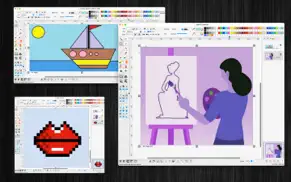
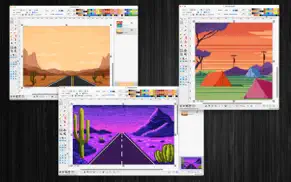
Was ist die paint with steps recorder-app? "Paint raster" is an user-friendly raster editing application with screen-step-recording function.
(* The image size, the number of recorded images per session is limited. You can upgrade to the Pro version to remove this limitation. *)
Key Features:
+ Pain/raster drawing Tools:
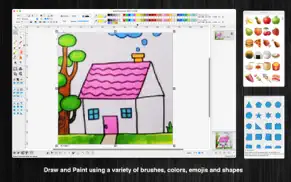
The application offers a variety of basic drawing tools, including:
Brush, pencil, eraser, fill color, color picker, and more.
Magic wand selection, rectangular selection, oval selection, and other selection tools.
+ Allow users to edit each pixel of the painting
+ Precise Step Recording:
The application records each step every time you left-click the mouse on the screen or within other application windows. This feature is invaluable for users who need a thorough and accurate representation of their actions, whether for troubleshooting, instructional purposes, or collaborative projects.
+ New feature: Merge multi images, pdf to a single PDF/TIFF file
+ New feature: Batch convert multi images to another format
+ New feature: Replace image files in the selected folder with a different format and quality to save memory space
+ Annotation Shapes:
Choose from over 100 basic annotation shapes to enhance your drawings. You can add or edit text within these shapes and merge them into the background to apply color filters if necessary.
+ Emoji:
Access a collection of over 1,200 colorful emoji objects to add a fun and expressive touch to your work.
+ Drag and Drop:
Easily drag and drop image files directly from Finder into the current editing window to incorporate them into your document.
+ Image Enhancement:
Enhance specific areas of your images with various filter effects, such as:
Keeping only one color
Grayscale
Inverting colors
Adjusting Red, Green, and Blue levels
Adjusting Hue and Saturation
Applying Texture Masks
Crystallizing images
Blurring
Glass distortion
Adding Gloom or Bloom effects
Applying comic effects
And more...
+ Open/Save to “*.paintsr” File:
If your drawing contains independent annotation objects, save it as a paintsr file type (“*.paintsr”) so you can edit these objects later.
+ Export to Report File:
Press “CMD-E” to export your current document as an multi-pages format file in HTML, PDF, TIFF, PNG, JPEG, or other supported formats.
+ Copy/Paste:
The application supports copy/paste functions for shapes. You can copy shapes or lines from the current canvas window and paste them into another window or application.
Example:
Select an area on the canvas, then press “CMD-C” to capture the image. Open the Preview application, press “CMD-N” to paste the captured image for viewing or saving as an image file. You can also paste the image into Excel, Word, or other applications.
👋 Wenn dir die Paint with Steps recorder anwendung gefällt, kannst du sie dann mit deinen freunden teilen?


| Anwendungsname | Paint with Steps recorder |
| Kategorie | Grafik und Design |
| Entwicklers | Tien Thinh Vu |
| Veröffentlicht | Samstag, 24. August 2024 |
| Aktualisiert | Mittwoch, 18. Dezember 2024 |
| Dateigröße | 23.17 MB |
Kommentare zu den Noten Paint with Steps recorder
Wir überweisen monatlich über vier milliarden Euro. Wir sorgen dafür, dass privat- und geschäftskonten 4 Millionen Euro an überweisungsgebühren einsparen. Erhalte deine gebührenfreie Überweisung
Wussten sie, dass sie durch ihre anmeldung 25 US-Dollar auf unserer website verdienen können? Verdiene 25$ kostenlos indem du dich bei Payoneer anmeldest!

Paint with Steps recorder app Facebook-Kommentare werden hochgeladen, bitte warten...
Paint with Steps recorder Kundendienst
Was halten Sie von der Paint with Steps recorder-App? Können Sie Ihre Beschwerden, Erfahrungen oder Gedanken zur Anwendung mit dem Unternehmen und den Mitarbeitern von Tien Thinh Vu teilen?

Paint with Steps recorder Apps Bilder und Bildschirmfoto
Paint with Steps recorder app iphone, ipad, apple watch ve apple tv app bilder.
| Sprache | German |
| Preis | Kostenlos |
| Altersgrenze | 4+ jahre und älter |
| Letzte Version | 2.1 |
| Play Store | com.vutienthinh.macos.brushDraw.rasterPaint2 |
| Kompatibilität | iOS 11.0 und höher |
Paint with Steps recorder (Version 2.1) Anwendung Herunterladen und Installieren
Die Applikation Paint with Steps recorder wurde am Samstag, 24. August 2024 in der kategorie Grafik und Design veröffentlicht und von Tien Thinh Vu [Developer ID: 393568128] entwickelt. Diese anwendungsdatei hat eine größe von 23.17 MB. Diese App wurde von 17 Benutzern bewertet und hat eine Bewertung von 4,0 von 1. Die neueste auf Mittwoch, 18. Dezember 2024 veröffentlichte Version von Paint with Steps recorder ist 2.1. Es funktioniert problemlos auf feräten mit mindestens IOS 11.0 und höher. ID-Nummer des Google Play Store: com.vutienthinh.macos.brushDraw.rasterPaint2. Von der App unterstützte Sprachen:
CS DA NL EN FI FR DE IT JA KO NB PL PT RU ZH ES SV TH ZH TR VI Installieren und Herunterladen!| Anwendungsname | Score | Kommentare | Preis |
| ShortCut2 | 1 | Keine kommentare | Kostenlos |
| SourceCounter | 1 | Keine kommentare | Kostenlos |
| WebCache | 1 | Keine kommentare | Kostenlos |
| XProject2 | 1 | Keine kommentare | Kostenlos |
| Visual PDF Editor | 1 | Keine kommentare | Kostenlos |
- New feature: merge multi images, pdf to a single PDF/TIFF file - New feature: batch convert multi images to another format - New feature: Replace image files in the selected folder with a different format and quality to save memory space - Improve UI - Fix bugs
| Anwendungsname | Entwicklers |
| Wizard AI - KI Bild Generator | OneMoreThing |
| AI Video - KI-Video-Generator | HUBX |
| AR Drawing - Draw Sketch App | Braly |
| Cosmos | Cosmos Entity |
| Foto Collage Erstellen | Fitness Labs |
Überprüfen Sie die Ergebnisse Ihrer SEO-Arbeit? Oder sehen Sie sich einfach Ihr Keyword-Ranking in Google an? Wenn Sie die Daten Ihrer SEO-Arbeit nicht richtig lesen können, verlieren Sie viel!
| Anwendungsname | Entwicklers |
| Qlone 3D Scanner STEM | EyeCue Vision Tech |
| Logoist 5 | Synium Software GmbH |
| XPalette - Nur Farben | MARK MANSER |
| Procreate Pocket | Savage Interactive Pty Ltd |
| Transparent App Icons | Noah Gilmore |
Entdecken Sie, wie verschiedene Kryptowährungen funktionieren, und verdienen Sie einen kleinen Betrag von jeder Kryptowährung, um sie selbst auszuprobieren. Coinbase ist der einfachste Ort, um Krypto zu kaufen und zu verkaufen. Jetzt anmelden, loslegen.
| Anwendungsname | Entwicklers |
| Ticketmaster - Tickets kaufen | Ticketmaster |
| Telegram Messenger | Telegram FZ-LLC |
| DB Navigator | Deutsche Bahn |
| ChatGPT | OpenAI |
Jasper ist der Schöpfer künstlicher Intelligenz, der Ihnen und Ihrem Team dabei hilft, kreative Barrieren zu überwinden, um erstaunliche, originelle Inhalte 10x schneller zu erstellen.
| Anwendungsname | Entwicklers |
| Bloons TD 5 | Ninja Kiwi |
| Dumbify | AB Apps Inc. |
| MONOPOLY | Marmalade Game Studio |
| Mein Kind Lebensborn | Sarepta Studio AS |
| Earn to Die 2 | Not Doppler |
Mind Lab Pro ® ist ein wissenschaftliches Medikament, das die Arbeitsleistung und Produktivität mit Nootropika für Konzentration, Stress-Multitasking, kreative Problemlösung und mehr verbessert. Bringen Sie Ihr Gehirn auf 100% Leistung!
Adsterra ist das bevorzugte Werbenetzwerk für diejenigen, die nach einer Alternative zu AdSense suchen. Adsterra ist die ideale Wahl für neue Websites mit geringem täglichen Traffic. Um auf der Website in Adsterra zu werben, ist wie in anderen Werbenetzwerken ein bestimmtes Traffic-Limit, Domain-Alter usw. erforderlich. Es gibt keine strengen Regeln.
Adsterra ist das bevorzugte Werbenetzwerk für diejenigen, die nach einer Alternative zu AdSense suchen. Adsterra ist die ideale Wahl für neue Websites mit geringem täglichen Traffic. Um auf der Website in Adsterra zu werben, ist wie in anderen Werbenetzwerken ein bestimmtes Traffic-Limit, Domain-Alter usw. erforderlich. Es gibt keine strengen Regeln.