SimpleCAD2 Bewertung
SimpleCAD2 App Beschreibung und Prüfung
Was ist die simplecad2-app? This is the Pro version of SimpleCAD.
SimpleCAD2 is an easy, simple to learn 2D Computer Aided Design program (CAD) made to meet all of your basic design needs.
SimpleCAD2 is more than just a vector paint program, because you could move, copy, edit, scale, rotate and offset… objects.
(* Number of objects/shapes added to each document is limited, you could upgrade to Pro-Version to remove this limitation. *)
Main Functions of the application:
- Multi-sheets: Each document support multiple sheets of drawing canvas
- Basic draw items: including freehand lines, line, polyline, orthogonal line, tangent line, parallel line, rectangle, polygon, circle, arc (NOTE: native ellipse is not supported, only support ellipse created by polyline object). Text box, callout box, picture box (imported from image file), measure items…
- Modify functions: move, erase, copy, mirror, offset, rotate, scale, stretch items' vertices, lengthen, trim, extend, break, chamfer, fillet and explode polyline, join, array, polar array...
- Auto Snap point setting: Snap to grid, end points of objects, on entity, center of arc - line - circle, middle point of arc - line, intersections, snap to top, left, right, bottom edges of a circle, arc
- Multi layers: you could create new layer to draw more items. Layers could be shown, hidden independently.
- Add image: You could add any image file (support file type: svg, svgz, gif, jpeg, png, bmp, pict, tiff) to display as an item inside the application.
Image file could be shown in following modes: Stretch / Fit inside bound / Fit outside bound.
The application also allows to DRAG/DROP many image files directly from Finder (or press Cmd-V to paste image from current Clipboard) to current editing window to add them to the diagram.
- Add items (block) to Block Template list:
Right click on selected items then select "Add to template list" to save the block to template list so that you can reuse it later
- Customizable background:
Background color, total size of the diagram could be changed during editing.
Background color also can be set to transparent.
- Open/Save to "*.AAD" file:
AAD (*.aad) is the new file type created only for this application.
Press "Cmd-S" to save current diagram to an AAD file so that you could load it later for editing.
- Capture to clipboard:
Press "Cmd-9" or click on Capture button to export current diagram image to clipboard, then you could paste that image to another application.
Example: Open [Preview] application, press "Cmd-N" to paste above captured image to view or to save to an image file.
Of course, you could paste that image to Excel, Word application too.
- SUPPORT MULTI-LANGUAGES:
English
Deutsch
Français
日本語
한국어
Español
Português
Čeština
Dansk
Suomi
Italiano
Nederlands
Norsk
Polski
Русский
Svenska
ไทย
Türkçe
Tiếng Việt
中文(中国)
中文(台灣)
Other functions:
- Supports Metric or English units (you could change it in the Preferences dialog)
- Unlimited Undo/Redo (shortcut key: Cmd-Z / Shift-Cmd-Z)
- Support Thumbnail view
- Copy / Paste (shortcut key: Cmd-C / Cmd-V)
- Group / Ungroup Items (shortcut key: Cmd-G / Shift-Cmd-G)
- Lock/Unlock items position (shortcut key: Cmd-L / Shift-Cmd-L)
- Change display order
- Export to png, jpeg, tiff, pdf image file (shortcut key: Cmd-E)
- Print supported (shortcut key: Cmd-P)
👋 Wenn dir die SimpleCAD2 anwendung gefällt, kannst du sie dann mit deinen freunden teilen?


| Anwendungsname | SimpleCAD2 |
| Kategorie | Grafik und Design |
| Entwicklers | Tien Thinh Vu |
| Veröffentlicht | Samstag, 7. November 2020 |
| Aktualisiert | Donnerstag, 31. Oktober 2024 |
| Dateigröße | 13.49 MB |
Kommentare zu den Noten SimpleCAD2
Wir überweisen monatlich über vier milliarden Euro. Wir sorgen dafür, dass privat- und geschäftskonten 4 Millionen Euro an überweisungsgebühren einsparen. Erhalte deine gebührenfreie Überweisung
Wussten sie, dass sie durch ihre anmeldung 25 US-Dollar auf unserer website verdienen können? Verdiene 25$ kostenlos indem du dich bei Payoneer anmeldest!

SimpleCAD2 app Facebook-Kommentare werden hochgeladen, bitte warten...
SimpleCAD2 Kundendienst
Was halten Sie von der SimpleCAD2-App? Können Sie Ihre Beschwerden, Erfahrungen oder Gedanken zur Anwendung mit dem Unternehmen und den Mitarbeitern von Tien Thinh Vu teilen?
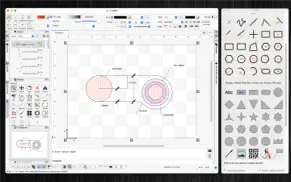


SimpleCAD2 Apps Bilder und Bildschirmfoto
SimpleCAD2 app iphone, ipad, apple watch ve apple tv app bilder.
| Sprache | German |
| Preis | Kostenlos |
| Altersgrenze | 4+ jahre und älter |
| Letzte Version | 2.7 |
| Play Store | com.vutienthinh.macos.NullCAD2020 |
| Kompatibilität | iOS 11.0 und höher |
SimpleCAD2 (Version 2.7) Anwendung Herunterladen und Installieren
Die Applikation SimpleCAD2 wurde am Samstag, 7. November 2020 in der kategorie Grafik und Design veröffentlicht und von Tien Thinh Vu [Developer ID: 393568128] entwickelt. Diese anwendungsdatei hat eine größe von 13.49 MB. Diese App wurde von 17 Benutzern bewertet und hat eine Bewertung von 4,0 von 1. Die neueste auf Donnerstag, 31. Oktober 2024 veröffentlichte Version von SimpleCAD2 ist 2.7. Es funktioniert problemlos auf feräten mit mindestens IOS 11.0 und höher. ID-Nummer des Google Play Store: com.vutienthinh.macos.NullCAD2020. Von der App unterstützte Sprachen:
CS DA NL EN FI FR DE IT JA KO NB PL PT RU ZH ES SV TH ZH TR VI Installieren und Herunterladen!| Anwendungsname | Score | Kommentare | Preis |
| RecordMultiSteps | 1 | Keine kommentare | Kostenlos |
| FloorDesign | 1 | Keine kommentare | 14.99 |
| FloorDesign2 HD | 5 | 1 | Kostenlos |
| FillForm | 1 | Keine kommentare | 6.99 |
| VisualDesigner2 | 1 | Keine kommentare | Kostenlos |
- Improve UI - Fix bugs Previous updates: - Support "BLOCK" - Add "Insert" command to insert block into drawing - Allow to edit single item inside its group - Support macOS 13 Ventura - Allow modify functions (copy, trim..) to change objects from multiple layers - Allow modify functions (copy, trim..) to accept "right-click on mouse" as "press-ENTER" - Allow modify functions (copy, trim..) to accept undo/redo functions - Allow to change order of Inspector-views on left/right sides of document window - Support tree-view of all objects (via "Layers" Inspector-view) - Allow to import/export custom favorite shapes - Allow to find/replace string inside shapes - Add shortcut: hold SPACE key then move mouse to maneuver around document
| Anwendungsname | Entwicklers |
| Home Al - KI Innenarchitektur | HUBX |
| AR Drawing - Draw Sketch App | Braly |
| AR Drawing, Sketch Trace Draw | AvnTech Inc. |
| Logo Erstellen, Grafik Design | Logo Maker LLC |
| Tattoo AI - Tattoo Design | HUBX |
Überprüfen Sie die Ergebnisse Ihrer SEO-Arbeit? Oder sehen Sie sich einfach Ihr Keyword-Ranking in Google an? Wenn Sie die Daten Ihrer SEO-Arbeit nicht richtig lesen können, verlieren Sie viel!
| Anwendungsname | Entwicklers |
| Lux Meter for professional | Byungil Park |
| AppIconz - Exclusive App Icons | Mogens Erik Egeskov-Madsen |
| 3D Scanner App | Route One Consulting Pte Ltd |
| Qlone 3D Scanner STEM | EyeCue Vision Tech |
| Zen Brush 3 | PSOFT |
Entdecken Sie, wie verschiedene Kryptowährungen funktionieren, und verdienen Sie einen kleinen Betrag von jeder Kryptowährung, um sie selbst auszuprobieren. Coinbase ist der einfachste Ort, um Krypto zu kaufen und zu verkaufen. Jetzt anmelden, loslegen.
| Anwendungsname | Entwicklers |
| Doctolib - Die Gesundheits-App | Doctolib |
| Splash - Party Spiele | Cranberry Apps |
| Ticketmaster - Tickets kaufen | Ticketmaster |
| AliExpress Shopping App | Alibaba |
Jasper ist der Schöpfer künstlicher Intelligenz, der Ihnen und Ihrem Team dabei hilft, kreative Barrieren zu überwinden, um erstaunliche, originelle Inhalte 10x schneller zu erstellen.
| Anwendungsname | Entwicklers |
| Bloons TD 5 | Ninja Kiwi |
| Earn to Die 2 | Not Doppler |
| Dumbify | AB Apps Inc. |
| Babyphone 3G | TappyTaps s.r.o. |
| Balatro | Playstack Ltd |
Mind Lab Pro ® ist ein wissenschaftliches Medikament, das die Arbeitsleistung und Produktivität mit Nootropika für Konzentration, Stress-Multitasking, kreative Problemlösung und mehr verbessert. Bringen Sie Ihr Gehirn auf 100% Leistung!
Adsterra ist das bevorzugte Werbenetzwerk für diejenigen, die nach einer Alternative zu AdSense suchen. Adsterra ist die ideale Wahl für neue Websites mit geringem täglichen Traffic. Um auf der Website in Adsterra zu werben, ist wie in anderen Werbenetzwerken ein bestimmtes Traffic-Limit, Domain-Alter usw. erforderlich. Es gibt keine strengen Regeln.
Adsterra ist das bevorzugte Werbenetzwerk für diejenigen, die nach einer Alternative zu AdSense suchen. Adsterra ist die ideale Wahl für neue Websites mit geringem täglichen Traffic. Um auf der Website in Adsterra zu werben, ist wie in anderen Werbenetzwerken ein bestimmtes Traffic-Limit, Domain-Alter usw. erforderlich. Es gibt keine strengen Regeln.