FloorDesign Bewertung
FloorDesign App Beschreibung und Prüfung
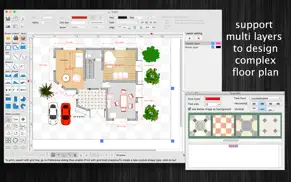
Was ist die floordesign-app? FloorDesign (standard version) is an interior design application (floor plan) that allows you to easily design your home plan in 2D, as well as change the color or the texture of each room, and drag - drop furniture, doors, windows... onto the room from a catalog organized by categories.
Main Functions of the application:
- SUPPORT MULTI-LANGUAGES:
English
Deutsch
Français
日本語
한국어
Español
Português
Čeština
Dansk
Suomi
Italiano
Nederlands
Norsk
Polski
Русский
Svenska
ไทย
Türkçe
Tiếng Việt
中文(中国)
中文(台灣)
- Customizable Room:
Drag (create new) room object into the draw view, double click on it to edit all information of the room (walls, intersection points. measure information....)
- Import House blueprint image:
Import a house blueprint image into the canvas, then design your new house base on it.
- Add custom items to Template list:
Right click on a group of objects then select "Add to template list" to save them so that you can reuse it later.
Use this function to create your own interior item from many basic shapes.
- Pre-Defined Interior objects:
There are many predefined nice Interior objects for you to add to the design: door, window, stair, chair, sofa....
- Basic shape :
There are many shapes to add to the design, including text box, round box, line connector, callouts....
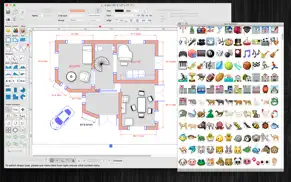
- Over 3000 Beautiful Symbols:
More than that, there are over 3000 beautiful symbols to add the view.
Please press the "Smile icon" button on the left to add and select any symbol you want.
- Drag/Drop Image from Finder (or press Cmd-V to paste image from current Clipboard):
The application allows users to drag/drop many image files directly from Finder to current editing window.
- Allow to make curved wall inside Room object
- User could save edited room object to templates list to reused later
- When edit room object , right click on wall line to show menu with following actions : select / deselect all walls, show / hide measure arrow information, change line to curved style....
Other functions:
- Unlimited Undo/Redo (shortcut key: Cmd-Z / Shift-Cmd-Z)
- Copy / Paste (shortcut key: Cmd-C / Cmd-V)
- Duplicate select items (shortcut key: Cmd-D)
- Group / Ungroup Items (shortcut key: Cmd-G / Shift-Cmd-G)
- Lock/Unlock items position (shortcut key: Cmd-L / Shift-Cmd-L)
- Rotate left, rotate right (shortcut key: Cmd-J / Cmd-K)
- Trim room wall
- Scale size of select items
- Flip select items
- Customizable Color / Font / Size / Line Type
- Shadow supported
- Snap to Grid
- Auto Align with another object when resize or move
- Change display order
- Export to png, jpeg, tiff, pdf image file (shortcut key: Cmd-E)
- Print supported (shortcut key: Cmd-P)
👋 Wenn dir die FloorDesign anwendung gefällt, kannst du sie dann mit deinen freunden teilen?


| Anwendungsname | FloorDesign |
| Kategorie | Grafik und Design |
| Entwicklers | Tien Thinh Vu |
| Veröffentlicht | Montag, 4. Februar 2013 |
| Aktualisiert | Montag, 9. März 2026 |
| Dateigröße | 71.06 MB |
Kommentare zu den Noten FloorDesign
Wir überweisen monatlich über vier milliarden Euro. Wir sorgen dafür, dass privat- und geschäftskonten 4 Millionen Euro an überweisungsgebühren einsparen. Erhalte deine gebührenfreie Überweisung
Wussten sie, dass sie durch ihre anmeldung 25 US-Dollar auf unserer website verdienen können? Verdiene 25$ kostenlos indem du dich bei Payoneer anmeldest!

FloorDesign app Facebook-Kommentare werden hochgeladen, bitte warten...
FloorDesign Kundendienst
Was halten Sie von der FloorDesign-App? Können Sie Ihre Beschwerden, Erfahrungen oder Gedanken zur Anwendung mit dem Unternehmen und den Mitarbeitern von Tien Thinh Vu teilen?


FloorDesign Apps Bilder und Bildschirmfoto
FloorDesign app iphone, ipad, apple watch ve apple tv app bilder.
| Sprache | German |
| Preis | 14.99 EUR |
| Altersgrenze | 4+ jahre und älter |
| Letzte Version | 3.2.9 |
| Play Store | com.vutienthinh.macos.machousedesign2 |
| Kompatibilität | iOS 11.0 und höher |
FloorDesign (Version 3.2.9) Anwendung Herunterladen und Installieren
Die Applikation FloorDesign wurde am Montag, 4. Februar 2013 in der kategorie Grafik und Design veröffentlicht und von Tien Thinh Vu [Developer ID: 393568128] entwickelt. Diese anwendungsdatei hat eine größe von 71.06 MB. Diese App wurde von 17 Benutzern bewertet und hat eine Bewertung von 4,0 von 1. Die neueste auf Montag, 9. März 2026 veröffentlichte Version von FloorDesign ist 3.2.9. Es funktioniert problemlos auf feräten mit mindestens IOS 11.0 und höher. ID-Nummer des Google Play Store: com.vutienthinh.macos.machousedesign2. Von der App unterstützte Sprachen:
CS DA NL EN FI FR DE IT JA KO NB PL PT RU ZH ES SV TH ZH TR VI Installieren und Herunterladen!| Anwendungsname | Score | Kommentare | Preis |
| XProject2 | 1 | Keine kommentare | Kostenlos |
| EncryptedZip2 for zip rar | 1 | Keine kommentare | Kostenlos |
| Visual PDF Editor | 1 | Keine kommentare | Kostenlos |
| FloorDesign2 HD | 5 | 1 | Kostenlos |
| SimpleMindMap | 1 | Keine kommentare | Kostenlos |
- Support macOS 26 Tahoe - Improve UI - Fix bugs Previous update: - Support Apple Silicon - Add Template selection dialog - Allow user to input Absolute coordinates, Relative coordinates, Polar coordinates for creating objects, walls - Import more Clipart to "Interior" panel - Improve drawing of Room, Wall objects - Add 'Merge layers' function - Add Decimal Precision setting - Add menu to select all item inside a room object - Add modify functions: Apply Gradient fill to multi objects - Add modify functions: Copy/Paste properties - Add more arrow types (architectural ticks....) - Add more dash setting - Add more fill image patterns for room object - Add shape operation: Append, Separate - Add short cut key CMD+B, CMD+I to change text to Bold or Italic - Add support for macOS 10.15 - Add wall textures - Add Zoom in, Zoom out short cut key - Add “Copy to another layer”, “Move to another layer” menu - Add “Resize dialog" "Crop dialog” - Allow to change theme color of all items inside current document - Allow to connect 2 polylines when dragging top vertex - Allow to distribute shapes (same space between multiple shapes) - Allow to edit any object shape in a separate dialog - Allow to resize canvas from all directions - Allow user to change join-path , cap-path styles for walls, shapes - Allow user to import old House Blueprint image - Allow user to show/hide “More shapes” dialog - Allow user to switch between "Room" and "Wall polyline" objects - Allow users to copy/paste selected layer - At the bottom-right of canvas, Position & Size panel was added to edit coordinate of selected items - Auto align all measure object when moving them - Auto align shape, box with floors' walls - Create room from multi points - door and external wall polyline now can attach to a room object - draw measure information when item is selected - Filter by name in "More shapes" dialog - fix arrow head size - Hold ALT(Option) when moving objects to dublicate - Hold CONTROL to resize/rotate a group of selected objects - Improve app's performance - Improve ColorWell UI - Improve export function (add export EPS file format) - Improve floor background select dialog - Improve Grid setting, Snap setting (add minor step setting...) - Improve print dialog (add Detail controls to print dialog) - Improve UI of [More Shapes] dialog - Improve User Interface - More print setting - Press "CMD-9" to change zoom to fit to canvas size - Press and hold SPACE-BAR to maneuver/scroll around document - Press Shift+Cmd+T to move, resize group of items temporary - Rectangular/Polar array copy functions added - Show measurement information (wall thick or wall length) directly onto the wall - Support continuity when draw wall, room at intersection point - Support Find function to search for text - Support input size value in feet-inches format (1' 3" or 1' 6 1/2" , 1' 6 1/8") - Support more modify functions: Path boolean operation - Support multi-languages: English, Deutsch, Français, 日本語, 한국어, Español, Português, Čeština, Dansk, Suomi, Italiano, Nederlands, Norsk, Polski, Русский, Svenska, ไทย, Türkçe, Tiếng Việt, 中文(中国), 中文(台灣) - Support to input Feet, inchs with Fraction (e.g.: 2’ 3 1/2” ) - Support to show Ruler - Support to show unit in Feet-inches format - Switch current select object to another shape type - Unit setting for each document: each document support different unit setting - Update door/window shapes - User can move, resize object to outside of canvas's printable area
| Anwendungsname | Entwicklers |
| Arch - AI Home Design | APPNATION YAZILIM HIZMETLERI TICARET ANONIM SIRKETI |
| Retouch Removal Foto Retusche | 煦慧 蒙 |
| Tattoo AI - Tattoo Design | HUBX |
| AI Video - KI-Video-Generator | HUBX |
| Gencraft - AI Art Generator | Gencraft, LLC |
Überprüfen Sie die Ergebnisse Ihrer SEO-Arbeit? Oder sehen Sie sich einfach Ihr Keyword-Ranking in Google an? Wenn Sie die Daten Ihrer SEO-Arbeit nicht richtig lesen können, verlieren Sie viel!
| Anwendungsname | Entwicklers |
| ColorQueryPro | Alan Meyers |
| Lux Meter for professional | Byungil Park |
| Brushes | Envoza |
| Removal Pro Bilder Bearbeiten | 煦慧 蒙 |
| Sie Doodle pro-Bild-Editor | Digital Ruby, LLC |
Entdecken Sie, wie verschiedene Kryptowährungen funktionieren, und verdienen Sie einen kleinen Betrag von jeder Kryptowährung, um sie selbst auszuprobieren. Coinbase ist der einfachste Ort, um Krypto zu kaufen und zu verkaufen. Jetzt anmelden, loslegen.
| Anwendungsname | Entwicklers |
| Google Gemini | |
| Threads | Instagram, Inc. |
| Komoot - Wandern und Radfahren | Komoot GmbH |
| Instagram, Inc. | |
| ChatGPT | OpenAI |
Jasper ist der Schöpfer künstlicher Intelligenz, der Ihnen und Ihrem Team dabei hilft, kreative Barrieren zu überwinden, um erstaunliche, originelle Inhalte 10x schneller zu erstellen.
| Anwendungsname | Entwicklers |
| AutoSleep Schlaftracker | Tantsissa |
| Farming Simulator 23 | GIANTS Software GmbH |
| Bloons TD 6 | Ninja Kiwi |
| Age of History 3 | Lukasz Jakowski Games |
| Earn to Die 2 | Not Doppler |
Mind Lab Pro ® ist ein wissenschaftliches Medikament, das die Arbeitsleistung und Produktivität mit Nootropika für Konzentration, Stress-Multitasking, kreative Problemlösung und mehr verbessert. Bringen Sie Ihr Gehirn auf 100% Leistung!
Adsterra ist das bevorzugte Werbenetzwerk für diejenigen, die nach einer Alternative zu AdSense suchen. Adsterra ist die ideale Wahl für neue Websites mit geringem täglichen Traffic. Um auf der Website in Adsterra zu werben, ist wie in anderen Werbenetzwerken ein bestimmtes Traffic-Limit, Domain-Alter usw. erforderlich. Es gibt keine strengen Regeln.
Adsterra ist das bevorzugte Werbenetzwerk für diejenigen, die nach einer Alternative zu AdSense suchen. Adsterra ist die ideale Wahl für neue Websites mit geringem täglichen Traffic. Um auf der Website in Adsterra zu werben, ist wie in anderen Werbenetzwerken ein bestimmtes Traffic-Limit, Domain-Alter usw. erforderlich. Es gibt keine strengen Regeln.