SSH Client - Secure ShellFish Bewertung
SSH Client - Secure ShellFish App Beschreibung und Prüfung
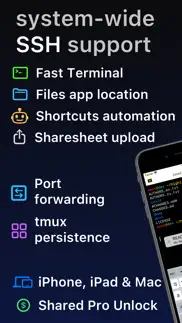
Was ist die ssh client - secure shellfish-app? Lightning fast SSH terminal with remote file access. No other app fuses your SSH servers and iOS devices as well as Secure ShellFish. Tap Get and see for yourself.
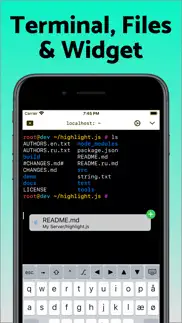
Terminal supports standard text editing gestures for selection, scrolling and copy/paste as well as custom gestures to send arrow keys and tabulator making shell entry and full screen editing with vim or emacs delightful. Bar above the keyboard makes it easy to type special keys and insert snippets.
Select and drag filenames out of the terminal as actual files and drag files from other apps into the terminal to upload. Use built-in tmux support to persist terminal sessions if you lose Internet access, pick existing sessions with thumbnails and Handoff sessions between devices.
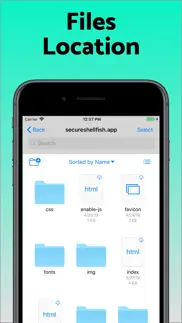
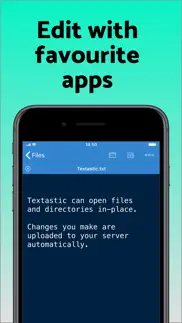
Server file system is available in the Files app and recently accessed files and directories are cached to make them available when offline. Use apps like Textastic and iA Writer for a native editing experience working on your remote server files.
Upload files or entire directories from the share sheet with minimal friction as the last destination directory for each kind of file is remembered or automate file transfers in the Shortcuts app.
Connect to your Mac, Synology NAS and any other SSH server or create new Digital Ocean droplets right from the app.
Secure ShellFish is useful as a free app and paying pro users can disable ads in the terminal, upload through the Files app and configure unlimited number of servers.
👋 Wenn dir die SSH Client - Secure ShellFish anwendung gefällt, kannst du sie dann mit deinen freunden teilen?


| Anwendungsname | SSH Client - Secure ShellFish |
| Kategorie | Entwickler-Tools |
| Entwicklers | Anders Borum |
| Veröffentlicht | Freitag, 28. Juni 2019 |
| Aktualisiert | Mittwoch, 8. Juli 2026 |
| Dateigröße | 116.78 MB |
Kommentare zu den Noten SSH Client - Secure ShellFish
Wir überweisen monatlich über vier milliarden Euro. Wir sorgen dafür, dass privat- und geschäftskonten 4 Millionen Euro an überweisungsgebühren einsparen. Erhalte deine gebührenfreie Überweisung
Super App!. Es empfehlenswert - mit und ohne in-App Kauf. Ich kann den In-App Kauf aber sehr empfehlen: Der Preis ist fair und die Zusatz-Features sind nützlich. Ausserdem unterstützt man damit die Weiterentwicklung dieser super App.
Shellfisch + Working Copy = Big ♥️. Beide Apps sind einfach klasse und wahre Gamechange für meinen Workflow. Damit kann ich seit Jahren überall administrative Aufgaben durchführen, ganz ohne MacBook.
Erster Eindruck enttäuscht. Nachdem ich jetzt die Pro Version gekauft habe und nur damit wirklich testen kann, bin ich doch etwas endtäuscht von der App. Die Bedienung ist überhaupt nicht Mac like und umständlich. Schon die Textfelder zur Eingabe von User, Host etc. sind winzig und man sieht keinen Cursor, wenn man etwas eingibt oder ändert. Auch diese rechtsbündige Anordnung der Eingaben ist aus UX-Sicht grausam schlecht. Mittlerweile ärgere ich mich, dass ich gleich die Vollversion gekauft habe und nicht nur ein Abo, welches ich hätte schnell kündigen können.
Gut aber hängt sich auf. Die App ist super. Ich benutze sie für den SFTP Zugang. Leider hängt sie sich nach jeder ca. 50. Verbindung auf, so dass ich das Handy neu starten muss.
lifetime Kauf ohne Funktion. Ich habe die Lifetime Funktion gekauft - aber das App lässt sich nicht freischalten
Zu gierig. Ich habe nichts dagegen die Arbeit eines Entwicklers finanziell zu unterstützen. 0,99€, 1,99€ - ja vielleicht sogar 4,99€ wenn die App wirklich herausragend ist. Aber 24,99€? Und das soll dann irgendwie besser sein als jeden Monat wiederholt zu bezahlen? Das hat nichts mehr mit Unterstützung oder Wertschätzung zu tun, das ist einfach nur frech und gierig. Und ich bin selbst seit 12 Jahren in der Branche. Nein danke, ich finde eine andere App. Update: jetzt werde ich auch noch mit Werbung genervt. Nein Danke. Deinstalliert.
Perfekte SSH-App. Kann alles, was man braucht und will, top Tastatur, Sondertasten und vor allem das Einfügen aus der Zwischenablage sind genial gelöst. Leider gibt es viel zu wenige Apps dieser Art: kostenlos verwendbar, aber lohnenswertes Pro Upgrade für einen fairen Preis anstelle eines überteuerten Abos.
Perfekt. Super für die Arbeit, Zuhause und unterwegs. Mal kurz den Server neu starten oder von Bett auf den mac. Für Terminal Freaks ein Muss.
Beste SSH Verbindung die man sich vorstellen kann!. Ich nutze normalerweise WebSSH (ich mag WebSSH eigentlich) aber es hat ein paar Probleme: es ist sehr langsam und die Latenz und Eingabe instabil. Hier fühlt sich jeder klick an wie Echtzeit! Das ist gerade bei ASCII games wirklich spürbar! Nun ja, ich nutze zwar die Free version weil ich kein Geld besitze aber die ist wirklich gut!
Großartiges Stück Software. Was soll ich sagen? Nach diversen anderen ausprobierten Apps bin ich aktuell mit Shell Fish sehr zufrieden. Nicht überfrachtete Oberfläche, einfach in der Bedienung, Integration in den Finder (wie ein weiteres Laufwerk. Und es synchronisiert auch noch mit iPad und iPhone über die iCloud - was willst du mehr? Ein „No-Brainer“ eben…
Keine Funktion nach Download. Eine App die ich nach dem Download nicht nutzen kann. Gelöscht!
Top App für SSH. Die App ist kurzgesagt einfach Spitze! Funktioniert immer! Man kann Automationen erstellen und seine Fotos auf dem Server sichern. Am eindrucksvollsten ist aber die Integration in die Push Services. Damit ist es möglich Push Notifications aus jedem beliebigen SH-Script zu senden. Zudem kann man sich Widgets erstellen, die Daten vom Server präsentieren. So eine tolle Arbeit der Entwickler unterstütze ich gerne mit einem Abo! Weiter so!
die beste ssh + scp/sftp app für iOS. viele clevere features, wie das einbinden des file systems eines beliebigen remote servers per ssh als storage in die iOS files app, machen diese App zum besten ssh tool unter iOS. Die kostenlose Version ist mehr als brauchbar, nach mehreren Jahren habe ich dann aber auch die Premium-Funktionen gekauft. Vielen Dank an den Entwickler der App für die hervorragende Pflege über die Jahre.
Für mich Super. Nutze die App um mit Kodex meine Webprojekte auf einem Raspberry Pi Zero W, mit einer Powerbank als Stromversorgung, zu bearbeiten. Der Pi ist mein Webserver. PHP, Python und NodeJS. Für mich ein besserer Workflow als mit anderen Editoren die es für IOS gibt. Hab Textastic, Coda für IOS und GoCoEdit. Ist so wie früher zu Zeiten mit Notepad++ und WinSCP. Ich kann es nur empfehlen.
Viel mehr als nur SSH. Ich war eigentlich mit meiner bisherigen SSH App (Prompt) zufrieden und dachte sie kann alles was eine SSH App eben können muss. Shellfish habe ich nur aus Neugier ausprobiert, weil ich von Working Copy bereits begeistert war. Dieser Entwickler hat das seltene Talent, sich Features auszudenken von denen man nicht wusste, dass man sie braucht bevor man sie hat, die man dann aber nicht mehr missen möchte. So wie die unfassbar geniale neue Funktion, Widgets auf meinem iPhone mit Daten von meinen Server zu füttern, und zwar über den Apple Push Dienst auch ohne stehende SSH Verbindung. Das ist aber nur eins neben vielen anderen super durchdachten Features, die die Nutzung von SSH auf einem Handybildschirm einigermaßen erträglich machen! Ich bin gespannt was die Zukunft noch alles bringen wird, Danke und weiter so!
App mit veralteter Oberfläche und fragwürdiger Preisgestaltung. Die Anwendung ist nicht stabil und hat eine veraltete Benutzeroberfläche. Die kostenlose Version ist aufgrund der vielen Einschränkungen kaum nutzbar. Ich würde sie niemandem empfehlen. Die Pro-Version kostet normalerweise 24,99 €, was den Eindruck eines falschen „Angebots“ erweckt, um Nutzer zum Kauf zu bewegen. Da die App von einem einzelnen Entwickler stammt, ist sie eine riskante Investition. Wenn der Entwickler das Projekt aufgibt, könnte Ihr hart verdientes Geld verloren gehen.
Server-Admin über iPad. Mit der App funktioniert die Administration verschiedener (Root-)Server problemlos vom iPad aus. Die App ist für mich in den letzten Jahren ein unverzichtbares Tool geworden. Ein wichtiger Baustein, um das iPad auch mit ernsthaften Anwendungsszenarien zu nutzen und mit einem einzigen Device durch‘s (IT-)Leben zu kommen.
Beide Daumen hoch.. 👍🏼 Eine wirklich hilfreiche App. Vielen Dank
Fast super. allerdings hadere ich noch mit dem Kauf da der Start der App offenbar nicht durch Passwort oder Biometrie gesichert werden kann. Wundert mich doch etwas bei einer sonst gut durchdachten App. Ich lege die Verbindungen also sicherheitshalber an ohne das Passwort zu speichern. Etwas lästig und trübt den sonst guten Gesamteindruck.
Kostet!!!!. Weder als kostenpflichtig noch mit In-App-Käufen gekennzeichnet, will aber Geld haben. Sofort deinstalliert.
Tolles Produkt. Ich hab'ne Menge Schund auf dem Smartphone und dem Tablet. Secure ShellFish ist eines der wenigen Softwaretitel die wirklich sinnvoll ist. Bisher hatte ich keine Probleme. Mit aktiver *location persistence* wird die Verbindung auch über längeren Zeitraum gehalten. Jedoch kann es im Mobilfunknetz natürlich immer mal vorkommen, das die Verbindung abreißt. Praktisch finde ich das man sich direkt in der App einen Schlüssel, für die Authentifizierung erstellen kann. Und die Möglichkeit diesen auch simpel, bei bestehender Verbindung auf den Server installieren kann. Für die weiter Absicherung muss man natürlich selbst Sorge tragen.
Top App. Beste SSH App die ich seit langem benutze. Das war mir sogar die Einmalzahlung wert, da ich die App wirklich jeden Tag benutze um mich mit meinem Raspi, Unifi UDM Pro und diversen Proxmox Installationen zu verbinden. Keine Ahnung was die 1 Stern Müll Bewertungen sollen. Absolute Quatsch Gründe.
Erfüllt alle Wünsche. Der Funktionsumfang von Shellfish lässt - zumindest für mich - keine Wünsche offen. Ich kann mich mithilfe meiner SSH-Keys direkt verbinden, Dateien austauschen, Ports forwarden und die Session bleibt quasi dauerhaft im Hintergrund offen. Ich wünschte, die App gäbe es so neben dem iPad/iPhone auch für Windows und nicht nur für den Mac.
Einfach eine klasse App. Einfach eine klasse App die ich täglich nutze.
Sehr gut. Tut was es soll und mehr. Upload und Download ist eine super Funktion und gut durchdacht. Was ich etwas schade finde ist, das im Cloud Menü nur Ocean-Cloud möglich ist. Was ist mit Hetzner, Strato, Netcup, Azure, AWS, IONOS und so weiter?
Sehr überzeugend. Bin völlig begeistert, Bedienung, Funktion Einfach Klasse.
Sehr guter SSH Client auf iPad und iPhone. Sehr guter SSH Client auf dem iPad und dem iPhone. Was ich sehr mag ist die Unterstützung der sicheren Speicherung / Erzeugung von SSH Schlüsseln in der Enklave der Geräte. Zudem viele nützliche Details in den Einstellungen bzw. der Umsetzung der Konsole.
Perfekt. ShellFish ist perfekt um mein home lab auch vom iphone aus zu administrieren. Vor allem gefällt mir die Cursor-Bedienung. Das ist bei anderen shells deutlich schlechter gelöst.
Elegant und geschmeidig. Funktioniert einfach und nervt nicht! Wunderbar.
Super gut. Extrem durchdachte Features die einfach funktionieren und ich teilweise so noch nirgends gesehen habe. Bin sehr beeindruckt, danke für die großartige App. Und das Angebot des sehr fairen Einmalkaufs.
Unverzichtbar. Fantastische App, um mal schnell via SSH sich auf seinen V- oder Homeserver zu verbinden. Auch die Integration in die Dateien-App ist super und läuft zuverlässig.
Ein prima Helfer. Ein wunderbares Tool für die Arbeit auf und mit meinen Servern. Und dies auf allen Plattformen. Auf dem Mac macht zudem die direkte Integration in den Finder Spaß.
Bester SSH Client. Die App ist super und funktioniert hervorragend. Ist jeden Cent wert
Wunderbare App für meinen Anwendungsfall. Ich nutze die App nun schon Monaten und bin immer noch sehr positiv beeindruckt. UI und UX sind ein Augenschmaus. Meine Produktivität ist dank der App gefühlt besser geworden.
Super Tool. Super Tool, das ein paar Features hat, die andere aktuell angebotene SSH-Clients nicht mitbringen.
Beste Terminal für iOS. Ich nutze das Teil für meine Linuxserver jeden Tag. Gibt nichts besseres als das. Inkl. Filetransfer für meine Webseiten, Tmux etc… SSH-Keys… super teil und sehr stabil. Auch in 2024 beste Erweiterung für iOS und Shells.
Die beste SSH - App...... Ich kann diese APP nur jedem empfehlen, der wirklich autark arbeiten will und keine Abhängigkeiten von CLOUD - Services der versch. Hersteller haben möchte.
Schöne Sache, aber ein App-Passwort/TouchId fehlt dringend. ..wie gesagt, funktioniert sehr gut, aber ein App-Passwort bzw. die Absicherung mit TouchId ist absolut notwendig. Bis dahin bleibt die App (leider) eher etwas für den semiprofessionellen Freizeitgarten - Aber vielleicht habe ich auch das Feature übersehen, dann geb‘t Bescheid…
Top SSH und SFTP Client. Guter Workflow.. Tolle App mit echten Mehrwert. Ist geplant einen iCloud Sync zu implementieren, um die Settings über mehrere Geräte zu syncen ?
Indispensable Tool. schon lange täglich in Gebrauch an Mac, iPad und iPhone. Sehr zu empfehlen
Funktioniert tadellos. Ich brauche die Pro-Funktionen nicht, würde sie aber jederzeit kaufen.
39 Euro für diese App? Gerne, denn die ist top!. Nach einer Testphase sehr gerne das Geld ausgeben , auch wenn ich sie sehr selten nutze. Aber funktioniert einfach klasse. Und kann tmux 🥳.
Super App. Nutze ShellFish als Ersatz für Termius
Eine meiner Lieblingsapps!. Bester SSH-Client für iOS! Funktioniert tadellos!
Praktisch, umfangreich, durchdacht. Die App hat mir von Anfang an nicht nur in ihrer durchdachten Art gefallen, Funktionen für die tägliche Nutzung zu integrieren, sondern auch durch ihre Zuverlässigkeit. Bisher konnte ich mich immer darauf verlassen, dass ich mit ihr arbeiten kann ohne über sie nachzudenken oder mich gar zu ärgern - sie tut ihren Job ohne Fehl und Tadel und bietet dabei auch noch zahlreiche Funktionen, die ich erst hier kennengelernt habe, sie sofort in meine Abläufe integrieren konnte und heute nicht mehr ohne sein will. An meinem iPad pro mit Magic Keyboard ein mittlerweile unverzichtbares Arbeitstier. Dank und Gratulation an den/die Entwickler für ein prächtiges Stück Software!
Super Terminal!. Ich war lange auf der Suche nach einem guten Terminal Programm für meine Home-Server und bin sehr zufrieden mit der App. Alles da was ich brauche und nicht zu viel. Übersichtlich und zuverlässig. Empfehle ich sehr gerne weiter.
Perfekt. Auf Grund vom Umstieg auf MAC suchte ich eine alternative zu Putty. ShellFish erfüllt meine Erwartungen. Vermisse aktuell nichts. Zusammengefasst: Klare Empfehlung.
Zugriff auf meinen Webspace. Ich liebe Shellfish damit kann ich ganz easy unterwegs meine Website aktualisieren. Es spielt hervorragend mit der Dateien App zusammen. Ich kann meine html- oder Textdateien mit einem Texteditor bearbeiten und sofort ist die Änderung sichtbar. Top Empfehlung.
Praktisch. Das Tool ist einfach zu bedienen und übersichtlich aufgebaut. Es funktioniert fehlerfrei. Sehr nützliches Tools.
Unglaubliches Multi tool und toller Support. Secure Shell fish ist so unglaublich gut. Damit wird das Leben als Admin echt einiges leichter. Shortcuts sind toll, Lesezeichen und strukturierte Server-Ordner = sehr praktisch Dazu noch toller Support. Danke!!
Wussten sie, dass sie durch ihre anmeldung 25 US-Dollar auf unserer website verdienen können? Verdiene 25$ kostenlos indem du dich bei Payoneer anmeldest!
Best SSH FTP. Used it for while now and it’s just simple works
Best SSH Browser for Apple Devices. I use it on iPad (Pro), iPhone and MBP - and its hands down the best SSH Browser for the Apple Environment. Integration of SCP (unfortunately no SSHFS) in Files App or Finder. Supports Jumphost configurations which enables me to control a fleet of devices with all my Apple devices! Top!
Excellent SSH Client. SSH Client mit integration in Files — was will man mehr. Ah An excellent SSH client with Files integration — what could one want more? Ah yes, a one time payment purchase option. It even has that.
Very useful. Works great
Perfect for me. In particular the automatic execution of commands upon establishing the connection comes in handy
very good and outstanding sshfs integration. yo! thanks for the app, it allows to access other system’s storage in an unified way, which is a great feature! keep it up
Excellent app to access Linux servers. Using it for ssh access but also to access files on Linux servers. The integration with the iOS Files app works great.
good zu. the best ssh tool i have tested so far.
Magnificent!. Great tool for managing my servers. Easy to setup, reliable to use AND fast! Perfect for up- and downloading with the files app integration. I was a long-term "Prompt"-user but I never want to use it again - ShellFish serves me much better and convinced me in every way.
Works great. very good integration in MacOS and supports everything I need
Supercool tool. for working on linux system remotely via my iPad: * simple login * intuitive copy paste of shell text * support remote data viewing via file manager * … Really great, thank you Anders
The shell workplace nr 1. best features, seamlessly integrated into mac os and iOS, comprehensive key-handling, files app, and much more. Top!
Sehr guter SSH/SFTP/FTP Client!. Mit dem blink shell App wurde ich nie glücklich (schneidet NerdFonts ab, die Integration ins Dateien App ist extrem wackelig selbst im gleichen Netzwerk, die Serververwaltung wird schnell unübersichtlich, …). Diese App hat diese Probleme nicht und ist auch noch leichter zu bedienen. Echt Top 👍🏻
Der erste Eindruck der App ist sehr gut.. Ja so ist es
Better than Prompt!. Awesome SSH client.
Very unreliable. The app is very unreliable. Sometimes I have to remove and add the server multiple times to detect changes or see all files in a folder. The competition does a lot better.
Mind Lab Pro ® ist ein wissenschaftliches Medikament, das die Arbeitsleistung und Produktivität mit Nootropika für Konzentration, Stress-Multitasking, kreative Problemlösung und mehr verbessert. Bringen Sie Ihr Gehirn auf 100% Leistung! Besorgen!
Best SSH client for Mac. Easy drag and drop file transfer between computers. Support of password protected private keys, and a lot more.
ShellFish. This tool make a good job for me easy to use and simple
Great application for ssh. This app is one of my favorite ssh client applications for iPad or iPhone. I think the price for the lifetime pro unlock is worth it! The only thing that I'm personally missing is the ability to sort my sessions in multi-level nested folders (or am I just overseeing this one?)
Great ssh client. Very nice and feature rich ssh editor. Moved from Termius to this and I like the tmux integration as well as file edit with other external editors. Developer ist very nice with support and answered very fast. Also very Open to new features. Would love to have faster gocoedit support as well (already works with sharesheet command) and support for external editing of system protected files with sudo.
Lizenz verloren. Die aktuelle Version erkennt nicht die Livetime Lizenz
On my essentials short list. Excellent tool for administrators who need remote access via SSH. Easy to use and totally reliable, Shellfish resides on all my devices – iMac, MacBook Pro, iPad and iPhone.
++. This is the ssh/sftp solution on iOS we all have been waiting for since ages. Hurray for shellfish!
Excellent. Way better than Termius. Hope the developer keeps adding features.
Stop Ad Screens. Please stop the ad screen for rating or advertising. I paid for ad free so stop that. Restore purchase doesn’t help.
Outstanding SSH Client. I have been using ShellFish on the Mac and iPad for several years. It is by far the best SSH client in the store, doing what it is supposed to do flawlessly with excellent performance. A support request was answered in 15 minutes and my problem was solved. This is champions league and the reason for one of my rare app recessions. ShellFish is worth every penny.
Love it!. Does everything I needed and everything I didn’t know I needed. Really handy tool for managing servers and web development.
High CPU Use. This is really useful tool, at first I was only looking at it for iPad and then tried the MacOs version too, and was really impressed. This is the kind of too that makes Mac to much more than other OS's, The high CPU use has returned 300% is too much
Nicht auf andere Apple IDs übetragbar. Wie bei vielen anderen auch ist die App nicht übertragbar auf andere apple IDs da kein eigener Account.
Very good ssh client but agent forwarding is missing. Default tmux integration is a great idea and the Finder/Files integration also works very well. To get 5 stars, this app is only missing agent forwarding support - one of the killer features of ssh, which I hope will be integrated in a future version.
Excellent. Not only this app provides a fantastic integration to the Files app, it also provides the *best* SSH client for iOS, by far. Don't hesitate to purchase this app.
Very versatile and feature rich SSH client. ShellFish is a very useful SSH client, with support for keys as well as OTP. Its UI is very responsive both on iPhone as well as on iPad.
Excellent remote shell access. I use this app to access all my servers and the Webhosting accounts I administer and it works perfectly. I can travel with iPad only and won't miss the MacBook. This app "Secure Shellfish" provides an excellent and convenient way to do my job!
One of the most used apps. Very good at what it does. Works perfectly! What cannot be overstated is the convenience it adds. I can literally connect and check my servers from the sofa, or the train. 👍
Best SSH app for iPad and iPhone. Switched from Prompt and I have to say that I am not disappointed. Author reacted really fast to questions/feedback. 👍 Still going strong.
The benchmark for SSH clients. Anders Borum clearly understands how mobile users actually work, and everything here feels thoughtfully integrated rather than like a bolted-on web wrapper. What truly sets it apart is the purely native terminal. The real killer feature for my workflow is how it handles dictation and text expansion. Because these features tie directly into the OS (just like on a Mac), I can dictate commands or fire off snippet expansions without ever breaking my terminal flow. It is a massive boost for productivity. The native Shortcuts integration is also incredibly handy. While I do wish this specific section was just a bit more polished or allowed for more direct scripting, even as-is, it has saved me countless manual steps. Bottom line: If you want a thoughtful, productive, and truly native terminal experience, look no further.
Very nice for playing around with SSH. This brings SSH to the highly restricted world of Apples embedded ecosystem, and with it the usual baggage, such as user tracking, DRM, ads, subscriptions, the inability to install specific software versions, or run background tasks. Unfortunately for me personally SSH is too critical (I use it for work) to deal with this kind of anti-features. But I imagine that it it might be fun for playing around if all you got is a phone.
NO PRO UNLOCK BUG IN TERMINAL. I was close into getting the Pro Unlock, but No, The Problem is i made a Programm the first half of the output are all Systems Data then there is a space and 4 lines of test output, a empty line again and then for closing the Programm close confirm data , Now when the screen is complete empty , ALL output is normal,but when the screen hits the Bottom, the 4 Test Outputs becomes 1 Test Output and the other 3 are delete. Thats a big No, not in the mood to look for bugs only to find out its from the Shell, Sorry look and feel is good , but i need reliability .
Best Terminal and Filesharing. You can use Shellfish as first class Terminal App, to login to your remote servers with SSH. Second (for me) feature is the ability to mount your server filesystem (e.g. via SSH) into your iPad Files app. So you can use it from any other app. Anders is often delivering updates and new features. What do you want more? Thanks for this App.
Saves so much time, great finder integration. Rock solid, been using this nearly daily for about a year. Have my homelab (12 virtual machines) + 4 VPS configures. It synchs to iPhone and Mac, just love it. Missing app for the other mobile eco system though :)
Love it.. Wish o could change the yellow top frame
Best iOS SSH app. I’ve been on the lookout for the best SSH app for iOS for a long time and I have tried most popular options, but most of them were never convenient enough for me to actually use them consistently. Thanks to Secure ShellFish this has changed and I can finally access all of my servers from anywhere again and do smaller maintenance tasks from my phone.
Blurry on macOS. Will not be buying. The entire interface on macOS is blurry; fonts appear unusually bold but still fuzzy; option buttons are tiny, cramped with bold font, and still barely readable. This is a typical issue with the scaling of apps that were designed originally for iPad and use Catalyst to also run on macOS. Someone clearly tried to avoid having to build a native macOS app, and it shows. With a macOS experience this bad, I won’t even try the iPad version. (Which will probably look fine and crisp, since it was built for iPad.) Giving a good-will star, because it otherwise seems generally well-received on iOS. If the dev fixes the blur issue, I might reconsider and re-review.
Made previously free features paid. The standout feature compared to other ssh clients was the files app integration. Uploading files from ios to a server was previously free but is now a paid feature. The app is therefore dead to me and I'll switch back to my old ssh client which doesn't constantly promt me to pay.
Great tool. I only work on the servers from my iPad occasionally, but it's good to know that I have full terminal power and control when I'm on the go.
Impressive!. Very impressive function range. Especially the sftp-files mount and -sync is unparalleled. But I have 1 wish for inprovement: The transfer of Filetags (and xattr in general i guess) doesn‘t work. If you fix that, I‘ll give you the 5th star 💫
Excellent, no nonsense SSH client. I switched to this client initially because I disliked the competing products' pricing, and this turned out to be the right decision: ShellFish does the job, and does it well.
Just the best. Using it for years now and it never failed me.
Best app ever!. What a fu+++++ great app. It is the only app I have, that is worth every penny I spend. I use it on Mac iPad and iPhone. It just works like a Charme. The UX is amazing. Only downside is, that I accidentally get to know new features.
Best SSH companion for iOS. Just do not need anything else to connect to my Linux servers while away from the office desk. I also bought the pro unlock. Altogether I am amazed how well that thing works. Run a lengthy build in a terminal backed by tmux, it just reconnects you magically when you come back. And the icing on the cake: you can also send push notifications from scripts or even remotely control widgets on your Home Screen.
Good SSH for IPad. Stable SSH client for IPad. Works well for everyday use and maintenance client for Linux servers. Well integrated in the Apple ecosystem. Nevertheless it does what putty does as open source for free on other systems.
Sehr cooles Tool!. Funktioniert perfekt!
top. nur zu empfehlen
Best SSH App for iPad. The best SSH App for iPad. You can generate keys to authenticate, with and without requiring biometric identification (aka FaceID), to your SSH Server. The files integration allowed one to access / save files from a remote location, but does naturally not work with FaceID, as the Files app tries to login in the background.
Good. Would recommend
Indispensable app (for me). Secure ShellFish is indispensable for my work environment requiring concurrent work on several platforms (macOS, iOS/iPadOS, Linux and Windows) with several NAS systems in the background and avoiding public Cloud services as much as I possible. In fact I don't need any clouds anymore ... Secure ShellFish is 100% stable, never had a single problem, never had any trouble using it. Thanks a lot to the developer(s)! This app is major component in my highly secure setup.
Most favorite - mosh Support please. My favorite ShellApp. I use it on my iPhone and iPad to synchronize files and administrate my home servers via VPN. I love the feature to configure fonts. I use powerlevel10k with NerdFonts on my machines, so it's great to have the same great experience on mobile. I would love to see mosh support in future.
So useful!. On iPad, iPhone, and Mac, the integration with Files / Finder lets me seamlessly access and store files on the Linux machines in my home.
Only ssh app with all features I need. This app is just great, it supports everything I need: - sixel/iTerm2 graphic support - persistent sessions - no popup or other obstacle when switching back from other apps - multiple tabs Thank you!
Just perfect!. Full of features you wouldnt even think of!
Works fine as long if you do not use special characters or offline files. Generally, this is a nice piece of software for server administration and online file access. I also like the way the app integrates into the Files app. Sadly, I keep getting into serious trouble when using offline files. Synchronisation stops every now and then for no identifiable reason. The log file is of no use here. In addition there seems to be a problem when using umlauts in file and folder names. Unfortunately I can not avoid them in a German speaking environment. This problem also occurs more or less randomly. For pure online work as well as server administration, I can recommend this app without limitations. If you depend on offline use and the use of special characters, it is unfortunately not suitable for use in a productive environment.
Best SSH/SFTP App. The developer takes user feedback seriously and is constantly adding new features or fixing issues. Best "Pro Unlock" money I have ever spent.
Solid Access to directories, completely integrated in Files App. Also quick reaction from the dev about feature requests and bug reports! Well worth the money!
Does much more than I thought I would need. Besides the ssh terminal functionality, which I do need a lot this tool also provides the possibility to mount remote file systems on my iPad and much more. A great tool, much more functionality than I expected plus a stable running. Good job!
Refuses to connect to dropbear server (?). Otherwise i would give it a try ..
Very reliable terminal app. Plus, issues get fixed faster than you can report them. Many thanks to the developer!
Suchen Sie nach einer alternativen Adsense-Werbeplattform? Adsterra ist das bevorzugte Werbenetzwerk für diejenigen, die nach einer Alternative zu AdSense suchen. Adsterra ist die ideale Wahl für neue Websites mit geringem täglichen Traffic. Um auf der Website in Adsterra zu werben, ist wie in anderen Werbenetzwerken ein bestimmtes Traffic-Limit, Domain-Alter usw. erforderlich. Es gibt keine strengen Regeln. Jetzt registrieren!

SSH Client - Secure ShellFish app Facebook-Kommentare werden hochgeladen, bitte warten...
SSH Client - Secure ShellFish Kundendienst
Was halten Sie von der SSH Client - Secure ShellFish-App? Können Sie Ihre Beschwerden, Erfahrungen oder Gedanken zur Anwendung mit dem Unternehmen und den Mitarbeitern von Anders Borum teilen?
SSH Client - Secure ShellFish Apps Bilder und Bildschirmfoto
SSH Client - Secure ShellFish app iphone, ipad, apple watch ve apple tv app bilder.
| Sprache | German |
| Preis | Kostenlos |
| Altersgrenze | 4+ jahre und älter |
| Letzte Version | 2026.25 |
| Play Store | com.appliedphasor.secure-shellfish |
| Kompatibilität | iOS 17.4 und höher |
SSH Client - Secure ShellFish (Version 2026.25) Anwendung Herunterladen und Installieren
Die Applikation SSH Client - Secure ShellFish wurde am Freitag, 28. Juni 2019 in der kategorie Entwickler-Tools veröffentlicht und von Anders Borum [Developer ID: 343532883] entwickelt. Diese anwendungsdatei hat eine größe von 116.78 MB. Diese App wurde von 652 Benutzern bewertet und hat eine Bewertung von 4,0 von 4.7. Die neueste auf Mittwoch, 8. Juli 2026 veröffentlichte Version von SSH Client - Secure ShellFish ist 2026.25. Es funktioniert problemlos auf feräten mit mindestens IOS 17.4 und höher. ID-Nummer des Google Play Store: com.appliedphasor.secure-shellfish. Von der App unterstützte Sprachen:
DA EN Installieren und Herunterladen!| Anwendungsname | Score | Kommentare | Preis |
| ShellFish for Business | 1 | Keine kommentare | 39.99 |
| Git client - Working Copy | 4.8 | 1,068 | Kostenlos |
Fixed a bug from a recent update where an already-authenticated connection would wait for re-authentication, causing delays with tmux or would refuse to attempt authentication for some server configurations. The keyboard bar now has a three-way visibility setting: Never, Automatically, or Always, remembered separately for the on-screen and external keyboards. The Always setting keeps the bar on screen for the whole session, even when the terminal is not focused. Export servers as a CSV file from the (...) button above the server list. New 'settitle' shell command sets the terminal, tab, and window title and works in bash, zsh, and fish. An empty argument restores the default title. This requires updating the Shell Integration. Fixed a crash when a port forward was configured with a port number above 65535.
| Anwendungsname | Entwicklers |
| XTerminal - SSH Terminal Shell | 婉媚 邵 |
| A-Shell mini | Nicolas Holzschuch |
| Google Play Console | |
| ETicket.app | Sasse Solutions GmbH |
| Text Editor | TAPUNIVERSE LLC |
Überprüfen Sie die Ergebnisse Ihrer SEO-Arbeit? Oder sehen Sie sich einfach Ihr Keyword-Ranking in Google an? Wenn Sie die Daten Ihrer SEO-Arbeit nicht richtig lesen können, verlieren Sie viel!
| Anwendungsname | Entwicklers |
| Textastic Code Editor | Alexander Blach |
| Scarlet | Steven Troughton-Smith |
| ReactElements Studio | STRICS IT GmbH |
| PasteMe - Pastebin Client | RanduSoft SRL |
| TCP UDP Debugger | 珣 张 |
Entdecken Sie, wie verschiedene Kryptowährungen funktionieren, und verdienen Sie einen kleinen Betrag von jeder Kryptowährung, um sie selbst auszuprobieren. Coinbase ist der einfachste Ort, um Krypto zu kaufen und zu verkaufen. Jetzt anmelden, loslegen.
| Anwendungsname | Entwicklers |
| DAZN Sport Live Stream | DAZN Limited |
| Doctolib - Die Gesundheits-App | Doctolib |
| Google Chrome | |
| Lieferando.de | Takeaway.com Central Core B.V. |
Jasper ist der Schöpfer künstlicher Intelligenz, der Ihnen und Ihrem Team dabei hilft, kreative Barrieren zu überwinden, um erstaunliche, originelle Inhalte 10x schneller zu erstellen.
| Anwendungsname | Entwicklers |
| Forest - Bleib fokussiert | SEEKRTECH CO., LTD. |
| Rebel Inc. | Ndemic Creations |
| WeatherPro | DTN Germany GmbH. |
| Minecraft | Mojang |
| Mein Kind Lebensborn | Sarepta Studio AS |
Mind Lab Pro ® ist ein wissenschaftliches Medikament, das die Arbeitsleistung und Produktivität mit Nootropika für Konzentration, Stress-Multitasking, kreative Problemlösung und mehr verbessert. Bringen Sie Ihr Gehirn auf 100% Leistung!
Adsterra ist das bevorzugte Werbenetzwerk für diejenigen, die nach einer Alternative zu AdSense suchen. Adsterra ist die ideale Wahl für neue Websites mit geringem täglichen Traffic. Um auf der Website in Adsterra zu werben, ist wie in anderen Werbenetzwerken ein bestimmtes Traffic-Limit, Domain-Alter usw. erforderlich. Es gibt keine strengen Regeln.
Adsterra ist das bevorzugte Werbenetzwerk für diejenigen, die nach einer Alternative zu AdSense suchen. Adsterra ist die ideale Wahl für neue Websites mit geringem täglichen Traffic. Um auf der Website in Adsterra zu werben, ist wie in anderen Werbenetzwerken ein bestimmtes Traffic-Limit, Domain-Alter usw. erforderlich. Es gibt keine strengen Regeln.