Home Repair 3D - AR Design
Home Repair 3D - AR Design Uygulama İncelemesi
Home Repair 3D - AR Design uygulaması nedir, nasıl kullanılır? >>Check out Pro version of this app "Home Repair 3D Pro" for iOS & macOS<<
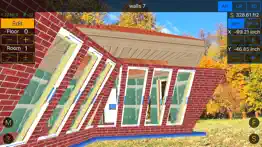
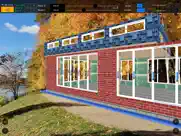
No special skills in 3D, you can create a project of a country house or find materials and cost estimates to repair the apartment and see it in augmented reality!
* New modes: AR (Augmented Reality) and UR.
You can import your projects into OS X app "Home Repair 3D Pro".
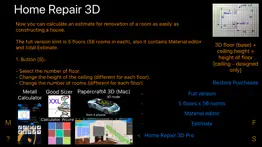
The full version limit is 5 floors (56 rooms in each), also it contains Material editor and total Estimate.
1. Button [S]:
- Select the number of floor.
- Change the height of the ceiling (different for each floor).
- Change the number of rooms (different for each floor)
- To export your existing project into text form - tap [Export].
- If you wish to edit existing project in text form and save it - edit and then tap [Save]. WARNING: New project will replace existing one!
- To import another project - [Copy] project text from anywhere, [Paste] it to the text field and press [Save]. WARNING: New project will replace existing one!
After importing another project simply go to the preview of each room which used a modified material (once in any section) to recalculate the results listed in [Estimate].
2. Button [F]:
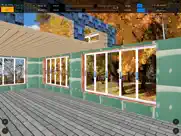
Three views: AR (Augmented Reality), UR and 3D.
You can rotate and move the view using the following gestures:
- Move the finger left or right: the view moves left or right, too.
- Move the finger up or down: the view moves up or down and turns at the same time.
- Pinch-in and pinch-out gestures are used to zoom the view in or out, correspondingly.
- Turn two fingers clockwise and counter-clockwise: the view turns.
For each room selected via floor & room selectors:
- Set the size of room (width & lenght); using the [Edit] button, you can adjust the number of walls (from 3 to 7).
- Adjust X, Y position of room in floor plan.
- To save your changes - go to the Edit section or change floor or room.
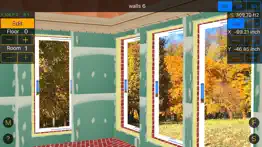
3. If you wish to add openings, doors, windows & materials - tap [Edit]:
- Set the thickness & material of walls in (it is equal for all rooms in one floor).
- Set the thickness & material of walls and roof out (it is equal for all rooms in one floor).
- Add openings, doors, windows in room two modes: auto placement and manual.
- In the base section of FLOOR category select thickness & material of floor.
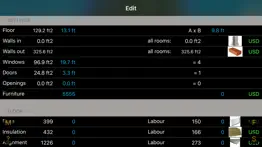
- If you add any layers of material the S, Volume, cost of this material & labour parameters are calculated automatically (using average prices).
- Gradually you can fill the actual expenditure.
4. Tap [F] to select next room or floor...
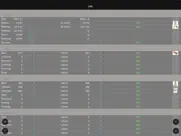
5. If you want to see total estimate - tap [S] and then [Estimate].
The app calculates automatically the area of openings, doors, windows, slopes and amount of materials needed.
Instead of the average price, you can specify a custom using [M] section. If you enter a value bigger than 0, then the calculation is carried on it. After the price change, simply go to the preview of each room which used a material with modified price (once in any section) to recalculate the results.
All parameters (currencies, cm-inch) can be changed on the fly.
Accuracy of input prices is $0.01 (or the equivalent in other currencies), for input parameters it is 0.01 cm or 0.01 in.
* You can see trailer on YouTube or on support website.
* Custom price for materials & labour.
👋 Home Repair 3D - AR Design aplikasyonunu beğendiyseniz arkadaşlarınızla paylaşır mısınız?


| Uygulama Adı | Home Repair 3D - AR Design |
| Kategori | Üretkenlik |
| Geliştirici | Aleksandr Varaksa |
| Yayın Tarihi | 24 Haziran 2013 Pazartesi |
| Güncelleme | 11 Ekim 2018 Perşembe |
| Dosya Boyutu | 18.59 MB |
Home Repair 3D - AR Design Hakkındaki Yorumlar
Sadece kaydolarak sitemizden 25 Dolar kazanabileceğinizi biliyor muydunuz? Payoneer'a katılarak ücretsiz 25$ kazanın!

Lütfen bekleyin! Home Repair 3D - AR Design uygulama yorumları yükleniyor...
Home Repair 3D - AR Design Müşteri Hizmetleri
Home Repair 3D - AR Design aplikasyonu hakkında ne düşünüyorsunuz? Uygulama hakkındaki şikayet, deneyim veya düşüncelerinizi Aleksandr Varaksa şirketi ve insanlarla paylaşır mısınız?
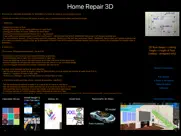
Home Repair 3D - AR Design Uygulaması Ekran Görüntüleri & Resimleri
Home Repair 3D - AR Design uygulaması iphone, ipad, apple watch ve apple tv aplikasyon görüntüleri.
| Dil | Türkçe |
| Fiyat | Bedava |
| Yaş Sınırı | 4+ yaş ve üstü |
| Son Versiyon | 5.0 |
| Play Store | com.iworld4us.Home-Repair-F |
| Uyumluluk | IOS 9.0 ve üstü |
Home Repair 3D - AR Design (Versiyon 5.0) Aplikasyonu İndir & Yükle
Home Repair 3D - AR Design ios uygulaması Aleksandr Varaksa [Geliştirici ID: 478681813] tarafından geliştirilip, 24 Haziran 2013 Pazartesi günü Üretkenlik kategorisinde yayınlanmıştır. Aplikasyonun dosya boyutu 18.59 MB'tır. Bu uygulama 17 kullanıcı tarafından oylanmış ve 5 üzerinden 1 puan almıştır. Home Repair 3D - AR Design programının 11 Ekim 2018 Perşembe günü yayınlanan son sürümü 5.0 versiyonudur. Minumum IOS 9.0 ve üzeri cihazlarda sorunsuz olarak çalışmaktadır. Google Play Store ID numarası: com.iworld4us.Home-Repair-F. Uygulamanın desteklediği diller şunlardır:
EN RU ZH Uygulamayı İndir & Yükle!
| Uygulama Adı | Puan | Yorumlar | Fiyat |
| Multimetal 3D | 1 | 1 | 49.99 |
| VarCAM Concept Car Constructor | 1 | Yorum yapılmamış | 3999.99 |
| Eye DPI Test | 1 | 1 | Ücretsiz |
| Calculator Wcore | 1 | Yorum yapılmamış | Ücretsiz |
| Stl2Gcode 5x | 1 | Yorum yapılmamış | 499.99 |
* Controlling the view became easier with gestures. * User Interface update. >>Check out Pro version of this app "Home Repair 3D Pro" for iOS & macOS<<
| Uygulama Adı | Geliştirici |
| Yupi - Reports for Instagram | Oguz Cal |
| Eyotek | Turtek Yazilim Tic. Ltd. Sti. |
| Auto Clicker - Click Assistant | Hamza El karmouni |
| Microsoft OneDrive | Microsoft Corporation |
| ChatGPT | OpenAI |
VPN programları, dünyanın her yerinden sınırsız ve güvenli internet erişimi sağlayarak internete erişmenin en güvenli yolunu sunar. Uzman ekibimizin objektif incelemeleri ve derinlemesine analizleri ile ihtiyacınıza uygun 2026 yılının en iyi VPN programını seçin!
| Uygulama Adı | Geliştirici |
| EDrawings Pro | Dassault Systemes SolidWorks Corporation |
| Aiko | Sindre Sorhus |
| BimmerLink for BMW and MINI | SG Software GmbH & Co. KG |
| 3sparks Chat | 3sparks Labs LLC |
| FasstRead | STEVE ALTUNTAS |
Farklı kripto para birimlerinin nasıl işlediğini keşfedin ve bizzat denemek üzere her kriptodan küçük bir tutar kazanın. Coinbase, kripto satın almak ve satmak için en kolay yerdir. Kaydolun, hemen başlayın.
| Uygulama Adı | Developer |
| Akbank | Akbank T.A.S |
| Spotify - Music and Podcasts | Spotify |
| Ziraat Mobil | T.C. Ziraat Bankası A.Ş. |
| Gmail - Email by Google | |
| CDAS | T.C. Saglik Bakanligi |
Jasper, size ve ekibinize 10 kat daha hızlı şaşırtıcı, orijinal içerik oluşturmak için yaratıcı engelleri aşmanıza yardımcı olan yapay zeka içerik üreticisidir.
| Uygulama Adı | Geliştirici |
| Body Measurement - Tracker | Peter Lynch |
| Alamy | Alamy Co |
| ANIMALSEQER | Sandra Samuel |
| Big Apple Pizza App | UpMenu |
| Birthday cake doodle | Aizaz Shazil |
Mind Lab Pro ® odaklanma, stres altında çoklu görev yapma, yaratıcı problem çözme ve daha fazlası için nootropiklerle iş performansını ve üretkenliğini arttıran bilimsel bir ilaçtır. Beyninizi %100 performansa çıkarın!
Adsterra, AdSenseye alternatif arayanların en çok tercih ettiği reklam ağıdır. Adsterra, günlük site trafiği düşük olan yeni siteler için en ideal bir seçimdir. Adsterra’da siteye reklam vermek için diğer reklam ağları gibi belli bir trafik sınırı, domain yaşı vb. katı kurallar bulunmuyor.