XDiagram
XDiagram Uygulama İncelemesi
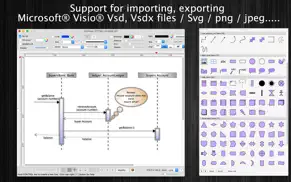
XDiagram uygulaması nedir, nasıl kullanılır? xDiagram application could help you make nice diagram graphic documents or UML documents quickly by keeping lines connected to shapes even when they're moved.
Functions of the application:
+ Support VISIO formats: VSDX, VSDM (Microsoft Visio Format)
+ IMPORT old VISIO formats: VSD, VSS (Import only)
+ Support many other formats: svg, png, jpeg, multi-pages tiff, pdf...
+ Sync document files to iCloud
+ SMART LINE / CONNECTOR:
Smart Line if attached to a shape will automatically change position every time when the main shape is moved, resized.
+ BASIC SHAPE (new):
There are 92 shapes to add to your diagram. You could add/change text to display inside the shape.
Drawing UML activity diagram will be easier using these shapes.
+ PRE-DEFINED IMAGES (new):
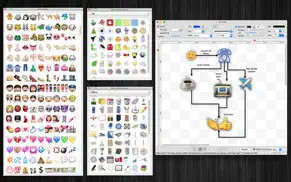
There are 1056 predefined nice images shapes for you to add to your diagram.
Shape types are as following:
- Computer
- Network
- Office
- Life
- Traffic
+ OVER 2000 BEAUTIFUL SYMBOLS:
More than that, there are over 2000 beautiful symbols for you to add to the diagram.
+ ADD IMAGE:
You could add any image file (support file type: gif, jpeg, png, bmp, pict, tiff) to display as an item inside the application.
Image file could be shown in following modes: Stretch / Fit inside bound / Fit outside bound.
The application also allows to DRAG/DROP many image files directly from Finder or pasted image from clipboard to current editing window to add them to the diagram.
+ GENERATE UML CLASS DIAGRAM from C++/JAVA SOURCE:
By dragging C++ header(*.h) or Java files, folders into the diagram window, the application will auto-generate UML class diagram for you. (Accurate rate: 90%)
+ ALIGN MULTIPLE ITEMS:
Select many items then do right-click mouse to select alignment options as following:
(also allow to auto-align with another objects)
- Left
- Right
- Top
- Bottom
- Center (Horizontal or Vertical)
- Distribute ....
+ OPEN/SAVE to "*.UMD3" file:
UMD3 (*.umd3) is the new file type created only for this application.
Press “Cmd + S" to save current diagram to an UMD3 file so that you could load it later for editing.
+ EXPORT TO IMAGE FILE:
Press "Cmd + E" to export current diagram to an image file with format of VSDX, SVG, PDF, TIFF or PNG or JPEG.
+ SUPPORT PRINT:
Press "Cmd + P" to print current document.
+ CAPTURE TO CLIPBOARD:
Press "Cmd + 4" or click on Capture button to export current diagram image to clipboard, then you could paste that image to another application.
Example: Open [Preview] application, press "Cmd + N" to paste above captured image to view or to save to an image file.
Of course, you could paste that image to Excel, Word application too.
-----------------
Other functions:
- Unlimited Undo/Redo (shortcut key: Cmd-Z / Shift-Cmd-Z)
- Copy / Paste (shortcut key: Cmd-C / Cmd-V)
- Duplicate select items (shortcut key: Cmd-D)
- Group / Ungroup Items (shortcut key: Cmd-G / Shift-Cmd-G)
- Lock/Unlock items position (shortcut key: Cmd-L / Shift-Cmd-L)
- Rotate left, rotate right (shortcut key: Cmd-J / Cmd-K)
- Press Cmd+T to move, resize group of items temporary
- Short cut key CMD+B, CMD+I to change text to Bold or Italic
- User could drag right mouse on a current shape to create a new attached object with line
- Double click on the canvas to create a new text box item
- Allow to switch current select object to another shape type
- Allow to change selected items display order
- Scale size of select items
- Path boolean operations supported
- Flip select items
- Shadow supported
- Snap to Grid
- Auto Align with another object when resize or move
- Change display order
- Export to png, jpeg, tiff, pdf image file (shortcut key: Cmd-E)
- Print supported (shortcut key: Cmd-P)
- Customizable color / Font / Size / Line Type
- Support gradient fill to shapes
- Customize measure unit and scale (point, cm, mm, inch….)
- Allow to Export image in 300dpi
- Allow user to select items then save them to Favorites list to reuse later
👋 XDiagram aplikasyonunu beğendiyseniz arkadaşlarınızla paylaşır mısınız?


| Uygulama Adı | XDiagram |
| Kategori | Grafik ve Tasarım |
| Geliştirici | Tien Thinh Vu |
| Yayın Tarihi | 19 Nisan 2012 Perşembe |
| Güncelleme | 5 Mart 2021 Cuma |
| Dosya Boyutu | 81.76 MB |
XDiagram Hakkındaki Yorumlar
Sadece kaydolarak sitemizden 25 Dolar kazanabileceğinizi biliyor muydunuz? Payoneer'a katılarak ücretsiz 25$ kazanın!

Lütfen bekleyin! XDiagram uygulama yorumları yükleniyor...
XDiagram Müşteri Hizmetleri
XDiagram aplikasyonu hakkında ne düşünüyorsunuz? Uygulama hakkındaki şikayet, deneyim veya düşüncelerinizi Tien Thinh Vu şirketi ve insanlarla paylaşır mısınız?


XDiagram Uygulaması Ekran Görüntüleri & Resimleri
XDiagram uygulaması iphone, ipad, apple watch ve apple tv aplikasyon görüntüleri.
| Dil | Türkçe |
| Fiyat | 799.99 TL |
| Yaş Sınırı | 4+ yaş ve üstü |
| Son Versiyon | 5.7 |
| Play Store | com.vutienthinh.macos.xdiagram |
| Uyumluluk | IOS 10.11 ve üstü |
XDiagram (Versiyon 5.7) Aplikasyonu İndir & Yükle
XDiagram ios uygulaması Tien Thinh Vu [Geliştirici ID: 393568128] tarafından geliştirilip, 19 Nisan 2012 Perşembe günü Grafik ve Tasarım kategorisinde yayınlanmıştır. Aplikasyonun dosya boyutu 81.76 MB'tır. Bu uygulama 17 kullanıcı tarafından oylanmış ve 5 üzerinden 1 puan almıştır. XDiagram programının 5 Mart 2021 Cuma günü yayınlanan son sürümü 5.7 versiyonudur. Minumum IOS 10.11 ve üzeri cihazlarda sorunsuz olarak çalışmaktadır. Google Play Store ID numarası: com.vutienthinh.macos.xdiagram. Uygulamanın desteklediği diller şunlardır:
CS DA NL EN FI FR DE IT JA KO NB PL PT RU ZH ES SV TH ZH TR VI Uygulamayı İndir & Yükle!
| Uygulama Adı | Puan | Yorumlar | Fiyat |
| Visual PDF Editor | 1 | Yorum yapılmamış | Ücretsiz |
| ElectricDesign | 1 | Yorum yapılmamış | 799.99 |
| EncryptedZip2 for zip rar | 1 | Yorum yapılmamış | Ücretsiz |
| SourceCounter | 1 | Yorum yapılmamış | Ücretsiz |
| SimpleMindMap | 1 | Yorum yapılmamış | Ücretsiz |
- Improve UI - Fix bugs Previous updates: - Support Apple Silicon - Support macOS 11 Big Sur - Support Find/Replace text - Support multi-canvas (multi-tabs) for each document - Improve Grid setting, Snap setting (add minor step setting...) - Improve polyline object (support curve segment...) - "CMD-9" to change zoom to fit to canvas size - Allow to change arrow size of each line - Allow to change theme color of all items inside current document - Support fill setting: Pattern - Add modify functions: Copy/Paste properties - Add modify functions: Apply Gradient fill to multi objects - Unit setting for each document: each document support different unit setting - Allow to resize, move sub-object (which is inside a group) individually - Allow to resize canvas from all directions - User can move, resize object to outside of canvas's printable area - Improve app's performance - Support rich text format - Allow to add hyperlink/description to shapes - Hold SPACE-BAR to maneuver/scroll around document - Hold ALT key then drag items to clone/duplicate - Hold 'A' key then drag mouse to create a new smart connection line - Add "keep proportion ratio" property - Improve ColorWell UI - Support rotated table - Press shortcut key 'F' to edit shape's path, points - Add more text-align setting - Add 'Merge layers' function - Improve UI of "More Shapes" dialog - Support multi-languages: English, Deutsch, Français, 日本語, 한국어, Español, Português, Čeština, Dansk, Suomi, Italiano, Nederlands, Norsk, Polski, Русский, Svenska, ไทย, Türkçe, Tiếng Việt, 中文(中国), 中文(台灣) - Improve print dialog (add Detail controls to print dialog) - Allow users to copy/paste selected layer - Add Decimal Precision setting - Add more arrow types (architectural ticks....) - Support sync to iCloud - Import from Visio's VSD, VSS format - Import multi-pages tiff format
| Uygulama Adı | Geliştirici |
| Home AI - AI Interior Design | HUBX |
| Motion blur photo, blur effect | IDEVELOP PLUS - FZCO |
| Leonardo.Ai - Image Generator | Leonardo Interactive Pty Ltd |
| AI Video - AI Video Generator | HUBX |
| Pixelcut AI Photo Editor | Pixelcut Inc. |
VPN programları, dünyanın her yerinden sınırsız ve güvenli internet erişimi sağlayarak internete erişmenin en güvenli yolunu sunar. Uzman ekibimizin objektif incelemeleri ve derinlemesine analizleri ile ihtiyacınıza uygun 2026 yılının en iyi VPN programını seçin!
| Uygulama Adı | Geliştirici |
| Mandala Maker 360 Pro | Bhupesh Singh |
| Explorer for Sketchfab | Sozzled LLC |
| Ibis Paint | Ibis inc. |
| Poetics | Soulincode Inc. |
| Tayasui Sketches - Art Drawing | Andrea Terdich |
Farklı kripto para birimlerinin nasıl işlediğini keşfedin ve bizzat denemek üzere her kriptodan küçük bir tutar kazanın. Coinbase, kripto satın almak ve satmak için en kolay yerdir. Kaydolun, hemen başlayın.
| Uygulama Adı | Developer |
| ChatGPT | OpenAI |
| Instagram, Inc. | |
| E-Devlet | Turkiye Cumhuriyeti Cumhurbaskanlıgı Dijital Donusum Ofisi Baskanlıgı |
| Getcontact | GETVERIFY LDA |
Jasper, size ve ekibinize 10 kat daha hızlı şaşırtıcı, orijinal içerik oluşturmak için yaratıcı engelleri aşmanıza yardımcı olan yapay zeka içerik üreticisidir.
| Uygulama Adı | Geliştirici |
| Bricks break balls puzzle game | Milan Devmurari |
| Baila insights | Kian Dousti |
| Build With Me Club | The Toolkit |
| AURIS PIZZA | Alessio messineo |
| ANIMALSEQER | Sandra Samuel |
Mind Lab Pro ® odaklanma, stres altında çoklu görev yapma, yaratıcı problem çözme ve daha fazlası için nootropiklerle iş performansını ve üretkenliğini arttıran bilimsel bir ilaçtır. Beyninizi %100 performansa çıkarın!
Adsterra, AdSenseye alternatif arayanların en çok tercih ettiği reklam ağıdır. Adsterra, günlük site trafiği düşük olan yeni siteler için en ideal bir seçimdir. Adsterra’da siteye reklam vermek için diğer reklam ağları gibi belli bir trafik sınırı, domain yaşı vb. katı kurallar bulunmuyor.