Epson Setting Assistant
Epson Setting Assistant Uygulama İncelemesi
Epson Setting Assistant uygulaması nedir, nasıl kullanılır? Epson Setting Assistant is an app that automatically corrects the shape of a projected image by using your camera.
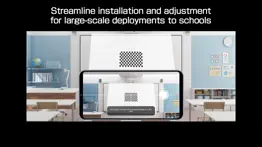
By taking a shot of the projected pattern, the app automatically corrects distortion in the projected image and adjusts its shape to match the screen.
[Main Features]
1) Shape correction
The app adjusts the image to a rectangular shape or aligns it with a frame, such as a projector screen.
2) Unevenness correction
The app detects small surface irregularities, such as on a wall, and corrects distortion in the projected image.
[For Home Projector (EH Series) Users: Using the App]
Make sure your iPhone®, iPad®, or iPod® touch and the projector are connected to the same network.
1. Select [Installation] ([Installation] > [Geometry Correction Wizard]) from the projector's menu.
2. Open this app on your iPhone®, iPad®, or iPod® touch and select [Home] as the projector type to automatically connect to the projector.
3. Follow the on-screen instructions to take a shot of the projected pattern using the camera in the app, and the corrections will be completed automatically.
[For Business Projector (EB Series) Users: Using the App]
Make sure the [Wireless LAN Power] setting is set to [On] in the projector‘s [Management] menu.
1. Select [Installation] > [Connect to Setting Assistant] from the projector's menu to project a QR code.
2. Open this app on your iPhone®, iPad®, or iPod® touch, select [Business] as the projector's type, and then scan the QR code to automatically connect to the projector.
3. Follow the on-screen instructions to take a shot of the projected pattern using the camera in the app, and the corrections will be completed automatically.
[Supported Projectors]
Visit https://support.epson.net/projector_appinfo/setting_assistant/en/ for details.
Depending on your projector model, some features may not be available.
[Notes for use]
Depending on your environment, such as a curved projection surface or wallpaper with rough textures or patterns, automatic correction using the app may not be available. In these situations, please correct the image shape from the projector's menu.
Depending on your smartphone/tablet, the Wi-Fi settings may prevent you from temporarily connecting to the projector. Turn your Wi-Fi off and then on again and try again.
For detailed important points, visit https://download2.ebz.epson.net/sec_pubs_visual/apps/setting_assistant/210/EN/index.html.
You can also check these from the [Online support guide] in the menu at the top right of the app.
Images used here are for illustrative purposes only. The actual images may differ.
[App Permissions]
To use the app, the following permissions are required.
[Required] Local Network
For searching and connecting to the projector.
[Required] Camera
For capturing correction patterns or QR codes for connection.
* Optional permissions can be declined, but some features may not work.
👋 Epson Setting Assistant aplikasyonunu beğendiyseniz arkadaşlarınızla paylaşır mısınız?


| Uygulama Adı | Epson Setting Assistant |
| Kategori | Üretkenlik |
| Geliştirici | Seiko Epson Corporation |
| Yayın Tarihi | 1 Eylül 2022 Perşembe |
| Güncelleme | 31 Ekim 2025 Cuma |
| Dosya Boyutu | 93.78 MB |
Epson Setting Assistant Hakkındaki Yorumlar
Sadece kaydolarak sitemizden 25 Dolar kazanabileceğinizi biliyor muydunuz? Payoneer'a katılarak ücretsiz 25$ kazanın!
Mind Lab Pro ® odaklanma, stres altında çoklu görev yapma, yaratıcı problem çözme ve daha fazlası için nootropiklerle iş performansını ve üretkenliğini arttıran bilimsel bir ilaçtır. Beyninizi %100 performansa çıkarın! Satın Al!
Adsterra, AdSenseye alternatif arayanların en çok tercih ettiği reklam ağıdır. Adsterra, günlük site trafiği düşük olan yeni siteler için en ideal bir seçimdir. Adsterra’da siteye reklam vermek için diğer reklam ağları gibi belli bir trafik sınırı, domain yaşı vb. katı kurallar bulunmuyor. Hemen üye ol!

Lütfen bekleyin! Epson Setting Assistant uygulama yorumları yükleniyor...
Epson Setting Assistant Müşteri Hizmetleri
Epson Setting Assistant aplikasyonu hakkında ne düşünüyorsunuz? Uygulama hakkındaki şikayet, deneyim veya düşüncelerinizi Seiko Epson Corporation şirketi ve insanlarla paylaşır mısınız?




Epson Setting Assistant Uygulaması Ekran Görüntüleri & Resimleri
Epson Setting Assistant uygulaması iphone, ipad, apple watch ve apple tv aplikasyon görüntüleri.
| Dil | Türkçe |
| Fiyat | Bedava |
| Yaş Sınırı | 4+ yaş ve üstü |
| Son Versiyon | 2.1.1 |
| Play Store | com.epson.projector.settingassistant |
| Uyumluluk | IOS 15.0 ve üstü |
Epson Setting Assistant (Versiyon 2.1.1) Aplikasyonu İndir & Yükle
Epson Setting Assistant ios uygulaması Seiko Epson Corporation [Geliştirici ID: 326876195] tarafından geliştirilip, 1 Eylül 2022 Perşembe günü Üretkenlik kategorisinde yayınlanmıştır. Aplikasyonun dosya boyutu 93.78 MB'tır. Bu uygulama 13 kullanıcı tarafından oylanmış ve 5 üzerinden 4.3 puan almıştır. Epson Setting Assistant programının 31 Ekim 2025 Cuma günü yayınlanan son sürümü 2.1.1 versiyonudur. Minumum IOS 15.0 ve üzeri cihazlarda sorunsuz olarak çalışmaktadır. Google Play Store ID numarası: com.epson.projector.settingassistant. Uygulamanın desteklediği diller şunlardır:
CS DA NL EN FI FR DE EL HU IT JA KO NB PL PT RU ZH ES SV ZH TR UK Uygulamayı İndir & Yükle!
| Uygulama Adı | Puan | Yorumlar | Fiyat |
| Epson Exif Label Tool | 1 | Yorum yapılmamış | Ücretsiz |
| Epson TM Print Assistant | 1 | Yorum yapılmamış | Ücretsiz |
| Epson Label Editor Lite | 1 | Yorum yapılmamış | Ücretsiz |
| Epson Creative Projection | 1 | Yorum yapılmamış | Ücretsiz |
| Epson ColorWorks Print | 1 | Yorum yapılmamış | Ücretsiz |
Minor bug fixes
| Uygulama Adı | Geliştirici |
| Microsoft Copilot | Microsoft Corporation |
| TRANSLATOR GO photo voice text | MATdev |
| VPN Proxy Master - Unlimited | ALL Connected Co.,Ltd |
| Turbo VPN Private Browser | INNOVATIVE CONNECTING PTE.LIMITED |
| MEGA | Mega Limited |
VPN programları, dünyanın her yerinden sınırsız ve güvenli internet erişimi sağlayarak internete erişmenin en güvenli yolunu sunar. Uzman ekibimizin objektif incelemeleri ve derinlemesine analizleri ile ihtiyacınıza uygun 2026 yılının en iyi VPN programını seçin!
| Uygulama Adı | Geliştirici |
| I.Protect - The Security Bag | Jan-Niklas FREUNDT |
| OneSafe password manager | Lunabee Pte. Ltd. |
| ChoreoRoom | Aaron Aquino |
| Be Focused Pro- Pomodoro Timer | Denys Ievenko |
| EDrawings | Dassault Systemes SolidWorks Corporation |
Farklı kripto para birimlerinin nasıl işlediğini keşfedin ve bizzat denemek üzere her kriptodan küçük bir tutar kazanın. Coinbase, kripto satın almak ve satmak için en kolay yerdir. Kaydolun, hemen başlayın.
| Uygulama Adı | Developer |
| Trendyol Go | Trendyol.com |
| Akbank | Akbank T.A.S |
| Nays | Türkiye İş Bankası A.Ş. |
| Papara | Papara Elektronik Para A.S |
| Garanti BBVA Mobile | T. Garanti Bankasi A.S. |
Jasper, size ve ekibinize 10 kat daha hızlı şaşırtıcı, orijinal içerik oluşturmak için yaratıcı engelleri aşmanıza yardımcı olan yapay zeka içerik üreticisidir.
| Uygulama Adı | Geliştirici |
| Book an Appointment - Oliva | SREYAS HOLISTIC REMEDIES PRIVATE LIMITED |
| AccessBadge Scanner | Spark Trading |
| AI Image Extender - AI Uncrop | Ruby Lakhani |
| Animal Drop Merge Games | Andri Octavianto Eko Nugroho |
| BlueTutor | Brock Brunson |
Mind Lab Pro ® odaklanma, stres altında çoklu görev yapma, yaratıcı problem çözme ve daha fazlası için nootropiklerle iş performansını ve üretkenliğini arttıran bilimsel bir ilaçtır. Beyninizi %100 performansa çıkarın!
Adsterra, AdSenseye alternatif arayanların en çok tercih ettiği reklam ağıdır. Adsterra, günlük site trafiği düşük olan yeni siteler için en ideal bir seçimdir. Adsterra’da siteye reklam vermek için diğer reklam ağları gibi belli bir trafik sınırı, domain yaşı vb. katı kurallar bulunmuyor.