TslaMirror
TslaMirror Uygulama İncelemesi
TslaMirror uygulaması nedir, nasıl kullanılır? One-week free trial.
TslaMirror is an app designed to mirror your iPhone apps to your Tesla’s built-in browser.
- Supported apps include Waze, Google Maps, Apple Maps, YouTube, TikTok, Plex, and more.
- DRM-protected apps, including but not limited to Netflix, Apple TV, YouTube TV, Amazon Prime Video, and Hulu, are not supported. Some DRM-protected apps may block video mirroring, resulting in a black screen in the Tesla browser.
Instructions for the Tesla built-in browser:
1. If possible, update your Tesla’s infotainment system to the most recent version.
2. Make sure the vehicle is PARKED (0 mph / 0 km/h).
3. Connect your Tesla to your iPhone Personal Hotspot (cellular data required). MCU2 or MCU3 hardware is required: available on Model 3 and Model Y, Model S built after March 2018, Model X built after March 2018, or vehicles upgraded from MCU1 to MCU2/3.
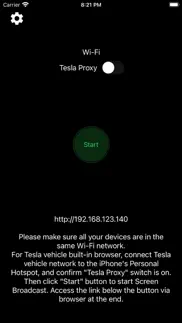
4. Ensure the iPhone is not in Low Power Mode. Launch the TslaMirror app and toggle on “Proxy.”
5. Tap “Start,” then select “Start Broadcast” to begin screen broadcast.
6. In your Tesla’s built-in browser, go to https://TslaMirror.com
7. Pinch in the browser to zoom in or out.
8. In H.264/H.265 mode, lossless audio playback is supported in the browser.
9. In MJPEG mode, only video is mirrored. For audio, use a Bluetooth connection from your iPhone to the Tesla’s speakers.
10. Keep your iPhone unlocked; due to Screen Broadcast API limitations, locking the screen stops casting and requires restarting the broadcast.
Key Features
1. No additional internet traffic is used for mirroring; traffic stays on the iPhone’s Personal Hotspot. However, while the Tesla is connected to the hotspot, the vehicle may use your cellular data for its own internet access.
2. Private: the screencast is only available to devices connected to the iPhone Personal Hotspot Wi-Fi network.
3. A 5 GHz Personal Hotspot (supported from the iPhone 12 series) is highly recommended. Do not enable “Maximize Compatibility” on iPhone 12 models; enabling it forces a 2.4 GHz hotspot.
4. H.264/H.265 mirroring recommendations:
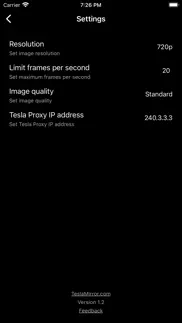
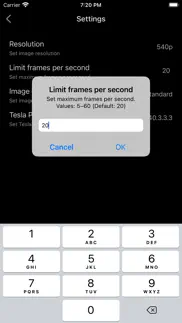
– MCU3 (AMD Ryzen): H.265 mode with 720p@60 fps recommended, as 1080p requires higher bandwidth. MCU3 supports up to 1080p@60fps (H.264 and H.265).
- H.265 playback is supported only on MCU3 or newer hardware. If your browser runs on MCU3 or higher-performance hardware, we recommend choosing H.265. H.265 delivers the best video quality.
– MCU2 (Intel Atom): H.264 mode with 540p@30fps recommended.
FAQ
1. This is not CarPlay.
2. iOS apps that use the AVPlayer framework (e.g., Apple Music, Netflix) are not supported.
3. Netflix is not supported.
Privacy/Security Notice: This app does not collect usage statistics, personal information, or analytics. On iOS 13 and later, it uses Location Services only to read the Wi-Fi network name (SSID). Location data is never stored or collected. No information is stored by us.
Disclaimer: This software and documentation are not affiliated with or endorsed by Tesla, Inc. Use at your own risk. We do not guarantee proper functioning. Some features require specific vehicle options (e.g., MCU2 or newer). The app uses interfaces similar to those used by official Tesla apps, but you are responsible for any changes to your car resulting from use. Use requires the vehicle’s built-in browser. We are not liable for any damages to you, your car, or any other property in conjunction with the use of this app.
Warning and Legal Disclaimer: Use only while PARKED (0 mph / 0 km/h). Local laws may restrict the use of a built-in web browser in a vehicle.
Terms of Use (EULA): https://teslamirror.com/terms.html
Privacy Policy: https://teslamirror.com/privacy.html
👋 TslaMirror aplikasyonunu beğendiyseniz arkadaşlarınızla paylaşır mısınız?


| Uygulama Adı | TslaMirror |
| Kategori | Yardımcılar |
| Geliştirici | Wuhan TrustComputing IT Co., Ltd. |
| Yayın Tarihi | 11 Aralık 2020 Cuma |
| Güncelleme | 26 Haziran 2026 Cuma |
| Dosya Boyutu | 13.89 MB |
TslaMirror Hakkındaki Yorumlar
Sadece kaydolarak sitemizden 25 Dolar kazanabileceğinizi biliyor muydunuz? Payoneer'a katılarak ücretsiz 25$ kazanın!
Mind Lab Pro ® odaklanma, stres altında çoklu görev yapma, yaratıcı problem çözme ve daha fazlası için nootropiklerle iş performansını ve üretkenliğini arttıran bilimsel bir ilaçtır. Beyninizi %100 performansa çıkarın! Satın Al!
Adsterra, AdSenseye alternatif arayanların en çok tercih ettiği reklam ağıdır. Adsterra, günlük site trafiği düşük olan yeni siteler için en ideal bir seçimdir. Adsterra’da siteye reklam vermek için diğer reklam ağları gibi belli bir trafik sınırı, domain yaşı vb. katı kurallar bulunmuyor. Hemen üye ol!

Lütfen bekleyin! TslaMirror uygulama yorumları yükleniyor...
TslaMirror Müşteri Hizmetleri
TslaMirror aplikasyonu hakkında ne düşünüyorsunuz? Uygulama hakkındaki şikayet, deneyim veya düşüncelerinizi Wuhan TrustComputing IT Co., Ltd. şirketi ve insanlarla paylaşır mısınız?


TslaMirror Uygulaması Ekran Görüntüleri & Resimleri
TslaMirror uygulaması iphone, ipad, apple watch ve apple tv aplikasyon görüntüleri.
| Dil | Türkçe |
| Fiyat | Bedava |
| Yaş Sınırı | 4+ yaş ve üstü |
| Son Versiyon | 9.63 |
| Play Store | com.hustmobile.screencastfortesla |
| Uyumluluk | IOS 16.0 ve üstü |
TslaMirror (Versiyon 9.63) Aplikasyonu İndir & Yükle
TslaMirror ios uygulaması Wuhan TrustComputing IT Co., Ltd. [Geliştirici ID: 370363169] tarafından geliştirilip, 11 Aralık 2020 Cuma günü Yardımcılar kategorisinde yayınlanmıştır. Aplikasyonun dosya boyutu 13.89 MB'tır. Bu uygulama 1 kullanıcı tarafından oylanmış ve 5 üzerinden 5 puan almıştır. TslaMirror programının 26 Haziran 2026 Cuma günü yayınlanan son sürümü 9.63 versiyonudur. Minumum IOS 16.0 ve üzeri cihazlarda sorunsuz olarak çalışmaktadır. Google Play Store ID numarası: com.hustmobile.screencastfortesla. Uygulamanın desteklediği diller şunlardır:
EN ZH Uygulamayı İndir & Yükle!
| Uygulama Adı | Puan | Yorumlar | Fiyat |
| GoodPlayer | 2.5 | 2 | 149.99 |
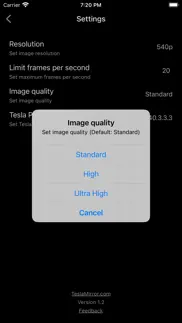
9.63: - Performance improvements. - For Tesla in-car system software version 2025.38.11 and later, H.265 mirroring is now recommended for both MCU2 and MCU3. 9.25: - Added H.265 mirroring mode for improved video quality. - H.265 playback is supported on all MCU3 vehicles, and on MCU2 vehicles running Tesla software 2025.38.11 or later. - To switch modes, tap the Settings button in the top-right corner → “Mirroring mode”. - H.264 remains the default. On MCU3 (and supported MCU2 vehicles), H.265 is recommended. - On MCU3, H.265 enables smooth playback at 1080p@60 fps. - Resolution and frame-rate settings for the H.265/H.264 modes depend on your vehicle’s performance. For older Tesla models, use lower settings; for newer models, increase them gradually to suit your needs. 8.07: Siri Shortcuts support: Start Mirroring, Stop Mirroring, Start Proxy, Stop Proxy. 8.06: - Enhanced H.264 performance on MCU3 (AMD Ryzen). MCU3 now supports up to 1080p@60fps. - MCU3: 720p@60fps is recommended, as 1080p requires higher network bandwidth. - MCU2 (Intel Atom): 540p@30fps is recommended. 7.06: - MCU1 (NVIDIA Tegra 3): Due to hardware limitations, this app is not recommended for use on MCU1 devices. We appreciate your understanding. 7.00: After careful investigation, it appears that the recent Tesla 2025.8.4 software update may have inadvertently impacted support for H.264 video streaming. - The updated H.264 mode is now compatible with Tesla’s 2025.8.4 software. - Due to limitations introduced in Tesla 2025.8.4, video playback performance in the new H.264 mode may be somewhat reduced compared with previous versions. - To achieve optimal streaming performance, consider lowering your “Resolution” and “Frames per second” settings. You can adjust these by tapping the Settings button in the top-left corner of the app. - To ensure the Tesla browser uses the latest version of a webpage, clear the vehicle’s browser data (as you would on a computer or phone) via Controls > Service > Clear Browser Data. Thank you for your understanding and patience. 6.00: - Starting with version 6.00, the audio transmission method has been completely updated and is no longer compatible with version 4.00. Tesla software versions 2024.45.32.1 and later no longer support the old method. - The new audio transmission method is comparable to Bluetooth audio and supports lossless audio. - Lossless audio specs: 44.1 kHz, stereo, 16-bit (CD quality). This is typically much better than Bluetooth or low-bitrate streaming audio. - These specs reflect the highest recording quality supported by iPhone. For best results, use music apps configured for lossless or higher-quality audio. - Lossless audio transmission is available only in H.264 mode, which includes a “Lossless Audio” option enabled by default that controls audio transmission to the browser. - Audio transmission depends on DRM restrictions set by third-party apps. If a third-party app allows screen recording and its audio is DRM-free, it can be transmitted normally. - To play audio in the browser, initial manual interaction is required (tap the audio button in the top-left corner). The button hides automatically after 30 seconds and reappears when the screen is touched. - During prolonged audio playback, latency may gradually increase. Tap the audio button in the top-left corner to restart audio and minimize latency. - For optimal transmission performance, we recommend using a 5G or 4G cellular signal along with a 5 GHz iPhone Wi-Fi hotspot (cellular signal and Wi-Fi frequency are separate parameters). 3.00: - Added support for the new H.264 mode.
| Uygulama Adı | Geliştirici |
| Advent VPN | Core Game |
| Google Chrome | |
| Petrol Ofisi | PETROL OFİSİ A.Ş. |
| Clap Phone Finder AntiTheft | Esame Marketing Limited |
| TurkNet | TurkNet Iletisim Hizmetleri A.S. |
VPN programları, dünyanın her yerinden sınırsız ve güvenli internet erişimi sağlayarak internete erişmenin en güvenli yolunu sunar. Uzman ekibimizin objektif incelemeleri ve derinlemesine analizleri ile ihtiyacınıza uygun 2026 yılının en iyi VPN programını seçin!
| Uygulama Adı | Geliştirici |
| Ask Adress - Where Am I | Batuhan Gundogdu |
| Egern | Byte Crossing |
| My Classic | 培屹 王 |
| LightSpectrum Pro | AM PowerSoftware |
| AtvTools | Oleksandr Hamlii |
Farklı kripto para birimlerinin nasıl işlediğini keşfedin ve bizzat denemek üzere her kriptodan küçük bir tutar kazanın. Coinbase, kripto satın almak ve satmak için en kolay yerdir. Kaydolun, hemen başlayın.
| Uygulama Adı | Developer |
| Instagram, Inc. | |
| WhatsApp Messenger | WhatsApp Inc. |
| Nays | Türkiye İş Bankası A.Ş. |
| Garanti BBVA Mobile | T. Garanti Bankasi A.S. |
Jasper, size ve ekibinize 10 kat daha hızlı şaşırtıcı, orijinal içerik oluşturmak için yaratıcı engelleri aşmanıza yardımcı olan yapay zeka içerik üreticisidir.
| Uygulama Adı | Geliştirici |
| Arsystem | Angel Alem Meza |
| Award Maker by Edco | Edco.com |
| AI Image Extender - AI Uncrop | Ruby Lakhani |
| BanGo | Isik Senol |
| ACTLinkMobile | Advanced Charging Technologies Inc |
Mind Lab Pro ® odaklanma, stres altında çoklu görev yapma, yaratıcı problem çözme ve daha fazlası için nootropiklerle iş performansını ve üretkenliğini arttıran bilimsel bir ilaçtır. Beyninizi %100 performansa çıkarın!
Adsterra, AdSenseye alternatif arayanların en çok tercih ettiği reklam ağıdır. Adsterra, günlük site trafiği düşük olan yeni siteler için en ideal bir seçimdir. Adsterra’da siteye reklam vermek için diğer reklam ağları gibi belli bir trafik sınırı, domain yaşı vb. katı kurallar bulunmuyor.