SimpleCAD2
SimpleCAD2 Uygulama İncelemesi
SimpleCAD2 uygulaması nedir, nasıl kullanılır? This is the Pro version of SimpleCAD.
SimpleCAD2 is an easy, simple to learn 2D Computer Aided Design program (CAD) made to meet all of your basic design needs.
SimpleCAD2 is more than just a vector paint program, because you could move, copy, edit, scale, rotate and offset… objects.
(* Number of objects/shapes added to each document is limited, you could upgrade to Pro-Version to remove this limitation. *)
Main Functions of the application:
- Multi-sheets: Each document support multiple sheets of drawing canvas
- Basic draw items: including freehand lines, line, polyline, orthogonal line, tangent line, parallel line, rectangle, polygon, circle, arc (NOTE: native ellipse is not supported, only support ellipse created by polyline object). Text box, callout box, picture box (imported from image file), measure items…
- Modify functions: move, erase, copy, mirror, offset, rotate, scale, stretch items' vertices, lengthen, trim, extend, break, chamfer, fillet and explode polyline, join, array, polar array...
- Auto Snap point setting: Snap to grid, end points of objects, on entity, center of arc - line - circle, middle point of arc - line, intersections, snap to top, left, right, bottom edges of a circle, arc
- Multi layers: you could create new layer to draw more items. Layers could be shown, hidden independently.
- Add image: You could add any image file (support file type: svg, svgz, gif, jpeg, png, bmp, pict, tiff) to display as an item inside the application.
Image file could be shown in following modes: Stretch / Fit inside bound / Fit outside bound.
The application also allows to DRAG/DROP many image files directly from Finder (or press Cmd-V to paste image from current Clipboard) to current editing window to add them to the diagram.
- Add items (block) to Block Template list:
Right click on selected items then select "Add to template list" to save the block to template list so that you can reuse it later
- Customizable background:
Background color, total size of the diagram could be changed during editing.
Background color also can be set to transparent.
- Open/Save to "*.AAD" file:
AAD (*.aad) is the new file type created only for this application.
Press "Cmd-S" to save current diagram to an AAD file so that you could load it later for editing.
- Capture to clipboard:
Press "Cmd-9" or click on Capture button to export current diagram image to clipboard, then you could paste that image to another application.
Example: Open [Preview] application, press "Cmd-N" to paste above captured image to view or to save to an image file.
Of course, you could paste that image to Excel, Word application too.
- SUPPORT MULTI-LANGUAGES:
English
Deutsch
Français
日本語
한국어
Español
Português
Čeština
Dansk
Suomi
Italiano
Nederlands
Norsk
Polski
Русский
Svenska
ไทย
Türkçe
Tiếng Việt
中文(中国)
中文(台灣)
Other functions:
- Supports Metric or English units (you could change it in the Preferences dialog)
- Unlimited Undo/Redo (shortcut key: Cmd-Z / Shift-Cmd-Z)
- Support Thumbnail view
- Copy / Paste (shortcut key: Cmd-C / Cmd-V)
- Group / Ungroup Items (shortcut key: Cmd-G / Shift-Cmd-G)
- Lock/Unlock items position (shortcut key: Cmd-L / Shift-Cmd-L)
- Change display order
- Export to png, jpeg, tiff, pdf image file (shortcut key: Cmd-E)
- Print supported (shortcut key: Cmd-P)
👋 SimpleCAD2 aplikasyonunu beğendiyseniz arkadaşlarınızla paylaşır mısınız?


| Uygulama Adı | SimpleCAD2 |
| Kategori | Grafik ve Tasarım |
| Geliştirici | Tien Thinh Vu |
| Yayın Tarihi | 7 Kasım 2020 Cumartesi |
| Güncelleme | 31 Ekim 2024 Perşembe |
| Dosya Boyutu | 13.49 MB |
SimpleCAD2 Hakkındaki Yorumlar
Sadece kaydolarak sitemizden 25 Dolar kazanabileceğinizi biliyor muydunuz? Payoneer'a katılarak ücretsiz 25$ kazanın!

Lütfen bekleyin! SimpleCAD2 uygulama yorumları yükleniyor...
SimpleCAD2 Müşteri Hizmetleri
SimpleCAD2 aplikasyonu hakkında ne düşünüyorsunuz? Uygulama hakkındaki şikayet, deneyim veya düşüncelerinizi Tien Thinh Vu şirketi ve insanlarla paylaşır mısınız?
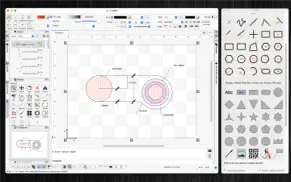


SimpleCAD2 Uygulaması Ekran Görüntüleri & Resimleri
SimpleCAD2 uygulaması iphone, ipad, apple watch ve apple tv aplikasyon görüntüleri.
| Dil | Türkçe |
| Fiyat | Bedava |
| Yaş Sınırı | 4+ yaş ve üstü |
| Son Versiyon | 2.7 |
| Play Store | com.vutienthinh.macos.NullCAD2020 |
| Uyumluluk | IOS 11.0 ve üstü |
SimpleCAD2 (Versiyon 2.7) Aplikasyonu İndir & Yükle
SimpleCAD2 ios uygulaması Tien Thinh Vu [Geliştirici ID: 393568128] tarafından geliştirilip, 7 Kasım 2020 Cumartesi günü Grafik ve Tasarım kategorisinde yayınlanmıştır. Aplikasyonun dosya boyutu 13.49 MB'tır. Bu uygulama 17 kullanıcı tarafından oylanmış ve 5 üzerinden 1 puan almıştır. SimpleCAD2 programının 31 Ekim 2024 Perşembe günü yayınlanan son sürümü 2.7 versiyonudur. Minumum IOS 11.0 ve üzeri cihazlarda sorunsuz olarak çalışmaktadır. Google Play Store ID numarası: com.vutienthinh.macos.NullCAD2020. Uygulamanın desteklediği diller şunlardır:
CS DA NL EN FI FR DE IT JA KO NB PL PT RU ZH ES SV TH ZH TR VI Uygulamayı İndir & Yükle!
| Uygulama Adı | Puan | Yorumlar | Fiyat |
| EncryptedZip2 for zip rar | 1 | Yorum yapılmamış | Ücretsiz |
| VisualDesigner | 1 | Yorum yapılmamış | Ücretsiz |
| Visual PDF Editor | 1 | Yorum yapılmamış | Ücretsiz |
| ElectricDesignPro | 1 | Yorum yapılmamış | Ücretsiz |
| WebCache | 1 | Yorum yapılmamış | Ücretsiz |
- Improve UI - Fix bugs Previous updates: - Support "BLOCK" - Add "Insert" command to insert block into drawing - Allow to edit single item inside its group - Support macOS 13 Ventura - Allow modify functions (copy, trim..) to change objects from multiple layers - Allow modify functions (copy, trim..) to accept "right-click on mouse" as "press-ENTER" - Allow modify functions (copy, trim..) to accept undo/redo functions - Allow to change order of Inspector-views on left/right sides of document window - Support tree-view of all objects (via "Layers" Inspector-view) - Allow to import/export custom favorite shapes - Allow to find/replace string inside shapes - Add shortcut: hold SPACE key then move mouse to maneuver around document
| Uygulama Adı | Geliştirici |
| Leonardo.Ai - Image Generator | Leonardo Interactive Pty Ltd |
| IWallpaper - Live Wallpapers | Fight Energy Inc |
| Wallpapers for Dynamic Island | INNOVA TAP APPS LIMITED |
| Rooms | Things, Inc. |
| Remove object from photo app | Outthinking electronics pvt ltd. |
VPN programları, dünyanın her yerinden sınırsız ve güvenli internet erişimi sağlayarak internete erişmenin en güvenli yolunu sunar. Uzman ekibimizin objektif incelemeleri ve derinlemesine analizleri ile ihtiyacınıza uygun 2026 yılının en iyi VPN programını seçin!
| Uygulama Adı | Geliştirici |
| ArtRage Vitae Mobile Painting | Ambient Design Ltd. |
| Abdz.do | Steale LLC |
| Voxel Max - 3D Modeling | Adrian Andreca |
| Line Art - Get line from pic | 哲颖 孙 |
| Face Model -posable human head | Tomi Nevalainen |
Farklı kripto para birimlerinin nasıl işlediğini keşfedin ve bizzat denemek üzere her kriptodan küçük bir tutar kazanın. Coinbase, kripto satın almak ve satmak için en kolay yerdir. Kaydolun, hemen başlayın.
| Uygulama Adı | Developer |
| Netflix | Netflix, Inc. |
| Papara | Papara Elektronik Para A.S |
| WhatsApp Messenger | WhatsApp Inc. |
| Spotify - Music and Podcasts | Spotify |
| ChatGPT | OpenAI |
Jasper, size ve ekibinize 10 kat daha hızlı şaşırtıcı, orijinal içerik oluşturmak için yaratıcı engelleri aşmanıza yardımcı olan yapay zeka içerik üreticisidir.
| Uygulama Adı | Geliştirici |
| ALL SEG RASTREAMENTO | Softruck |
| TennisACE - Tennis Tracker | Dankcolabs, LLC |
| Ata Tenis Kompleksi | Seckin Payziner |
| Birthday Cake Celebration | Kiritkumar Bhayani |
| Aerial9 | Autonomo LLC |
Mind Lab Pro ® odaklanma, stres altında çoklu görev yapma, yaratıcı problem çözme ve daha fazlası için nootropiklerle iş performansını ve üretkenliğini arttıran bilimsel bir ilaçtır. Beyninizi %100 performansa çıkarın!
Adsterra, AdSenseye alternatif arayanların en çok tercih ettiği reklam ağıdır. Adsterra, günlük site trafiği düşük olan yeni siteler için en ideal bir seçimdir. Adsterra’da siteye reklam vermek için diğer reklam ağları gibi belli bir trafik sınırı, domain yaşı vb. katı kurallar bulunmuyor.