Docker Management
Docker Management Uygulama İncelemesi
Docker Management uygulaması nedir, nasıl kullanılır? Connect via ssh to your Linux/MacOS machine and manage your docker.
This application allows you to:
- add multiple servers
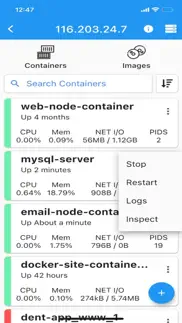
- list containers
- create containers
- start containers (multiple at once)
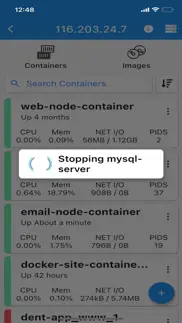
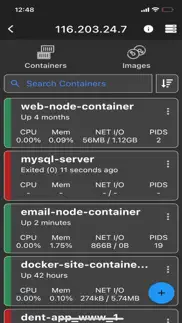
- stop containers (multiple at once)
- restart containers (multiple at once)
- remove containers (multiple at once)
- inspect containers
- view resource usage of containers
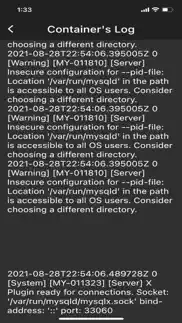
- view live logs of containers
- enter shell of containers
- list images
- build images
- search images
- pull images (also from private registries)
- remove images (multiple at once)
- inspect images
- connect through password or ssh key
Features
- server info is stored on phone only (the data is wiped out if app is removed)
NOTE
No docker daemon or docker api is required to be enabled for this app, simply connect via ssh. It is strongly recommended NOT to open unnecessary ports on your server (such as enabling docker daemon) as it can expose your server to more security threads.
Q/A
Q: Why I can not connect with non-root users?
A: The docker commands are executed by the app without "sudo" so you will need to add your non-root user to the docker group with the following command:
sudo usermod -aG docker $USER
sudo reboot
Q: How to connect to Docker Desktop on MacOS?
A: Since docker for MacOS is setup on different path, change it on my app by going to server information view, at the end of the page there is "Advance Settings" and set it to:
/usr/local/bin/docker
Note: make sure to enable "Remote login" on your mac and start docker desktop in order to connect.
Q: How to connect to Synology server?
A: If non-root user, then add user to docker group on your server:
sudo synogroup --add docker $USER
Since docker for synology is setup on different path, change it on my app by going to server information view, at the end of the page there is "Advance Settings" and set it to:
# for synology version 7.1.xxx or lower
/volume1/@appstore/Docker/usr/bin/docker
# for synology version 7.2.xxx or higher
/volume1/@appstore/ContainerManager/usr/bin/docker
Q: How to connect to QNAP server?
A: If non-root user, then add user to docker group on your server:
sudo addgroup $USER administrators
Since docker for QNAP is setup on different path, change it on my app by going to server information view, at the end of the page there is "Advance Settings" and set it to:
/share/CACHEDEV1_DATA/.qpkg/container-station/bin/docker
Found a bug?
Send an email to: [email protected]
👋 Docker Management aplikasyonunu beğendiyseniz arkadaşlarınızla paylaşır mısınız?


| Uygulama Adı | Docker Management |
| Kategori | Geliştirici Araçları |
| Geliştirici | Nevis Shkenza |
| Yayın Tarihi | 14 Ağustos 2020 Cuma |
| Güncelleme | 27 Ekim 2024 Pazar |
| Dosya Boyutu | 32.32 MB |
Docker Management Hakkındaki Yorumlar
Sadece kaydolarak sitemizden 25 Dolar kazanabileceğinizi biliyor muydunuz? Payoneer'a katılarak ücretsiz 25$ kazanın!

Lütfen bekleyin! Docker Management uygulama yorumları yükleniyor...
Docker Management Müşteri Hizmetleri
Docker Management aplikasyonu hakkında ne düşünüyorsunuz? Uygulama hakkındaki şikayet, deneyim veya düşüncelerinizi Nevis Shkenza şirketi ve insanlarla paylaşır mısınız?


Docker Management Uygulaması Ekran Görüntüleri & Resimleri
Docker Management uygulaması iphone, ipad, apple watch ve apple tv aplikasyon görüntüleri.
| Dil | Türkçe |
| Fiyat | 299.99 TL |
| Yaş Sınırı | 4+ yaş ve üstü |
| Son Versiyon | 5.5.4 |
| Play Store | com.nevishs.docker.ios |
| Uyumluluk | IOS 12.0 ve üstü |
Docker Management (Versiyon 5.5.4) Aplikasyonu İndir & Yükle
Docker Management ios uygulaması Nevis Shkenza [Geliştirici ID: 1268450891] tarafından geliştirilip, 14 Ağustos 2020 Cuma günü Geliştirici Araçları kategorisinde yayınlanmıştır. Aplikasyonun dosya boyutu 32.32 MB'tır. Bu uygulama 17 kullanıcı tarafından oylanmış ve 5 üzerinden 1 puan almıştır. Docker Management programının 27 Ekim 2024 Pazar günü yayınlanan son sürümü 5.5.4 versiyonudur. Minumum IOS 12.0 ve üzeri cihazlarda sorunsuz olarak çalışmaktadır. Google Play Store ID numarası: com.nevishs.docker.ios. Uygulamanın desteklediği diller şunlardır:
EN Uygulamayı İndir & Yükle!
| Uygulama Adı | Puan | Yorumlar | Fiyat |
| Devops ToolBox | 1 | Yorum yapılmamış | Ücretsiz |
- Auto detecting docker path
| Uygulama Adı | Geliştirici |
| Bluetooth Inspector | George Garside |
| GitHub | GitHub |
| Runestone Text Editor | Simon B. Støvring |
| WebSSH - SysAdmin Tools | MENGUS ARNAUD |
| Sbs Esnaf Kurye | EREN GUNEY |
VPN programları, dünyanın her yerinden sınırsız ve güvenli internet erişimi sağlayarak internete erişmenin en güvenli yolunu sunar. Uzman ekibimizin objektif incelemeleri ve derinlemesine analizleri ile ihtiyacınıza uygun 2026 yılının en iyi VPN programını seçin!
| Uygulama Adı | Geliştirici |
| SQLed - SQL Database Manager | Andreas Zimnas |
| Zeitgeist | Dan Eden |
| Kuber - Kubernetes Dashboard | Surge Networks Inc. |
| DNS Client | Sergii Kryvoblotskyi |
| Bee - Cookie Editor For Safari | Yury Apollov |
Farklı kripto para birimlerinin nasıl işlediğini keşfedin ve bizzat denemek üzere her kriptodan küçük bir tutar kazanın. Coinbase, kripto satın almak ve satmak için en kolay yerdir. Kaydolun, hemen başlayın.
| Uygulama Adı | Developer |
| CapCut - Video Editor | Bytedance Pte. Ltd |
| Instagram, Inc. | |
| Trendyolmilla | Trendyol.com |
| Google - More ways to search | |
| EBA | EBA |
Jasper, size ve ekibinize 10 kat daha hızlı şaşırtıcı, orijinal içerik oluşturmak için yaratıcı engelleri aşmanıza yardımcı olan yapay zeka içerik üreticisidir.
| Uygulama Adı | Geliştirici |
| Build With Me Club | The Toolkit |
| CBCC | Coolum Beach Christian College |
| Bank dam Maroc | Pragmatic Craft Skills |
| Beautiful Solitaire | Maurus Kuehne |
| AR Sales | Fikir Yazilim Teknoloji Anonim Sirketi |
Mind Lab Pro ® odaklanma, stres altında çoklu görev yapma, yaratıcı problem çözme ve daha fazlası için nootropiklerle iş performansını ve üretkenliğini arttıran bilimsel bir ilaçtır. Beyninizi %100 performansa çıkarın!
Adsterra, AdSenseye alternatif arayanların en çok tercih ettiği reklam ağıdır. Adsterra, günlük site trafiği düşük olan yeni siteler için en ideal bir seçimdir. Adsterra’da siteye reklam vermek için diğer reklam ağları gibi belli bir trafik sınırı, domain yaşı vb. katı kurallar bulunmuyor.