NMEA Monitor
NMEA Monitor Uygulama İncelemesi
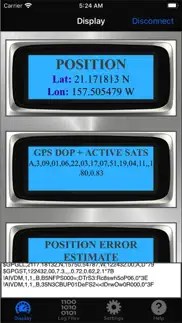
NMEA Monitor uygulaması nedir, nasıl kullanılır? NMEA Monitor is a powerful, easy-to-use tool to record and display a wealth of real-time information directly from NMEA or AIS WiFi devices such as the Vesper Marine XB8000. Information is sourced in real-time directly from the connected AIS device and data is logged to a file on your device which you can view directly on your mobile device, or email to yourself for later data analyses and archiving. Information is also displayed and updated in real-time on the screen of your mobile device during the logging process.
View, display and log a wide range of real-time measurements, including:
GPS position
Satellites in View
Position error estimates
GPS DOP and active satellites
Track-made-good and ground speed
Recommended minimum GPS data
Received AIS data
Received Wind data
And many others
With NMEA Monitor you can view, access and log all the NMEA sentences being broadcast from your AIS device. Use this data log to answer a wealth of questions including:
exactly how fast is my ship?
exactly where did my ship go?
what is the average and maximum speed of my ship?
how fast was the wind? maximum wind speed? direction?
what are the polars for my boat?
NMEA Monitor is very easy to use: Simply start and view your measurements with one touch of a button. NMEA Monitor does require that your iPhone or iPad be connected to the same wifi internet connection as your NMEA/AIS device. You do not need to know the exact IP address of your NMEA device as this app has AUTOSCAN capabilities. However you should know the default port number (or accept the default settings on the app for your AIS. The default for Vesper Marine XB8000 is 39150).
NMEA Monitor communicates wirelessly with your AIS device. To use NMEA Monitor you need to own or have access to an NMEA device such as the Vesper Marine XB8000. All your NMEA data is stored strictly on your device only and never transmitted elsewhere. You own your data and you only have access to it.
To get started, launch the app, select its Settings tab, and enter IP address of your AIS device (if known), and port number. If unknown, be sure to enable AUTOSCAN (on by default). You may disable the AUTOSCAN feature here if you know for certain the IP address of your NMEA device and are certain you do not need AUTOSCAN. In that case be sure to enter the correct IP address.
Ensure your mobile device is connected to the same WiFi network as your NMEA device. Then from the "DISPLAY" module of the app, tap on the "CONNECT" button at the top right corner of the screen.
Once you have selected CONNECT, the app will try to establish a connection with your NMEA device through the WiFi network. If AUTOSCAN is enabled, the app will methodically scan the network searching for an active NMEA device, and will connect to the first one it finds. If AUTOSCAN is disabled, the app will try only the IP address saved in the SETTINGS module, and give-up if no NMEA device is found there. It is recommended that you enable AUTOSCAN if you are unsure of the IP address of your NMEA device.
With AUTOSCAN enabled, the first scan may take a few minutes. When the app scans and finds an NMEA device, it remembers its IP address, such that the next time you try to use the app it should connect much faster - almost instantaneously.
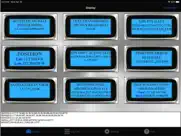
The primary dash displays of the app will show all the transmitted NMEA sentences in real time, as well as stream the live raw data in the lower portion of the screen.
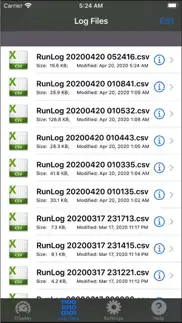
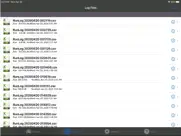
All runs will automatically be logged and the raw log files will be available under the "Log Files" module of this app.
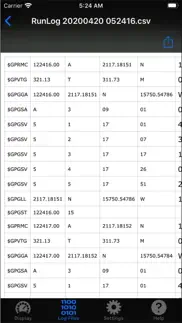
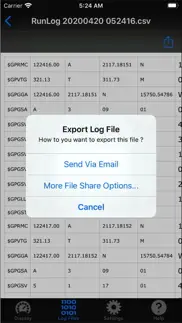
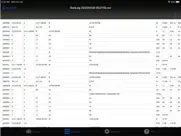
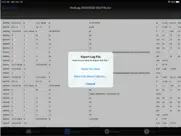
You can view raw data from current and past log files from the "Log Files" module of this app. You can email these log files to yourself, or export them to your other apps. The log files are text-based comma-delimitted files (CSV), which you should be able to view with a wide variety of common apps or text editors.
Ndili Technologies, Inc. has no affiliation to, and is not associated or sponsored by any AIS / NMEA company.
👋 NMEA Monitor aplikasyonunu beğendiyseniz arkadaşlarınızla paylaşır mısınız?


| Uygulama Adı | NMEA Monitor |
| Kategori | Navigasyon |
| Geliştirici | Ndili Technologies, Inc. |
| Yayın Tarihi | 21 Nisan 2020 Salı |
| Güncelleme | 16 Kasım 2024 Cumartesi |
| Dosya Boyutu | 46.42 MB |
NMEA Monitor Hakkındaki Yorumlar
Sadece kaydolarak sitemizden 25 Dolar kazanabileceğinizi biliyor muydunuz? Payoneer'a katılarak ücretsiz 25$ kazanın!

Lütfen bekleyin! NMEA Monitor uygulama yorumları yükleniyor...
NMEA Monitor Müşteri Hizmetleri
NMEA Monitor aplikasyonu hakkında ne düşünüyorsunuz? Uygulama hakkındaki şikayet, deneyim veya düşüncelerinizi Ndili Technologies, Inc. şirketi ve insanlarla paylaşır mısınız?
NMEA Monitor Uygulaması Ekran Görüntüleri & Resimleri
NMEA Monitor uygulaması iphone, ipad, apple watch ve apple tv aplikasyon görüntüleri.
| Dil | Türkçe |
| Fiyat | 199.99 TL |
| Yaş Sınırı | 4+ yaş ve üstü |
| Son Versiyon | 1.2 |
| Play Store | com.ndili.iphone.apps.nmm |
| Uyumluluk | IOS 12.0 ve üstü |
NMEA Monitor (Versiyon 1.2) Aplikasyonu İndir & Yükle
NMEA Monitor ios uygulaması Ndili Technologies, Inc. [Geliştirici ID: 331426521] tarafından geliştirilip, 21 Nisan 2020 Salı günü Navigasyon kategorisinde yayınlanmıştır. Aplikasyonun dosya boyutu 46.42 MB'tır. Bu uygulama 17 kullanıcı tarafından oylanmış ve 5 üzerinden 1 puan almıştır. NMEA Monitor programının 16 Kasım 2024 Cumartesi günü yayınlanan son sürümü 1.2 versiyonudur. Minumum IOS 12.0 ve üzeri cihazlarda sorunsuz olarak çalışmaktadır. Google Play Store ID numarası: com.ndili.iphone.apps.nmm. Uygulamanın desteklediği diller şunlardır:
EN Uygulamayı İndir & Yükle!
| Uygulama Adı | Puan | Yorumlar | Fiyat |
| Tracking for iPad | 1 | Yorum yapılmamış | 249.99 |
| Sailboat GPS Track Data Logger | 1 | Yorum yapılmamış | 249.99 |
| Fax Print Share | 1 | Yorum yapılmamış | 399.99 |
| Printing for iPad | 1 | 1 | 249.99 |
| Faxing for iPad | 1 | Yorum yapılmamış | 199.99 |
- enhancements, added compatibility with GPS-streaming 5G routers (Inseego)
| Uygulama Adı | Geliştirici |
| Qibla Finder, Qibla Compass AR | BEKART TECH BILISIM TEKNOLOJI INSAAT TICARET LIMITED SIRKETI |
| Arvento | Arvento Mobile Systems |
| TKGM Parsel Sorgu | Tapu Kadastro Genel Müdürlüğü |
| Topograf Parsel Sorgu 2024 | EywaSoft UK Limited |
| Speedometer Simple | Tevfik Yucek |
VPN programları, dünyanın her yerinden sınırsız ve güvenli internet erişimi sağlayarak internete erişmenin en güvenli yolunu sunar. Uzman ekibimizin objektif incelemeleri ve derinlemesine analizleri ile ihtiyacınıza uygun 2026 yılının en iyi VPN programını seçin!
| Uygulama Adı | Geliştirici |
| MilGPS | Cascode Labs Pty Ltd |
| GPS Speedometer Pro | Sensonet |
| SafeAnchor.Net Anchor Alarm | Barkin Takmaz |
| Blitzer.de PRO | Eifrig Media |
| TrafficCamNZ | David Wilson |
Farklı kripto para birimlerinin nasıl işlediğini keşfedin ve bizzat denemek üzere her kriptodan küçük bir tutar kazanın. Coinbase, kripto satın almak ve satmak için en kolay yerdir. Kaydolun, hemen başlayın.
| Uygulama Adı | Developer |
| Getcontact | GETVERIFY LDA |
| X | X Corp. |
| Turkcell | Turkcell Iletisim Hizmetleri A.S. |
| Telegram Messenger | Telegram FZ-LLC |
Jasper, size ve ekibinize 10 kat daha hızlı şaşırtıcı, orijinal içerik oluşturmak için yaratıcı engelleri aşmanıza yardımcı olan yapay zeka içerik üreticisidir.
| Uygulama Adı | Geliştirici |
| AR Sales | Fikir Yazilim Teknoloji Anonim Sirketi |
| ASU Student Travel Survey | ETC Institute |
| BanGo | Isik Senol |
| Body AI - Health Summary | Jacob Safar |
| Aetheryte | Jan Eisenhuth |
Mind Lab Pro ® odaklanma, stres altında çoklu görev yapma, yaratıcı problem çözme ve daha fazlası için nootropiklerle iş performansını ve üretkenliğini arttıran bilimsel bir ilaçtır. Beyninizi %100 performansa çıkarın!
Adsterra, AdSenseye alternatif arayanların en çok tercih ettiği reklam ağıdır. Adsterra, günlük site trafiği düşük olan yeni siteler için en ideal bir seçimdir. Adsterra’da siteye reklam vermek için diğer reklam ağları gibi belli bir trafik sınırı, domain yaşı vb. katı kurallar bulunmuyor.