DScanner -Best Doc PDF Scanner
DScanner -Best Doc PDF Scanner Uygulama İncelemesi
DScanner -Best Doc PDF Scanner uygulaması nedir, nasıl kullanılır? dScanner is the best, cheapest available app for scanning and managing any kind of documents/files in a simple and organized way. You don't need an expensive scanner any more. Now every document in your office, school, college, university or home is on your finger tip. dScanner's advanced image processing techniques will help you while you are at work or doing your studies.
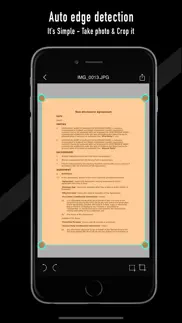
How to use : Just take a photo of your document in contrasting background and the app will find the borders of the document automatically. Now you just need to crop and save it.
Key Features :
- BATCH SCANNING.
- Easy to use.
- Dropbox support.
- Secured Login using Touch ID and four digit PIN.
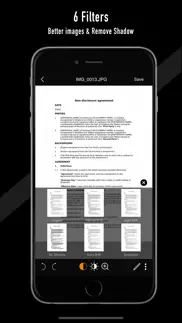
- Remove shadows intelligently. Usually when you take the photo of your document shadows may comes in the image. App has the option to remove those shadows and save it.
- Save scanned images in gray-scale, black and white or color.
- 6 image filters.
- Combine multiple scans to single PDF.
- Choose between low, medium and high quality.
- E-Signature on Documents.
- Make annotations on documents using different color pen.
- Avoid buying an expensive scanner that you use very rarely.
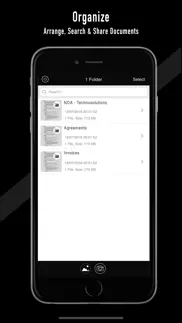
- Search folders/documents easily.
- Print option.
- Share to other apps.
- Organize documents in folders.
- Re-edit scanned image.
- No server is used. All documents are saved in the device only.
- Batch import from Photo Library.
- Set Page Size according to your doc size.
- Perspective correction is applied to straighten your document.
- Auto save captured or edited picture(s) to gallery.
- Scanned documents are processed on the iPhone without internet connection.
- Crop tool with magnifier.
- Signature can be saved and reused.
- Double tap a folder or file in the listing page to Rename.
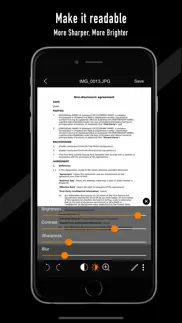
- Adjust Brightness, Contrast, Rotate, Zoom and More...
Document Sharing :
- Export/Share as PDF
- Share via Email
- Share to WhatsApp
- Share to Other Apps
- Copy images and paste in your desired app
- Save scans to Camera Roll
Supported document types:
- Office docs like contracts, business cards, receipts, agreements, letters, bills, whiteboard discussions, checks, worksheet
- Account books like journal entry book, day book, ledger, credit notes, debit notes, balance sheet, profit and loss account
- Identity cards, medical reports, certificates, articles, paintings, sheets, sketches, drawings, recipe
- or any type of documents/files/statements
Features that are restricted for free user:
- Free scans are restricted to maximum of 4 document scans, after that user will be prompted to purchase the app. User can still use the app, but will not allowed to scan further documents.
Benefits of Full version:
- Unlimited document scans, conversion, editing & uploading.
- For batch scan, add upto 50 documents at a time.
Tips to use:
- Make sure that document is placed flat & you have adequate lighting & try to avoid shadow.
- Place your document on a dark background with some margin around the document for better auto edge detection. (Edges will be detected automatically after taking the photo)
- Turn-on the flash light in low-light conditions. But for glossy files it is better to avoid flash light because the reflection on image will make conversion issues.
- Always backup or upload scanned documents.
- All the documents are saved in your device itself. Deleting dScanner will also delete the documents saved in documents folder. It is better to enable Auto Save documents to Photo Library in Settings.
👋 DScanner -Best Doc PDF Scanner aplikasyonunu beğendiyseniz arkadaşlarınızla paylaşır mısınız?


| Uygulama Adı | DScanner -Best Doc PDF Scanner |
| Kategori | Üretkenlik |
| Geliştirici | George Sebastian |
| Yayın Tarihi | 19 Aralık 2018 Çarşamba |
| Güncelleme | 23 Nisan 2024 Salı |
| Dosya Boyutu | 22.55 MB |
DScanner -Best Doc PDF Scanner Hakkındaki Yorumlar
Sadece kaydolarak sitemizden 25 Dolar kazanabileceğinizi biliyor muydunuz? Payoneer'a katılarak ücretsiz 25$ kazanın!

Lütfen bekleyin! DScanner -Best Doc PDF Scanner uygulama yorumları yükleniyor...
DScanner -Best Doc PDF Scanner Müşteri Hizmetleri
DScanner -Best Doc PDF Scanner aplikasyonu hakkında ne düşünüyorsunuz? Uygulama hakkındaki şikayet, deneyim veya düşüncelerinizi George Sebastian şirketi ve insanlarla paylaşır mısınız?
DScanner -Best Doc PDF Scanner Uygulaması Ekran Görüntüleri & Resimleri
DScanner -Best Doc PDF Scanner uygulaması iphone, ipad, apple watch ve apple tv aplikasyon görüntüleri.
| Dil | Türkçe |
| Fiyat | Bedava |
| Yaş Sınırı | 4+ yaş ve üstü |
| Son Versiyon | 2.3.3 |
| Play Store | com.sreemoblabs.docuscan |
| Uyumluluk | IOS 12 ve üstü |
DScanner -Best Doc PDF Scanner (Versiyon 2.3.3) Aplikasyonu İndir & Yükle
DScanner -Best Doc PDF Scanner ios uygulaması George Sebastian [Geliştirici ID: 1487871466] tarafından geliştirilip, 19 Aralık 2018 Çarşamba günü Üretkenlik kategorisinde yayınlanmıştır. Aplikasyonun dosya boyutu 22.55 MB'tır. Bu uygulama 17 kullanıcı tarafından oylanmış ve 5 üzerinden 1 puan almıştır. DScanner -Best Doc PDF Scanner programının 23 Nisan 2024 Salı günü yayınlanan son sürümü 2.3.3 versiyonudur. Minumum IOS 12 ve üzeri cihazlarda sorunsuz olarak çalışmaktadır. Google Play Store ID numarası: com.sreemoblabs.docuscan. Uygulamanın desteklediği diller şunlardır:
EN Uygulamayı İndir & Yükle!
| Uygulama Adı | Puan | Yorumlar | Fiyat |
| Image Format Batch Converter | 1 | Yorum yapılmamış | 49.99 |
| Bible Verses Devotional Quotes | 1 | Yorum yapılmamış | 49.99 |
| PALM READER The Fortune Teller | 1 | Yorum yapılmamış | 49.99 |
| Positive Thinking Everyday | 1 | Yorum yapılmamış | 49.99 |
v2.3.3 1. Added iPhone 15 support 2. Minor bug fixes
| Uygulama Adı | Geliştirici |
| Microsoft Excel | Microsoft Corporation |
| Eyotek | Turtek Yazilim Tic. Ltd. Sti. |
| Yupi - Reports for Instagram | Oguz Cal |
| AI Chat -Ask Chatbot Assistant | MLink Studio |
| PDF Converter , Photo to PDF | ABISHKKING LIMITED. |
VPN programları, dünyanın her yerinden sınırsız ve güvenli internet erişimi sağlayarak internete erişmenin en güvenli yolunu sunar. Uzman ekibimizin objektif incelemeleri ve derinlemesine analizleri ile ihtiyacınıza uygun 2026 yılının en iyi VPN programını seçin!
| Uygulama Adı | Geliştirici |
| WebCamera | SHAPE GmbH |
| MD2PDF | CAGAN DURGUN |
| Polaris Office Mobile | Polaris Office Corp. |
| IFiles | Imagam.com |
| Zoiper Premium voip soft phone | Securax Ltd. |
Farklı kripto para birimlerinin nasıl işlediğini keşfedin ve bizzat denemek üzere her kriptodan küçük bir tutar kazanın. Coinbase, kripto satın almak ve satmak için en kolay yerdir. Kaydolun, hemen başlayın.
| Uygulama Adı | Developer |
| Telegram Messenger | Telegram FZ-LLC |
| Instagram, Inc. | |
| CDAS | T.C. Saglik Bakanligi |
| Google Chrome | |
| EBA | EBA |
Jasper, size ve ekibinize 10 kat daha hızlı şaşırtıcı, orijinal içerik oluşturmak için yaratıcı engelleri aşmanıza yardımcı olan yapay zeka içerik üreticisidir.
| Uygulama Adı | Geliştirici |
| Banhlingo | Jeffrey Dick |
| Alamy | Alamy Co |
| CashKeepers | Hunter Wright |
| ACCUWISE | Accuwise LLC |
| Award Maker by Edco | Edco.com |
Mind Lab Pro ® odaklanma, stres altında çoklu görev yapma, yaratıcı problem çözme ve daha fazlası için nootropiklerle iş performansını ve üretkenliğini arttıran bilimsel bir ilaçtır. Beyninizi %100 performansa çıkarın!
Adsterra, AdSenseye alternatif arayanların en çok tercih ettiği reklam ağıdır. Adsterra, günlük site trafiği düşük olan yeni siteler için en ideal bir seçimdir. Adsterra’da siteye reklam vermek için diğer reklam ağları gibi belli bir trafik sınırı, domain yaşı vb. katı kurallar bulunmuyor.