XPS-to-PDF
XPS-to-PDF Uygulama İncelemesi
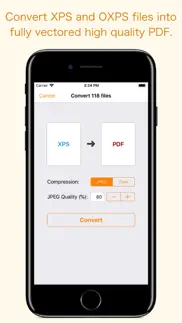
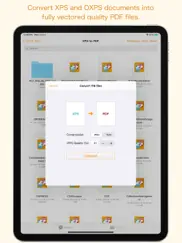
XPS-to-PDF uygulaması nedir, nasıl kullanılır? XPS-to-PDF is a simple, efficient and fast way to batch convert XML Paper Specification (.xps) and OpenXPS (.oxps) documents into fully vectored high quality PDF files on iPhone and iPad. XPS-to-PDF supports JPEG and Flate image compression types and JPEG quality settings for PDF conversion.
Do not found decent XPS/OXPS reader on your iPhone and iPad? Simply convert XPS/OXPS documents into quality PDF documents and read in your favorite PDF reader.
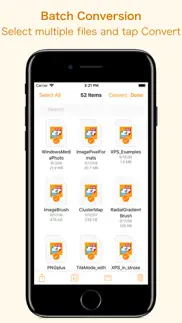
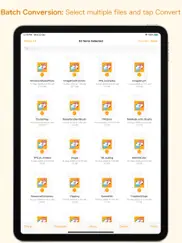
XPS-to-PDF supports batch conversion. Select multiple XPS/OXPS files in document browser view and tap Convert button at top to start batch conversion.
XPS to PDF CONVERSION FEATURES:
- Converts XPS to fully vector-PDF documents. Preserves text, vector graphics and raster images as editable PDF contents.
- Preserves Bookmarks (Outline).
- Preserves XPS internal and external topic hyperlinks into PDF. It automatically maintains XPS topic and page navigation links into PDF compatible annotations.
- Supports PDF conversion using JPEG and Flate image compression methods. Can set image quality for JPEG image compression.
- Preserves metadata properties.
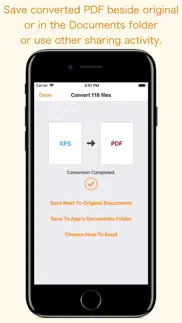
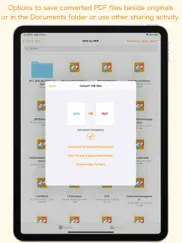
DESTINATION PATH : Convenient options to store converted PDF files at your easily accessible location. Choose from following
Save Next to Original Documents - Tap this button to save a converted file into the same location and directory as an existing original document. The converted document with unique name will be saved beside original document.
Save to App’s Documents Folder - Tap this button to save a converted file with unique name into XPS-to-PDF Documents folder.
Choose How to Send - Tap on this button to popup standard iOS activity controller. Tap one of the option in activity controller for sending, saving or posting a converted PDF. Choose a location, or provide the requested information (for example, an email address if you are sending an email) then send or post a copy of converted PDF.
DOCUMENT MANAGEMENT
- The inbuilt document browse view automatically gives you the option to share documents using the Share button or a drag-and-drop action. It also provides a standard interface for browsing and managing documents.
- Automatically handles access to iCloud for you within the app. It also provides access to documents managed by third-party storage service extensions installed on your device.
- Browse, find and sort documents to help you locate the document you want. Tap the XPS/OXPS file that you want to convert.
- You can move, delete, duplicate and rename a document with document manager in browser view.
- In the document manager, you can group related documents into folders so they’re easy to find.
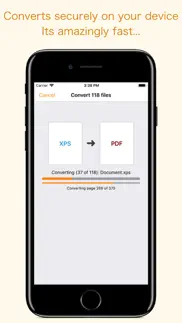
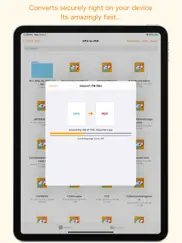
Note: XPS-to-PDF is a standalone application running natively to open and convert XPS and OXPS documents securely right on your iOS device.
You can refer inbuilt User Manual for any assistance Or Contact Support.
👋 XPS-to-PDF aplikasyonunu beğendiyseniz arkadaşlarınızla paylaşır mısınız?


| Uygulama Adı | XPS-to-PDF |
| Kategori | Üretkenlik |
| Geliştirici | RootRise Technologies Pvt. Ltd. |
| Yayın Tarihi | 11 Nisan 2018 Çarşamba |
| Güncelleme | 9 Ocak 2026 Cuma |
| Dosya Boyutu | 3.68 MB |
XPS-to-PDF Hakkındaki Yorumlar
Sadece kaydolarak sitemizden 25 Dolar kazanabileceğinizi biliyor muydunuz? Payoneer'a katılarak ücretsiz 25$ kazanın!

Lütfen bekleyin! XPS-to-PDF uygulama yorumları yükleniyor...
XPS-to-PDF Müşteri Hizmetleri
XPS-to-PDF aplikasyonu hakkında ne düşünüyorsunuz? Uygulama hakkındaki şikayet, deneyim veya düşüncelerinizi RootRise Technologies Pvt. Ltd. şirketi ve insanlarla paylaşır mısınız?
XPS-to-PDF Uygulaması Ekran Görüntüleri & Resimleri
XPS-to-PDF uygulaması iphone, ipad, apple watch ve apple tv aplikasyon görüntüleri.
| Dil | Türkçe |
| Fiyat | 299.99 TL |
| Yaş Sınırı | 4+ yaş ve üstü |
| Son Versiyon | 2.0 |
| Play Store | com.RootRiseTechnologies.Pvt.Ltd.XPS-to-PDF |
| Uyumluluk | IOS 15.6 ve üstü |
XPS-to-PDF (Versiyon 2.0) Aplikasyonu İndir & Yükle
XPS-to-PDF ios uygulaması RootRise Technologies Pvt. Ltd. [Geliştirici ID: 594431033] tarafından geliştirilip, 11 Nisan 2018 Çarşamba günü Üretkenlik kategorisinde yayınlanmıştır. Aplikasyonun dosya boyutu 3.68 MB'tır. Bu uygulama 17 kullanıcı tarafından oylanmış ve 5 üzerinden 1 puan almıştır. XPS-to-PDF programının 9 Ocak 2026 Cuma günü yayınlanan son sürümü 2.0 versiyonudur. Minumum IOS 15.6 ve üzeri cihazlarda sorunsuz olarak çalışmaktadır. Google Play Store ID numarası: com.RootRiseTechnologies.Pvt.Ltd.XPS-to-PDF. Uygulamanın desteklediği diller şunlardır:
EN Uygulamayı İndir & Yükle!
| Uygulama Adı | Puan | Yorumlar | Fiyat |
| PDFSplitter Pro | 1 | Yorum yapılmamış | 149.99 |
| PhotoConvert 5 | 1 | Yorum yapılmamış | Ücretsiz |
| PDFOptim - The PDF Compressor | 1 | Yorum yapılmamış | Ücretsiz |
| PhotoResize | 1 | Yorum yapılmamış | 199.99 |
| Winmail Reader | 1 | Yorum yapılmamış | 99.99 |
• Updated user interface to streamline with latest iOS. • Other minor bug fixes and improvements. If XPS-to-PDF useful to you, we would appreciate an App Store review. It will help other people find the app and make them delighted. Thank you all users for your feedback :)
| Uygulama Adı | Geliştirici |
| Gmail - Email by Google | |
| Microsoft Copilot | Microsoft Corporation |
| ChatGPT | OpenAI |
| Google One | |
| HP Smart | HP Inc. |
VPN programları, dünyanın her yerinden sınırsız ve güvenli internet erişimi sağlayarak internete erişmenin en güvenli yolunu sunar. Uzman ekibimizin objektif incelemeleri ve derinlemesine analizleri ile ihtiyacınıza uygun 2026 yılının en iyi VPN programını seçin!
| Uygulama Adı | Geliştirici |
| List Habits | 文华 肖 |
| Polaris Office Mobile | Polaris Office Corp. |
| FasstRead | STEVE ALTUNTAS |
| Himmet | Semih Zambak |
| Things 3 | Cultured Code GmbH & Co. KG |
Farklı kripto para birimlerinin nasıl işlediğini keşfedin ve bizzat denemek üzere her kriptodan küçük bir tutar kazanın. Coinbase, kripto satın almak ve satmak için en kolay yerdir. Kaydolun, hemen başlayın.
| Uygulama Adı | Developer |
| Garanti BBVA Mobile | T. Garanti Bankasi A.S. |
| Turkcell | Turkcell Iletisim Hizmetleri A.S. |
| Trendyol Go | Trendyol.com |
| Google - More ways to search | |
| WhatsApp Messenger | WhatsApp Inc. |
Jasper, size ve ekibinize 10 kat daha hızlı şaşırtıcı, orijinal içerik oluşturmak için yaratıcı engelleri aşmanıza yardımcı olan yapay zeka içerik üreticisidir.
| Uygulama Adı | Geliştirici |
| BYAPP | ESCOLA BEIT YAACOV |
| Beauty Influencer | Altplay Ltd |
| Award Maker by Edco | Edco.com |
| ALL SEG RASTREAMENTO | Softruck |
| ArchiTone | 克俊 张 |
Mind Lab Pro ® odaklanma, stres altında çoklu görev yapma, yaratıcı problem çözme ve daha fazlası için nootropiklerle iş performansını ve üretkenliğini arttıran bilimsel bir ilaçtır. Beyninizi %100 performansa çıkarın!
Adsterra, AdSenseye alternatif arayanların en çok tercih ettiği reklam ağıdır. Adsterra, günlük site trafiği düşük olan yeni siteler için en ideal bir seçimdir. Adsterra’da siteye reklam vermek için diğer reklam ağları gibi belli bir trafik sınırı, domain yaşı vb. katı kurallar bulunmuyor.