CAD Import - For PDF to DWG
CAD Import - For PDF to DWG Обзор приложения
Что такое приложение cad import - for pdf to dwg? CAD Import is a tool for converting vector graphics to CAD files, including various vector formats to various versions of CAD.
Sometimes you receive a PDF file or other vector graphics that you want to convert it to a .dwg file or a .dxf file, but you do not have a good way to do this and you have to draw each pattern in the CAD tool. Now you do not have to do that, with CAD Import, you can easily complete this thing, just need to press a few buttons, it will save you a lot of time, let you put your attention on other things.
Supported formats:
1. PDF: PDF files must contain vector graphics.(Free of PDF files within 100k)
2. DWF: Drawing Web Format(Autodesk).(in app purchase)
3. DAE: COLLAborative Design Activity(Collada).(in app purchase)
4. DGN: MicroStation and Interactive Graphics Design System (IGDS) CAD supported CAD format.(in app purchase)
5. DXF: AutoCAD format.(in app purchase)
6. DWG: AutoCAD format.(in app purchase)
Main Feature:
1. Multiple vector graphics to CAD:
- Convert PDF to dxf, dwg and dwf,
- Convert DWF to dxf, dwg,
- Convert DAE to dxf, dwg and dwf,
- Convert DGN to dxf, dwg and dwf,
- Convert DXF and DWG to diffrent version of dwg and dxf,
- Convert DXF and DWG to dwf.
2. Vector Graphics (PDF) to CAD:
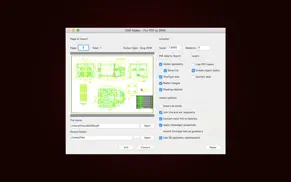
Convert all entities: Convert all entities in the PDF file, including lines and text. The conversion parameters can be modified in "More parameter settings".
Set PDF import data, including vector, entity, TrueType text, and more.
Set the import method, such as import as a block, apply line weight characteristics, import TrueType text into geometry, and so on.
3. Output Format: The default output format is DWG. If you need to convert to other versions of dwg and dxf, you can choose according to your needs.
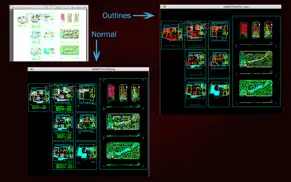
4. Preview: All recognizable conversion formats support preview, including PDF, DWF, DAE, DGN, DXF, and DWG. And allows you to resize the preview window, zoom in and out by scrolling the mouse, double-click to restore preview. If your vector graphics are large, loading the preview will take a lot of time, you can choose not to load, just check the "Disable loading preview" button. When you need to view the preview, you can load it through "Load Preview" and "Load All Preview" in the PopupMenu of the file list.
5. User-friendly Interface: Click on the header to sort column, open the source file directory with "Show in Finder", open the output directory, batch conversion of different types of files to CAD, etc.
Note: This tool only supports vector graphics, when you convert PDF files, you need to pay attention to whether your PDF file is a vector graphics. When your vector graphic file size is large(size>10M), the conversion may take a long time, the tool will not respond to your operation(appears color wheel), please be patient. In the test, there is a PDF vector file, the size is 28.6M, the output dxf file is 39M, conversion takes about 4 minutes, you can use this time to estimate your own conversion time.
We regularly update the product, if you have any questions or suggestions, please send a message to the mailbox([email protected]), or leave a message on our website.
If you are enjoying the app, please consider leaving a review or rating.
👋 Если вам нравится CAD Import - For PDF to DWG, можете ли вы поделиться им с друзьями?


| Имя приложения | CAD Import - For PDF to DWG |
| Категория | Графика и дизайн |
| Pазработчик | 沦 彭 |
| Дата выпуска | суббота, 27 мая 2017 г. |
| Обновлять | вторник, 9 января 2024 г. |
| Размер файла | 96.11 МБ |
CAD Import - For PDF to DWG Комментарии на
Мы переводим деньги более 4 миллиардов евро каждый месяц. Мы позволяем индивидуальным и корпоративным счетам сэкономить 4 миллиона евро на комиссиях за банковские переводы. Хотите бесплатно отправить деньги за границу или перевести деньги за границу бесплатно? Бесплатные международные денежные переводы!
Знаете ли вы, что вы можете заработать 25 долларов США на нашем сайте, просто зарегистрировавшись? Получите $25 бесплатно, присоединившись к Payoneer!

Пожалуйста, подождите! CAD Import - For PDF to DWG Загрузка комментариев uygulama...
CAD Import - For PDF to DWG обслуживание клиентов
Что вы думаете об CAD Import - For PDF to DWG? Можете ли вы поделиться своими жалобами, опытом или мыслями о приложении с 沦 彭 и другими людьми?



CAD Import - For PDF to DWG Uygulaması Снимок экрана и изображения
CAD Import - For PDF to DWG айфон, айпад, яблочные часы и яблоко тв скриншоты, картинки.
| язык | русский |
| Цена | Бесплатно |
| Возрастное ограничение | 4+ лет и старше |
| Последняя версия | 5.3 |
| Магазин игр | com.pl.pdftodwg |
| Совместимость | IOS 10.11 и выше |
CAD Import - For PDF to DWG (версия 5.3) Загрузите и установите приложение
Приложения CAD Import - For PDF to DWG были опубликованы в категории Графика и дизайн суббота, 27 мая 2017 г. и разработаны 沦 彭 [ID разработчика: 1176082793]. Размер этого приложения составляет 96.11 МБ. Это приложение создано пользователем 16 Он был оценен и получил 1 из 5. CAD Import - For PDF to DWG - игры, опубликованные вторник, 9 января 2024 г., текущая версия 5.3 и хорошо работает на IOS 10.11 и более высоких версиях. Идентификационный номер магазина Гугл игры: com.pl.pdftodwg. Языки, поддерживаемые приложением:
EN ZH ZH Скачайте и установите приложение!| Имя приложения | Счет | Комментарии | Цена |
| DWG Tools - View & Convert DWG | 3.8 | 7 | Бесплатно |
| DWG Viewer 2D - For DWG to PDF | 1 | Без комментариев | 599 |
| DWG Viewer 3D - For DWG to PDF | 1 | Без комментариев | 899 |
| DWG Tools - View & Convert DWG | 1 | Без комментариев | Бесплатно |
| Document Tool - Convert HTML and Docx Files | 1 | Без комментариев | Бесплатно |
Version 5.3 ● Application interface optimization. ● Support macOS Sonoma 14.2.1. ● Bug fixes and improving drawing conversion.
| Имя приложения | Pазработчик |
| Pixel Pals Widget Pet Game | Christian Selig |
| Создай свою открытку 2021 | Clear Coast LTD |
| AI Презентации Шаблоны Slides | Dmitriy Migunov |
| создание логотипа - Logo Maker | CONTENT ARCADE (UK) LTD. |
| Graphionica: сторис и коллажи | Aleksei Baskakov |
Проверяете ли вы результаты своей SEO-работы? Или вы просто смотрите на рейтинг ваших ключевых слов в Google? Если вы не можете правильно прочитать данные из вашей работы SEO, вы теряете много!
| Имя приложения | Pазработчик |
| ArtRage Vitae Mobile Painting | Ambient Design Ltd. |
| SceneShot | Ubicolor Ltd |
| New Pixels | 丽 张 |
| Ms Paint | Du Nguyen Viet |
| Шрифты для Сторис и Сообщений | Aleksei Varochko |
Узнайте, как работают определенные криптовалюты, и получите понемногу каждую криптовалюту, чтобы опробовать ее на себе. Coinbase — самое простое место для покупки и продажи криптовалюты. Зарегистрируйтесь и начните сегодня.
| Имя приложения | Pазработчик |
| Иви: сериалы, кино, спорт, ТВ | Ivi.ru LLC |
| Яндекс — с Алисой | Yandex LLC |
| ВКонтакте: сообщения, видеочат | V Kontakte OOO |
| Яндекс Карты и Навигатор | Intertech Services AG |
| Бристоль – сеть магазинов | ALBION-2002 |
Jasper — это генерирующая платформа искусственного интеллекта для бизнеса, которая помогает вашей команде создавать контент, адаптированный для вашего бренда, в 10 раз быстрее, где бы вы ни работали в Интернете.
| Имя приложения | Pазработчик |
| OCR全能扫描王-图片文字提取识别 | Umar Daraz |
| Fairytaile - Bedtime Stories | Whitebox Studio |
| Rogers of Pimlico | Dreamguy's Technologies |
| Playful soccer ball | ONLAIN BIG DATA, TOV |
| Queluz Lançamento de Faltas | Apus - Soluções em TI |
Каждая капсула содержит чистые, высокоэффективные ноотропные питательные вещества. Никаких бессмысленных добавок. Просто 100% естественная сила мозга. Независимая проверка и проверка в рамках проекта Clean Label Project.
Adsterra — наиболее предпочтительная рекламная сеть для тех, кто ищет альтернативу AdSense. Adsterra — идеальный выбор для новых сайтов с низкой дневной посещаемостью. Для размещения рекламы на сайте в Adsterra, как и в других рекламных сетях, требуется определенный лимит трафика, возраст домена и т.д. Строгих правил нет.