EXIF Manager
EXIF Manager App Análisis
¿Qué es la aplicación exif manager? The EXIF Manager takes all the images on your device and allows you to compare them in 6 different ways - by Exposure Value, by Shutter Speed, by ISO Rating, by f/stop, by focal length and by camera maker.
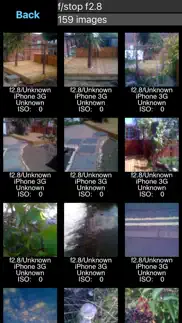
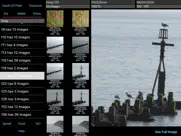
Select one of the various rows in the table and you'll be shown a screen of images with the relevant information underneath each one. You can then select to view just that image to have a better look at it.
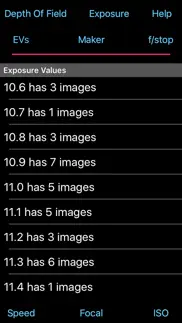
Exposure Value Ordering: Each image was taken assuming a certain level of exposure. The f/stop, focal length, shutter speed and iso were set and you took the image. You hoped you that you got the setting correct and the image was properly exposed, but was it?
Looking at the images by Exposure Value allows you to check what EV was assumed against what was actually achieved. So if for a given EV value 75% of the images look correctly exposed it is the other 25% that you need to look at. These may be either under or over exposed. The App shows you the relevant settings for each image so you can compared the correct ones with the incorrect ones and learn which of the settings of were wrong.
The correctly exposed images can also teach you what setting are required in a similar situation. So when next you're taking pictures in an EV 3 setting (indoors, not particularly bright) you can look at the EV 3 images in the App and check what sort of settings will be required.
Shutter Speed Ordering: All images taken with the same shutter speed are collated together. This is useful to look at to see if the images are correctly exposed. If the images for a shutter speed all appear over exposed or under exposed then you know that you are incorrectly using this speed and you should consider changing your use of this speed or changing other setting to make this speed correct.
Images may also appear blurred with certain shutter speeds and this also points to the use of too low a speed.
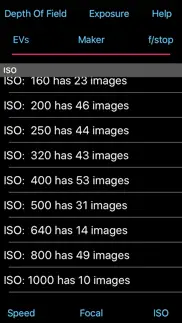
ISO Rating Ordering: Most digital cameras have multiple ISO settings and it can be useful to see which ones were taken with which ISO ratings. You might find that you rely too heavily on one specific ISO setting whereas you should consider using a higher rating to enable you to take fast action or low lighting images.
F/Stop Ordering: Being able to see what images were taken with what f/stop is another way to see whether you have been selecting the correct f/stop for the exposure to be correct. A quick look at all my f/5.6 images showed images that were under exposed (so if possible I should have been using a lower f/stop or slower shutter speed) but also images that were massively over exposed (so I should have used a much higher f/stop).
Focal Length Ordering: The images are ordered based on what focal length was used. This may well show you that you either only use one fixed focal length lens or you may have an variable focal length lens but many of your images are at one extreme or the other and few with any of the other values. You may be missing a few tricks and should try to use the other lengths that are possible.
Camera Maker Ordering: The final option is to see which images were taken with with device. With PhotoStream enabled your device will have images on it that were taken with other devices. I load my DSLR images onto my iPad on site to look at them so my DSLR images are also on my iPad.
The EXIF Manager is trying to show you other ways to consider the images you take so that you can improve your photo taking abilities.
Note: Not all images have all the EXIF data in them that will allow this App to function correctly. In these cases it may not be possible to calculate the Exposure value for the image or the image may basically say very little (images from my iPhone 3G seem to have little EXIF data in them).
For the various orderings if the required information is not available then the image is placed in the 'Unknown' set of images.
👋 ¿Te encanta la aplicación EXIF Manager? ¡Por favor comparte tus amigos!


| Nombre de la Aplicación | EXIF Manager |
| Categoría | Foto y vídeo |
| Desarrollador | Essence Computing |
| Fecha de Lanzamiento | miércoles, 26 de junio de 2013 |
| Fecha de Actualización | viernes, 19 de diciembre de 2025 |
| Tamaño | 4.6 MB |
EXIF Manager Comentarios & Crítica
¿Sabías que puedes ganar $25 desde nuestro sitio con solo registrarte? ¡Obtenga $25 gratis uniéndose a Payoneer!

¡Por favor espera! EXIF Manager app cargando comentarios de Facebook...
EXIF Manager Servicio al Cliente
¿Qué opinas sobre la aplicación EXIF Manager? ¿Puede compartir sus quejas, experiencias o pensamientos sobre la aplicación con la empresa y la gente de Essence Computing?



EXIF Manager Apps Capturas de Pantalla & e Imágenes
EXIF Manager aplicación iphone, ipad, apple watch ve apple tv solicitud imágenes.
| Idioma | Español |
| Precio | 0.99 EUR |
| Limite de edad | 4+ años y mayores |
| Versión Actual | 1.8.22 |
| Play Store | uk.co.esscomp.EXIFManager |
| Compatibilidad | IOS 9.0 o después |
EXIF Manager (Versión 1.8.22) Descargue e Instale la Aplicación
La aplicación EXIF Manager ios fue desarrollada por Essence Computing [ID del desarrollador: 333177404] y se lanzó en la categoría Foto y vídeo el miércoles, 26 de junio de 2013. El tamaño del archivo de la aplicación es 4.6 MB. Esta aplicación ha sido calificada por 17 usuarios y tiene una calificación de 1 sobre 5. EXIF Manager es la última versión 1.8.22 lanzada el viernes, 19 de diciembre de 2025. Funciona sin problemas en software IOS 9.0 mínimo y superior. Google Play ID: uk.co.esscomp.EXIFManager. Idiomas admitidos por la aplicación:
EN Descargar e Instalar!| Nombre de la Aplicación | Valoración | Reseñas | Precio |
| Angles Calculator | 1 | Sin comentarios | 0.99 |
| Fractions Calculator | 1 | Sin comentarios | 0.99 |
| Averages Calculator | 1 | Sin comentarios | 0.99 |
| Forage - Wild Free Food | 1 | Sin comentarios | 0.99 |
| Weight Monitor | 1 | 1 | 0.99 |
Added more cameras to Depth of Field
| Nombre de la Aplicación | Desarrollador |
| Remini - Mejorador de Fotos IA | Bending Spoons Apps ApS |
| Video Lite | Video Lite, Inc. |
| YouTube Studio | |
| Instagram, Inc. | |
| Visify - AI Photo Enhancer | GM UniverseApps Limited |
¿Comprueba los resultados de su trabajo de SEO? ¿O simplemente mira el ranking de palabras clave en Google? Si no puede leer los datos correctamente de su trabajo de SEO, ¡está perdiendo mucho!
| Nombre de la Aplicación | Desarrollador |
| Image Blender | JHND i Sverige AB |
| Minitube for Youtube | ASN GROUP LLC |
| EXIF Tool - Metadata Tool | Dongwook Cho |
| Compresor de video express | Jorge Cozain |
| EpocCam Webcamera for Computer | Corsair Memory, Inc. |
Descubra cómo funcionan las diferentes criptomonedas y gane una pequeña cantidad de cada cripto para probarlo usted mismo. Coinbase es el lugar más fácil para comprar y vender criptomonedas. Regístrese, comience ahora.
| Nombre de la Aplicación | Desarrollador |
| YouTube | |
| AliExpress Shopping App | Alibaba |
| Google Chrome | |
| Tattoo AI - Tattoo Design | HUBX |
| Importass Seguridad Social | Secretaría de Estado de la Seguridad Social. Ministerio de Empleo y Seguridad Social |
Jasper es el creador de inteligencia artificial que te ayuda a ti y a tu equipo a superar las barreras creativas para crear contenido sorprendente y original 10 veces más rápido.
| Nombre de la Aplicación | Desarrollador |
| AnimateX | Yauheni Stsefankou |
| Bhatti Biryani | TECH WORKS (PRIVATE) LIMITED |
| Asbc Cashback | Hong Quan Nguyen |
| Blexxon | Evoltsoft Technologies Private Limted |
| Captains Cooks Survival | Alder Property Ventures LLP |
Mind Lab Pro ® es un medicamento científico que mejora el rendimiento laboral y la productividad con nootrópicos para la concentración, el estrés, la multitarea, la resolución creativa de problemas y más. ¡Haz que tu cerebro funcione al 100%!
Adsterra es la red publicitaria preferida por aquellos que buscan una alternativa a AdSense. Adsterra es la opción ideal para sitios nuevos con poco tráfico diario. Para anunciarse en el sitio de Adsterra, al igual que otras redes publicitarias, se requiere cierto límite de tráfico, antigüedad del dominio, etc. No hay reglas estrictas.