PDFGenius 4
PDFGenius 4 App Análisis
¿Qué es la aplicación pdfgenius 4? * * * PDFGenius for iOS ( iPad, iPhone and iPod ) is available on the iTunes App Store. * * *
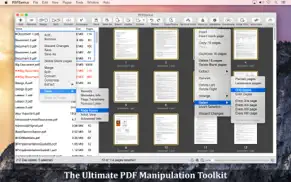
PDFGenius: The ultimate PDF manipulation toolkit is intuitive and powerful PDF utility that you will ever need. It offers features like creating and combining PDFs, splitting PDFs into multiple files, PDF compression to reduce file size, Batch convert and extract PDFs into images and text documents. PDFGenius also allows you to copy/paste, insert, delete, duplicate, rotate and reorder PDF pages. You can drag and drop PDF files and PDF pages between PDF files to create new PDF or insert pages. In addition, you can crop PDF pages, remove links, modify metadata, add/remove password security, add page transitions, change initial view and other advance PDF document properties.
PDFGenius do perform all manipulations on PDF by preserving original contents (i.e. structure of the file, color profiles, fonts, links, bookmarks) without losing document’s integrity and does it very fast.
KEY FEATURES:
◆ COMPRESSION : Compress PDF documents using Quartz and Image compression methods. ompress large image and graphics heavy PDF using extensive set of options and presets.
- Controls to change JPEG quality, color model, image resolution and Optimise graphics level to decrease the file size dramatically. New Optimize graphics option removes superfluous information to reduce vector graphics heavy PDF.
- Inbuilt most useful default set of compression filter presets. Preserves your favorite compression options.
- Real time side-by-side quality comparison of compressed PDF to original PDF.
◆ MERGE : Combine multiple files into single PDF document. Can merge PDF bookmarks. Alternate page merge supported.
◆ CONVERT : Batch convert PDF into each page as images (JPG, JP2, PNG, PSD, TIFF, BMP).
◆ SPLIT : Split PDF into multiple PDF files. Five divide criteria along with file labelling options. Split by page count, file size, outline levels, page size and comma separated page range. Split bu Outline level has option to have outline titles as PDF filenames.
◆ CUT/COPY/PASTE PDF pages between PDF documents. Added option to duplicate selected pages within PDF.
◆ Intuitive feature to drag and drop PDF files and PDF pages between PDF list view and PDF page browser view. You can create new PDF file, insert pages from one file to another, insert entire PDF file(s) into another file just within the application.
◆ EXTRACT PAGES: Reuse selected pages from one PDF document to create new PDF document.
◆ INSERT: Insert new pages into existing PDF by inserting images and pages from another PDF file. Feature to add blank page.
◆ DELETE: Delete pages from PDF file. Feature to delete blank pages.
◆ PASSWORD SECURITY: Add or remove password security. Allow to set PDF open document password and permission password with file restriction controls. You can define encryption level with key size.
◆ REMOVE LINKS: Remove annotations, internal links, external hyperlinks.
◆ PAGE BOXES: Set CropBox, ArtBox, TrimBox & BleedBox margins of the PDF documents. Options to remove white margins.
◆ CREATE and EDIT PDF OUTLINE
- Auto Magic to generate a new TOC by analysing the range of fonts used in the PDF to tease out a hierarchy of headings.
- Auto Match to generate a new TOC from your selected text in PDF file.
- Add new outline. Drag and drop selected text to create outline.
- Shuffle and arrange outlines. Copy/Paste to reuse outline.
- Change outline destination.
- Rename outline title.
◆ CREATE AND EDIT LINKS
◆ PAGE SELECTION : Most helpful page selection variations to speed up page manipulations.
◆ ARRANGE, SHUFFLE, REORDER and ROTATE PAGES
◆ CREATE PDF document from images and capturing screen, window or screen area selection.
- Change METADATA, PDF INITIAL VIEW, page TRANSITION and Advanced PDF properties.
Much more…
Note: PDFGenius is standalone application running natively to manipulate PDF documents securely on your iOS device.
👋 ¿Te encanta la aplicación PDFGenius 4? ¡Por favor comparte tus amigos!


| Nombre de la Aplicación | PDFGenius 4 |
| Categoría | Productividad |
| Desarrollador | RootRise Technologies Pvt. Ltd. |
| Fecha de Lanzamiento | jueves, 3 de mayo de 2012 |
| Fecha de Actualización | sábado, 17 de enero de 2026 |
| Tamaño | 6.92 MB |
PDFGenius 4 Comentarios & Crítica
¿Sabías que puedes ganar $25 desde nuestro sitio con solo registrarte? ¡Obtenga $25 gratis uniéndose a Payoneer!

¡Por favor espera! PDFGenius 4 app cargando comentarios de Facebook...
PDFGenius 4 Servicio al Cliente
¿Qué opinas sobre la aplicación PDFGenius 4? ¿Puede compartir sus quejas, experiencias o pensamientos sobre la aplicación con la empresa y la gente de RootRise Technologies Pvt. Ltd.?


PDFGenius 4 Apps Capturas de Pantalla & e Imágenes
PDFGenius 4 aplicación iphone, ipad, apple watch ve apple tv solicitud imágenes.
| Idioma | Español |
| Precio | 9.99 EUR |
| Limite de edad | 4+ años y mayores |
| Versión Actual | 4.16 |
| Play Store | com.SuperAppsDeveloper.Super-PDF-Utility |
| Compatibilidad | IOS 11.5 o después |
PDFGenius 4 (Versión 4.16) Descargue e Instale la Aplicación
La aplicación PDFGenius 4 ios fue desarrollada por RootRise Technologies Pvt. Ltd. [ID del desarrollador: 594431033] y se lanzó en la categoría Productividad el jueves, 3 de mayo de 2012. El tamaño del archivo de la aplicación es 6.92 MB. Esta aplicación ha sido calificada por 17 usuarios y tiene una calificación de 1 sobre 5. PDFGenius 4 es la última versión 4.16 lanzada el sábado, 17 de enero de 2026. Funciona sin problemas en software IOS 11.5 mínimo y superior. Google Play ID: com.SuperAppsDeveloper.Super-PDF-Utility. Idiomas admitidos por la aplicación:
EN FR DE IT ES Descargar e Instalar!| Nombre de la Aplicación | Valoración | Reseñas | Precio |
| PhotoResize | 1 | Sin comentarios | 3.99 |
| Archive Utility | 1 | Sin comentarios | 2.99 |
| Read CHM | 1 | Sin comentarios | Gratis |
| PDFOptim | 4.7 | 35 | Gratis |
| XPS-to-PDF | 1 | Sin comentarios | Gratis |
- Bug fixes and UI improvements to streamline with latest macOS. We are thankful to all users for their valuable feedback :)
| Nombre de la Aplicación | Desarrollador |
| VPN - Super Unlimited Proxy | Mobile Jump Pte Ltd |
| Microsoft Excel | Microsoft Corporation |
| Idealista | Idealista, S.A. |
| Google NotebookLM | |
| DeepSeek - Asistente de IA | 杭州深度求索人工智能基础技术研究有限公司 |
¿Comprueba los resultados de su trabajo de SEO? ¿O simplemente mira el ranking de palabras clave en Google? Si no puede leer los datos correctamente de su trabajo de SEO, ¡está perdiendo mucho!
| Nombre de la Aplicación | Desarrollador |
| Database Pro. | 强 李 |
| Auto Redial App | Pedro Carrazana |
| Bullet Journal Companion | Lightcage LLC |
| Foto Medidas - Photo Measures | Cubent |
| Road Trip MPG | Darren Stone |
Descubra cómo funcionan las diferentes criptomonedas y gane una pequeña cantidad de cada cripto para probarlo usted mismo. Coinbase es el lugar más fácil para comprar y vender criptomonedas. Regístrese, comience ahora.
| Nombre de la Aplicación | Desarrollador |
| Telegram Messenger | Telegram FZ-LLC |
| MiDGT | DGT-GI |
| Duolingo - Aprende idiomas | Duolingo |
| Zoom Workplace | Zoom Video Communications, Inc. |
| Tarjeta Transporte | Consorcio Regional de Transportes de Madrid |
Jasper es el creador de inteligencia artificial que te ayuda a ti y a tu equipo a superar las barreras creativas para crear contenido sorprendente y original 10 veces más rápido.
| Nombre de la Aplicación | Desarrollador |
| Arguments - Signal Processing | AudioThing Ltd. |
| Casa de Deus Church | Casa de Deus Church |
| Atom Energia | GdGestao |
| Barbearia Miranda | BestBarbers |
| Abel-Pub | Nikita Alekseev |
Mind Lab Pro ® es un medicamento científico que mejora el rendimiento laboral y la productividad con nootrópicos para la concentración, el estrés, la multitarea, la resolución creativa de problemas y más. ¡Haz que tu cerebro funcione al 100%!
Adsterra es la red publicitaria preferida por aquellos que buscan una alternativa a AdSense. Adsterra es la opción ideal para sitios nuevos con poco tráfico diario. Para anunciarse en el sitio de Adsterra, al igual que otras redes publicitarias, se requiere cierto límite de tráfico, antigüedad del dominio, etc. No hay reglas estrictas.