VizRef
VizRef App Análisis
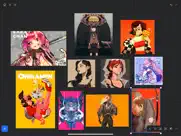
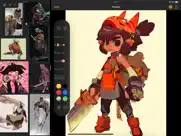
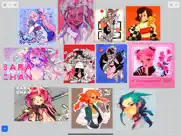
¿Qué es la aplicación vizref? VizRef for iPad enables creatives to finally take their inspiration anywhere. It becomes the perfect companion app for Procreate® or paired with your favorite drawing/animation application by utilizing iPad IOS multitasking features. Clear up your hard to find hidden layers in your drawing app and easily organize your inspiration on the go. Make visual reference boards with any images or gifs from web browsers, cloud storage, photos, screen captures and more. The first mood board creation app made by artists for artists, that brings comprehensive referencing tools to animators and visual artists/en. We are dedicated to bringing creatives what they need most in being inspired everywhere they go.
HIGHLIGHTS
-Perfect companion app paired with Procreate® Adobe Fresco ® Clip Studio Paint® Infinite Painter® etc. by utilizing iPad IOS multitasking features
-Supports many image types including GIF
-Drag and drop from web
-Batch Import from Photos app
-Batch Export images from boards to cloud storage using Files app
- *Multi-Select and auto pack images for a quicker workflow *
-Import High-Resolution images with HD toggle
_*Focus on whats importing with Focus mode. ( rotate imageboard )
-Batch Import from iCloud, Dropbox, Google Drive with split-screen
-Quick and responsive visual reference board experience
-Easy to use/ minimal UI
-Light mode and Dark mode
-Set thumbnails for reference boards to visually organize your inspiration
ANIMATED GIF SUPPORT
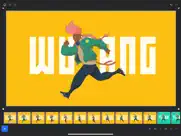
-Reference your favorite animated gifs
-Pause animation and play frame by frame to better understand referenced animations
-Advanced animation timeline gives you an interactive visual breakdown of all frames
EASY TO USE REFERENCE TOOLS
-Crop images to optimize screen space and view more references
-Greyscale toggle for images for value reference
-Flip horizontally and vertically
-Rotate Images
-Copy-paste images into other apps
Artwork and animation credits
@_Artazi
@_baomii
@_Deadslug_
@amnesiapancake
@barachan
@belgeist
@criisalys
@ergo.josh
@evan_monteiro
@gloomwastaken
@mrbeezul
@onemegawatt
@rocketboiART
@samuelyounart
@cobalt_requin
VizRef was created by Max Gonzalez and RoboWorld Entertainment with supporting development from Valere Labs
👋 ¿Te encanta la aplicación VizRef? ¡Por favor comparte tus amigos!


| Nombre de la Aplicación | VizRef |
| Categoría | Diseño gráfico |
| Desarrollador | Studio Pixanoh |
| Fecha de Lanzamiento | lunes, 16 de marzo de 2020 |
| Fecha de Actualización | martes, 8 de junio de 2021 |
| Tamaño | 4.36 MB |
VizRef Comentarios & Crítica
Problema al exportar 6 imágenes. Imposible exportar el panel entero de 6 pequeñas imágenes. Ni en pdf ni en png. Solo deja exportar cada imagen de forma individual y sin transparencia. Tengo un ipad pro de 5a generación, otros programas más complejos no se cuelgan así.
Útil pero…. Es una aplicación muy útil ,mi única pega es que no tenga una copia de seguridad. Ya que al cambiar de dispositivos todos los archivos se borran a no ser que los guardes tu de nuevo a mano.
I find this app very useful but…. It’s great to have an app where I can drag and drop images for visual references for my projects, but the big issue is that I can't understand why it doesn’t have any tools to add text. Adding text is such a basic feature for an app like this! I can't believe something so essential is missing. Because of this, I’m giving it only 3 stars—it’s something I just can’t overlook.
Great app, but.... It is a great app. Very useful. I only find one deficiency, that the images cannot be rotated. Please add the option in the next update. Thank you!
Muy util. La he estado usando meses y es una app inprescindible. Seria genial que se añadiese la opción de añadir cuadros de texto desde la app para hacer apuntes en las referencias y organizar ciertas cosas mejor.
Great app and very well integrated in iPadiOS. Drag and drop, import, export, rearrange, create multiple boards, etc. The only thing I miss is the ability to add text or notes so you can better organize your groups of images (Wasn’t this in the roadmap?).
Casi perfecta. La app es fantástica y la he usado en todos y cada uno de mis dibujos desde que la compré, desde luego valió la pena el gasto! Mi única queja es que parece que algunas imágenes pierden calidad al importarlas, y cuando quieres ver detalles finos, puede ser un problema. Estaría bien que se ofreciera la opción de importar la imagen a resolución real o reducida, si el problema es el peso de las imágenes.
Rotate tool and editing or overpainting. One thing i miss, is the ability of rotate the images, also it would be awesome to be able of painting over the images to make annotations about them but except of that, it is a great application
Me encanta!. Estaba buscando una app así en el iPad y de momento estoy encantada, estaría genial una opción de añadir anotaciones y textos o pequeñas marcas dibujando a mano(parecido a la opción de marcación de la edición de fotos del iPad) también poder elegir el color de fondo o incluso poder distinguir grupos de imágenes agregándolas un marco de color, creo que son pequeños detalles que le vendrían genial por el resto un 10! 💕
Import from pinterest. Hi, i really like the app but it would be great if you could drag from pinterest to not download the images, are you going to implement it in this one? Is this option in VizRefLite? Thank you very much
Crashes when exporting. Good app but commonly crashes when exporting.
Great but not perfect. I like a lot but it would be better if it were more social, and I could share and see the galleries of the others users!!
Muy cómoda. Para formar tu mosaico de imágenes y usarlo con cualquier programa, es útil. Echo de menos la posibilidad de girarlas y esa pérdida de calidad en algún caso. Por lo demás, perfecta y sencilla.
Una maravilla pero. Esta aplicación maravilla. Estaría bien que se pudieran inportar otras extensiones . Por ejemplo PDF. también alguna opción para copiar desde un espacio y llevártelo a otro no se puede copiar y pegar. . También estaría bien poder bloquear las imágenes para que no puedas arrastrarlas por error pero poder moverte por el espacio .
Great App. Great app. It is super handy and I love to use it. But I would love have the possibility to add notes. That would make it perfect!
¿Sabías que puedes ganar $25 desde nuestro sitio con solo registrarte? ¡Obtenga $25 gratis uniéndose a Payoneer!
Great app but…. I really like this app and it’s been really useful to keep beside procreate to look at references, but it would be amazing if you could add a writing tool so we can make annotations beside or on top of the pics
One of the best App for artist. i work making different types of artwork, this app let me organize all my reference in one place, i save a lot of time with this app
Mind Lab Pro ® es un medicamento científico que mejora el rendimiento laboral y la productividad con nootrópicos para la concentración, el estrés, la multitarea, la resolución creativa de problemas y más. ¡Haz que tu cerebro funcione al 100%! Comprar!
I love it, it’s really useful. One small thing though... I use my iPad for art, and this app is a time saver. I also love order, so it really calms my mind haha. The only thing I would improve would be to be able to rotate the pictures. That would make it perfect. Thank you very much! Stay safe.
Adsterra es la red publicitaria preferida por aquellos que buscan una alternativa a AdSense. Adsterra es la opción ideal para sitios nuevos con poco tráfico diario. Para anunciarse en el sitio de Adsterra, al igual que otras redes publicitarias, se requiere cierto límite de tráfico, antigüedad del dominio, etc. No hay reglas estrictas. ¡Regístrate ahora!
It’s the perfect app for moodboards.. VizRef has been one of my must have apps for designing and brainstorming. The functionality is unparalleled. Either the app has patched every complaint here or people just can’t be bothered to play with the app enough. You CAN export the boards as both PDF and image files, you CAN rotate the images... you can flip them, set them to monochome and do non-destructive cropping. The app is great not only for use while designing on the iPad itself but it is a perfect companion for desktop PC work, whether you’re doing illustration, 3D modeling, video editing or game development.
Amazing app. Would awesome to have a simple marker tool to highlight important stuff (this can be done while taking a screenshot) but would be cool to have it built in
Sugestion. I need a tool to rotate 45º the photos pls
100% útil. Pese a que ciertas apps ya tienen su propia integración para usar referencias esta app sigue teniendo características bastante útiles; como la cantidad de imágenes que puedes agregar, invertir las imagen y el cambio a blanco y negro. Tal vez sea poco probable recibir actualizaciones pero sería grandioso poder ver el grid sobre la imagen y no solamente detrás, eso me ayudaría muchísimo para tener mejores proporciones y referencia. Tal vez soy muy torpe y no he encontrado la ficción pero de no ser así por favor, por favor, escucha mi llamado😩🙏
Great idea but misses essential features. This concept is fantastic and is, in general, well executed... however, I just can’t understand how some very obvious features that would transform VizRef in an essential tool for artists are missing, i.e. I can’t rotate images, not even inside a square frame, also, I haven’t found a way to export moodboards as images, which would elevate the app from a reference app to a board creation app, since I could use the boards on anything. Oh, and I would like to be able to place more than a single frame of a gif, actually, an option to place all of them at the same time would be nice... I want this app to succeed, it’s really nice and easy to use, but please make it more functional. Thanks!
Super useful app. Keep improving :)
Not too much for the money. I really wanted to like this app (because all the reviews on YouTube), but most of the features are already available for free by using the built in Photo app (making albums, drag and drop images from safari, working in split mode),. In fact, the only feature I tough would be useful for me (selecting a frame from a gif and copy-paste that exact frame) is not possible. At least for me it was a waste of money and I really can’t see a game changer on this app.
Sugerencia. Me encanta la aplicación, se volvió una herramienta fundamental, pero si pudieran agregar un buscador para las carpetas, o la posibilidad de exportar imágenes en grupo de una carpeta a otra, y exportar imágenes en split view seria una cerecita en el pastel 👌🏻.
Mind Lab Pro ® odaklanma, stres altında çoklu görev yapma, yaratıcı problem çözme ve daha fazlası için nootropiklerle iş performansını ve üretkenliğini arttıran bilimsel bir ilaçtır. Beyninizi %100 performansa çıkarın! Satın Al!

¡Por favor espera! VizRef app cargando comentarios de Facebook...
VizRef Servicio al Cliente
¿Qué opinas sobre la aplicación VizRef? ¿Puede compartir sus quejas, experiencias o pensamientos sobre la aplicación con la empresa y la gente de Studio Pixanoh?
VizRef Apps Capturas de Pantalla & e Imágenes
VizRef aplicación iphone, ipad, apple watch ve apple tv solicitud imágenes.
| Idioma | Español |
| Precio | 3.99 EUR |
| Limite de edad | 4+ años y mayores |
| Versión Actual | 1.1.7 |
| Play Store | com.studiopixanoh.vizref |
| Compatibilidad | IOS 13.2 o después |
VizRef (Versión 1.1.7) Descargue e Instale la Aplicación
La aplicación VizRef ios fue desarrollada por Studio Pixanoh [ID del desarrollador: 1482680567] y se lanzó en la categoría Diseño gráfico el lunes, 16 de marzo de 2020. El tamaño del archivo de la aplicación es 4.36 MB. Esta aplicación ha sido calificada por 22 usuarios y tiene una calificación de 4.3 sobre 5. VizRef es la última versión 1.1.7 lanzada el martes, 8 de junio de 2021. Funciona sin problemas en software IOS 13.2 mínimo y superior. Google Play ID: com.studiopixanoh.vizref. Idiomas admitidos por la aplicación:
EN Descargar e Instalar!| Nombre de la Aplicación | Valoración | Reseñas | Precio |
| VizRef Lite | 1 | Sin comentarios | 1.99 |
NEW FEATURES in 1.1.7 Exporting- Fixed some bugs related to exporting. Some of the UI was unresponsive when hitting export within the app. This was most likely due to some newer IOS versions that were later released. *** Please keep in mind that exporting/ importing directly into other apps such as Dropbox or even using Airdrop and Discord all work completely differently because of how those apps are created. We, unfortunately, can not improve much on batch exporting/ importing into these apps unless those developers improve how their apps deal with multiple images being imported or passing through them. For batch exporting images, I still recommend hooking up Dropbox/ Google Drive to the files app on your iPad and just batch exporting through the files app from Vizref. Please also keep in mind that batch exporting hundreds of images at once will most likely crash Vizref. This is also out of our control. I recommend batch exporting about 50 images at once for the most stable and consistent experience. Vizref and other apps can't export hundreds of images at once because every app on the iPad is limited to how much Memory it can use during all operations. The app is crashing because of the hard limit set by Apple for each app. Feature - Revert Button- Revert will undo any cropping or rotating you've done to the image. The main reason for adding the revert button was that some users were finding their images were oddly scaled/ stretched to the wrong ratio. Revert is a backup for returning your image to the correct ratio/ scaling - the revert button is located in the toolbox icon at the bottom right after selecting an image. - Exporting gif files. Should work now give it a try! *Bug Fixes* -Fixed a bug that caused images from your board to not display if your board crashed on exporting. This bug should be completely gone. If it persists after updating your app please contact us at [email protected] **If your images have disappeared from your board, please note that those images are still on you iPad and stored locally. You can retrieve them by going to the Files app then searching for your Vizref folder in " On My iPhone " or " On My iPad" file Open "Private Documents" then you will see each .VRB file. These are your reference boards and store your images locally. You can then retrieve your images here. Fixed some crash bugs. Fixed several UI inconsistencies and bugs.
| Nombre de la Aplicación | Desarrollador |
| DaVinci - Arte Generado por IA | HUBX |
| WallPics - Fondos de pantalla | IgKnight Technologies Ltd |
| Live Activities - To Do Widget | FugaPiyo Inc. |
| Ibis Paint X | Ibis inc. |
| Arch - AI Home Design | APPNATION YAZILIM HIZMETLERI TICARET ANONIM SIRKETI |
¿Comprueba los resultados de su trabajo de SEO? ¿O simplemente mira el ranking de palabras clave en Google? Si no puede leer los datos correctamente de su trabajo de SEO, ¡está perdiendo mucho!
| Nombre de la Aplicación | Desarrollador |
| Sketch Club | Blackpawn.com |
| Herramientas de Ps | Paulo Narra |
| Ms Paint | Du Nguyen Viet |
| StitchSketch | Mozusystems, LLC |
| Graffiti Spray Can Art - KING | Svante Segelson |
Descubra cómo funcionan las diferentes criptomonedas y gane una pequeña cantidad de cada cripto para probarlo usted mismo. Coinbase es el lugar más fácil para comprar y vender criptomonedas. Regístrese, comience ahora.
| Nombre de la Aplicación | Desarrollador |
| ChatGPT | OpenAI |
| SHEIN - Compras Online | ROADGET BUSINESS PTE. LTD. |
| Microsoft Authenticator | Microsoft Corporation |
| Instagram, Inc. | |
| Google Maps |
Jasper es el creador de inteligencia artificial que te ayuda a ti y a tu equipo a superar las barreras creativas para crear contenido sorprendente y original 10 veces más rápido.
| Nombre de la Aplicación | Desarrollador |
| Blue Mountains Grammar School | Blue Mountains Grammar School Ltd |
| Celion Hub | Miguel Angel Cabanas aguilar |
| Arguments - Signal Processing | AudioThing Ltd. |
| Athletic Force | Eva Dijkstra |
| Academy Rufina Karamova | ORG DIKIDI |
Mind Lab Pro ® es un medicamento científico que mejora el rendimiento laboral y la productividad con nootrópicos para la concentración, el estrés, la multitarea, la resolución creativa de problemas y más. ¡Haz que tu cerebro funcione al 100%!
Adsterra es la red publicitaria preferida por aquellos que buscan una alternativa a AdSense. Adsterra es la opción ideal para sitios nuevos con poco tráfico diario. Para anunciarse en el sitio de Adsterra, al igual que otras redes publicitarias, se requiere cierto límite de tráfico, antigüedad del dominio, etc. No hay reglas estrictas.