Scrolling Credits Pro
Scrolling Credits Pro App Análisis
¿Qué es la aplicación scrolling credits pro? #1 must-have app for quickly and easily adding scrolling credits like you see in professional movies and TV shows to the beginning or ending of your videos. Also great for adding scrolling text to Instagram, documentaries, sales, and informational videos.
CHECK OUT THESE PRO FEATURES:
• Designed specifically to do scrolling credits!
• Powerful, yet super easy to use--no learning curve!
• Save and manage "projects," no need to start over to make a change!
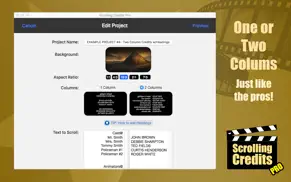
• Supports one or two-column credits, just like the pros!
• Easily add Headings to sections of credits!
• Chroma Key "green screen" support to scroll credits over video footage (not just a still background)!
• Control font style, size, color, and scrolling speed!
• Supports multiple SD/HD resolutions, including: SD 360p, HD 720p, HD 1080p and even Ultra HD 4K!
• Supports multiple Aspect Ratios, including: 1:1, 4:3, 16:9, 18:9 (2:1), and 21:9 (7:3).
• Smooth, non-jerky scrolling!
• Handles large projects without running out of memory!
• Includes dozens of HD backgrounds
• Upload your own background if desired!
• Also available for the iPhone/iPad! (Sold separately from the iOS App Store.)
HOW IT WORKS...
1. Choose from the dozens of backgrounds provided by the app (a solid color, a gradient color, an image, or "green-screen" chroma key to render credits over video footage), or upload your own background image.
2. Enter the text you want to have scroll over the background you've selected. You can even use headings or two columns for your credits, just like the pros.
3. Preview what your scrolling credits will look like, adjusting the scrolling speed and the font style, color, and size.
4. When you're happy with how everything looks, the app will render and save an HD video clip to your Mac. You then run iMovie or other video editing software, import the credits video clip, and drag it to where you want it to play in your movie.
Here are all the resolutions and sizes for each of the different aspect ratios:
====== 1:1 ======
SD 360p (360 x 360)
HD 720p (720 x 720)
HD 1080p (1080 x 1080)
Ultra HD 4K (2160 x 2160)
====== 4:3 ======
SD 360p (480 x 360)
HD 720p (960 x 720)
HD 1080p (1440 x 1080)
Ultra HD 4K (2880 x 2160)
====== 16:9 ======
SD 360p (640 x 360)
HD 720p (1280 x 720)
HD 1080p (1920 x 1080)
Ultra HD 4K (3840 x 2160)
====== 18:9 (2:1) ======
SD 360p (720 x 360)
HD 720p (1440 x 720)
HD 1080p (2160 x 1080)
Ultra HD 4K (4320 x 2160)
====== 21:9 (7:3) ======
SD 360p (840 x 360)
HD 720p (1680 x 720)
HD 1080p (2520 x 1080)
Ultra HD 4K (5040 x 2160)
___________________________________________________________________________________
Scrolling Credits Pro is also available for the iPhone/iPad. (Sold separately from the iOS App Store.)
Need help? Watch the included tutorial videos and sample projects. (For the tutorials, pull down the Menu from the home page of app or visit scrollingcredits.com.)
Still need help? Email us at [email protected]!
👋 ¿Te encanta la aplicación Scrolling Credits Pro? ¡Por favor comparte tus amigos!


| Nombre de la Aplicación | Scrolling Credits Pro |
| Categoría | Foto y vídeo |
| Desarrollador | Dating DNA, Inc. |
| Fecha de Lanzamiento | domingo, 25 de marzo de 2018 |
| Fecha de Actualización | miércoles, 4 de abril de 2018 |
| Tamaño | 41.39 MB |
Scrolling Credits Pro Comentarios & Crítica
¿Sabías que puedes ganar $25 desde nuestro sitio con solo registrarte? ¡Obtenga $25 gratis uniéndose a Payoneer!

¡Por favor espera! Scrolling Credits Pro app cargando comentarios de Facebook...
Scrolling Credits Pro Servicio al Cliente
¿Qué opinas sobre la aplicación Scrolling Credits Pro? ¿Puede compartir sus quejas, experiencias o pensamientos sobre la aplicación con la empresa y la gente de Dating DNA, Inc.?



Scrolling Credits Pro Apps Capturas de Pantalla & e Imágenes
Scrolling Credits Pro aplicación iphone, ipad, apple watch ve apple tv solicitud imágenes.
| Idioma | Español |
| Precio | 5.99 EUR |
| Limite de edad | 4+ años y mayores |
| Versión Actual | 1.03 |
| Play Store | com.datingdna.scrollingcreditspro |
| Compatibilidad | IOS 10.12 o después |
Scrolling Credits Pro (Versión 1.03) Descargue e Instale la Aplicación
La aplicación Scrolling Credits Pro ios fue desarrollada por Dating DNA, Inc. [ID del desarrollador: 295453837] y se lanzó en la categoría Foto y vídeo el domingo, 25 de marzo de 2018. El tamaño del archivo de la aplicación es 41.39 MB. Esta aplicación ha sido calificada por 17 usuarios y tiene una calificación de 1 sobre 5. Scrolling Credits Pro es la última versión 1.03 lanzada el miércoles, 4 de abril de 2018. Funciona sin problemas en software IOS 10.12 mínimo y superior. Google Play ID: com.datingdna.scrollingcreditspro. Idiomas admitidos por la aplicación:
EN Descargar e Instalar!| Nombre de la Aplicación | Valoración | Reseñas | Precio |
| CLIPish Sounds | 1 | Sin comentarios | Gratis |
| CLIPish HD Wallpaper Pro | 1 | Sin comentarios | 2.99 |
| CLIPish Tall Animations | 1 | Sin comentarios | 2.99 |
| Prog Radio | 4.8 | 5 | Gratis |
| CLIPish Stickers | 1 | Sin comentarios | 2.99 |
Thank you for making Scrolling Credits Pro such a hit! Remember...High ratings keep us motivated to keep adding features. :-) Here's what's new in this update: - In 2-column projects, the app still defaults any text in the right column to uppercase, but you can now hold the shift key down to override this to enter lowercase letters. - Misc. bug fixes.
| Nombre de la Aplicación | Desarrollador |
| TikTok Studio | TikTok Ltd. |
| VLC media player | VideoLAN |
| CHEERZ - Revelado de fotos | Printklub |
| Remini - Mejorador de Fotos IA | Bending Spoons Apps ApS |
| Kick - Live Streaming | Kick Streaming |
¿Comprueba los resultados de su trabajo de SEO? ¿O simplemente mira el ranking de palabras clave en Google? Si no puede leer los datos correctamente de su trabajo de SEO, ¡está perdiendo mucho!
| Nombre de la Aplicación | Desarrollador |
| Lumy | Raja V |
| Rarevision VHS - Retro 80s Cam | Rarevision |
| EXIF Tool - Metadata Tool | Dongwook Cho |
| ProCamera. Raw Foto Camara | Cocologics |
| DMD Panorama | Dermandar |
Descubra cómo funcionan las diferentes criptomonedas y gane una pequeña cantidad de cada cripto para probarlo usted mismo. Coinbase es el lugar más fácil para comprar y vender criptomonedas. Regístrese, comience ahora.
| Nombre de la Aplicación | Desarrollador |
| ChatGPT | OpenAI |
| Wallapop - Vende y compra | WALLAPOP SL |
| Threads | Instagram, Inc. |
| Gmail - El correo de Google | |
| YouTube |
Jasper es el creador de inteligencia artificial que te ayuda a ti y a tu equipo a superar las barreras creativas para crear contenido sorprendente y original 10 veces más rápido.
| Nombre de la Aplicación | Desarrollador |
| Camtrade Pass | RealMeds Solutions Private Limited |
| Car green calculator | Huseyin ALTUNKAYIK |
| Century 21 ollier | Omafitec |
| Bowling Cegielnia | Restaumatic s.r.o. |
| Acesso Church | Acesso Church |
Mind Lab Pro ® es un medicamento científico que mejora el rendimiento laboral y la productividad con nootrópicos para la concentración, el estrés, la multitarea, la resolución creativa de problemas y más. ¡Haz que tu cerebro funcione al 100%!
Adsterra es la red publicitaria preferida por aquellos que buscan una alternativa a AdSense. Adsterra es la opción ideal para sitios nuevos con poco tráfico diario. Para anunciarse en el sitio de Adsterra, al igual que otras redes publicitarias, se requiere cierto límite de tráfico, antigüedad del dominio, etc. No hay reglas estrictas.