Technical Camera
Technical Camera App Análisis
¿Qué es la aplicación technical camera? The ultimate still photo app for the conscious image maker - works equally well for serious photography as for organized visual note taking. With a handful of unique features you'll not find anywhere else.
Photos are saved to individual albums created with a specific purpose in mind. Such as different photo shoots or projects, visual shopping lists, recipes from the grandmother's cookbook, things for sale, monthly gas and electricity meter readings - the list is endless. These uses need different image qualities and sizes (you'll seldom make a large print of a meter reading, for example), so the app has:
• Album specific image quality, color space (wide color capable devices only) and geotagging settings.
• Selectable image quality with full, half, quarter, high color fidelity quarter HQ sizes and a super tiny 0.48 megapixel 800x600 JPG, as well as RAW and RAW+JPG on devices supporting RAW capture. The 800x600 JPG is up to 20 times smaller than a regular JPG, making it extremely gentle with your mobile plan's data allowance.
• Color space can be set to Display P3, Adobe RGB or sRGB for JPG files and Adobe RGB or sRGB for RAW previews.
• Home screen Quick Actions for selecting the last recently used three albums.
Unique features include:
• Framing Previsor for showing on the wide angle camera's image what the telephoto camera would see.* Also works with wide converters.
• Highlight and shadow alerts.
• Protective exposure metering.
• Auto ISO with minimum, maximum and minimum shutter speed settings.
• Real time distortion correction for wide angle converters via correction profiles, as well as a custom converter for other lenses.*
• Selectable screen frame rate to balance between fluid experience and power saving, and to avoid flicker with lighting running on 50Hz mains frequency.
• TIFF/EP compliant DNG files with support for wide color and full resolution embedded previews.
* Utilizes the time-tested precise simulation and distortion correction engines of our Mark II Artist's Viewfinder app.
Other notable features:
• Manual control for ISO and shutter speed in 1/3 stop increments.
• Manual focus with focus peaking. Selectable peaking color.
• Exposure compensation up to +/-5 stops.
• Exposure and focus lock.
• Continuous and single AF modes.
• Grid display with 2x2, 3x3 and 8x6 choices.
• Luminance only Black & White mode.
• Artist and copyright metadata. The copyright template supports tokens for the current year (so it's always up-to-date), artist name and the copyright symbol.
• Four user-assignable Smart Function Keys to bring most-used functions to a single tap distance, with 7 functions to choose from.
• Completely neutral viewing to avoid interfering with your color vision during composition.
• Fully color managed, from capture to display, including color-correct display of wide color RAW images.
Technical Camera only supports the back camera(s) in still photography mode. No videos or selfies. No fancy filters.
The Framing Previsor requires a dual-camera device or a wide converter lens.
The complete list of supported wide converter lenses can be found on the Tech Specs page: https://www.direstudio.com/technical-camera/tech-specs/
For more information we recommend to check out our Technical Camera How To's: https://www.direstudio.com/technical-camera/how-tos/
👋 ¿Te encanta la aplicación Technical Camera? ¡Por favor comparte tus amigos!


| Nombre de la Aplicación | Technical Camera |
| Categoría | Foto y vídeo |
| Desarrollador | DIRE Studio |
| Fecha de Lanzamiento | lunes, 18 de junio de 2018 |
| Fecha de Actualización | domingo, 19 de octubre de 2025 |
| Tamaño | 3.87 MB |
Technical Camera Comentarios & Crítica
¿Sabías que puedes ganar $25 desde nuestro sitio con solo registrarte? ¡Obtenga $25 gratis uniéndose a Payoneer!

¡Por favor espera! Technical Camera app cargando comentarios de Facebook...
Technical Camera Servicio al Cliente
¿Qué opinas sobre la aplicación Technical Camera? ¿Puede compartir sus quejas, experiencias o pensamientos sobre la aplicación con la empresa y la gente de DIRE Studio?
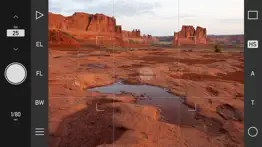
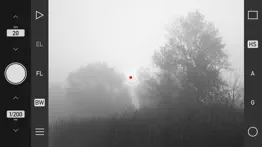
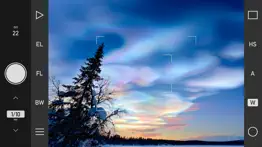
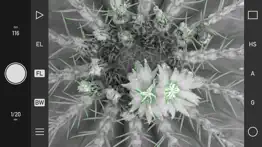


Technical Camera Apps Capturas de Pantalla & e Imágenes
Technical Camera aplicación iphone, ipad, apple watch ve apple tv solicitud imágenes.
| Idioma | Español |
| Precio | 19.99 EUR |
| Limite de edad | 4+ años y mayores |
| Versión Actual | 3.0 |
| Play Store | com.direstudio.TechnicalCamera |
| Compatibilidad | IOS 15.6 o después |
Technical Camera (Versión 3.0) Descargue e Instale la Aplicación
La aplicación Technical Camera ios fue desarrollada por DIRE Studio [ID del desarrollador: 362492883] y se lanzó en la categoría Foto y vídeo el lunes, 18 de junio de 2018. El tamaño del archivo de la aplicación es 3.87 MB. Esta aplicación ha sido calificada por 17 usuarios y tiene una calificación de 1 sobre 5. Technical Camera es la última versión 3.0 lanzada el domingo, 19 de octubre de 2025. Funciona sin problemas en software IOS 15.6 mínimo y superior. Google Play ID: com.direstudio.TechnicalCamera. Idiomas admitidos por la aplicación:
EN FR Descargar e Instalar!| Nombre de la Aplicación | Valoración | Reseñas | Precio |
| ShutterCount | 1 | Sin comentarios | 9.99 |
| ShutterCount Pro | 1 | Sin comentarios | 19.99 |
| Kwiketta for Adobe Photoshop | 1 | Sin comentarios | 4.99 |
| ShutterCount Pro Mobile | 1 | Sin comentarios | 19.99 |
| ShutterCount Mobile | 3.5 | 8 | 9.99 |
New features: • Added lab measured angle of views and ultra wide camera distortion profiles for iPhone 17, 17 Pro and 17 Pro Max. • Ultra wide camera zooming for JPG captures is extended to iPhone 17, 17 Pro and 17 Pro Max. • Support for iPhone Air screen size. • Improved iOS/iPadOS 26 support.
| Nombre de la Aplicación | Desarrollador |
| Remini - Mejorador de Fotos IA | Bending Spoons Apps ApS |
| Photoroom Studio Photo Editor | ARTIZANS OF PHOTO VIDEO BACKGROUND EDITOR APP |
| Kick - Live Streaming | Kick Streaming |
| YouTube | |
| Photoshop Express Editar Fotos | Adobe Inc. |
¿Comprueba los resultados de su trabajo de SEO? ¿O simplemente mira el ranking de palabras clave en Google? Si no puede leer los datos correctamente de su trabajo de SEO, ¡está perdiendo mucho!
| Nombre de la Aplicación | Desarrollador |
| Negative - Film Look Filter. | 스몰캐머러 |
| LumaFusion | Luma Touch LLC |
| Image Blender | JHND i Sverige AB |
| TV Cast Pro for Sony TV | Kraus und Karnath GbR 2Kit Consulting |
| EE35 Film Camera | EIGHTIVE DESIGN, Inc. |
Descubra cómo funcionan las diferentes criptomonedas y gane una pequeña cantidad de cada cripto para probarlo usted mismo. Coinbase es el lugar más fácil para comprar y vender criptomonedas. Regístrese, comience ahora.
| Nombre de la Aplicación | Desarrollador |
| Bluesky Social | Bluesky PBLLC |
| Google Fotos | |
| SHEIN - Compras Online | ROADGET BUSINESS PTE. LTD. |
| Instagram, Inc. |
Jasper es el creador de inteligencia artificial que te ayuda a ti y a tu equipo a superar las barreras creativas para crear contenido sorprendente y original 10 veces más rápido.
| Nombre de la Aplicación | Desarrollador |
| Amaatra | Hemakumar Raminni |
| Camtrade Pass | RealMeds Solutions Private Limited |
| AnimateX | Yauheni Stsefankou |
| Calorie Punch | Matthew Watts |
| AI QR Scan Guardian | Rajendran Sajith Sajindran |
Mind Lab Pro ® es un medicamento científico que mejora el rendimiento laboral y la productividad con nootrópicos para la concentración, el estrés, la multitarea, la resolución creativa de problemas y más. ¡Haz que tu cerebro funcione al 100%!
Adsterra es la red publicitaria preferida por aquellos que buscan una alternativa a AdSense. Adsterra es la opción ideal para sitios nuevos con poco tráfico diario. Para anunciarse en el sitio de Adsterra, al igual que otras redes publicitarias, se requiere cierto límite de tráfico, antigüedad del dominio, etc. No hay reglas estrictas.