Moments
Moments App Análisis
¿Qué es la aplicación moments? Transform Any Event Into an Unforgettable Experience
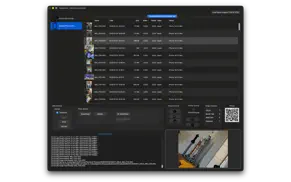
Moments brings professional photo booth magic to your Mac, creating instant memories for weddings, parties, corporate events, and special occasions. Capture spontaneous moments and display them in real-time on the big screen.
Why Moments?
Instant Gratification
Photos appear seconds after capture on stunning displays via AirPlay or dedicated monitors. The energy transforms when everyone sees themselves on the big screen - it's entertainment that creates lasting memories.
Professional Quality, Unlimited Flexibility
Mix and match cameras: Canon DSLRs for professional shots, multiple iPhones with Moments Camera throughout your venue, USB webcams for previews. Create a complete photo ecosystem tailored to your event with an elegant macOS interface.
Powerful Features
Multi-Camera Ecosystem
- DSLR: Canon EOS 650D (Rebel T4i) fully supported
- Moments Camera (iOS): Wired or wireless iPhone capture
- Webcam: Preview display or capture device
Real-Time Display
- AirPlay to Apple TV
- Dual monitor support
- Customizable slideshows
- Instant photo updates
Guest Interaction
- Countdown timers
- Custom flash effects
- Preview display
- Simple triggers (buttons, Bluetooth, keyboard)
Event Management
- Multiple stations on same network
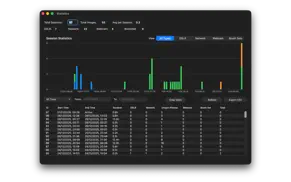
- Statistics dashboard
- Session management
Print & Share
- Direct printing
- Instant keepsakes
- Digital archive
Perfect For
Weddings • Parties • Corporate Events • Graduations • Festivals
What You'll Need
Essential:
- Mac (macOS 12.4+)
- One camera: Canon DSLR, iPhone with Moments Camera, or USB webcam
Optional:
- WiFi router
- Apple TV
- Second monitor
- Additional iPhones
- Trigger button
- Printer
From Vintage to Modern
Moments rockets the classic photo booth into the modern era with professional quality, instant display, wireless capabilities, and unlimited creative possibilities.
Ready to Get Started?
Free version includes basic capture and display. Unlock complete features with in-app purchase:
- Custom image messaging
- Webcam overlay control
- Booth Set configuration
Included for all users:
- Unlimited image capture
- Advanced statistics
- Bluetooth remote button support
- Works seamlessly with Moments Camera (separate iOS app)
- Works seamlessly with Moments Print (separate free app)
Capture the moment. You can be that moment. The moment will last forever.
👋 ¿Te encanta la aplicación Moments? ¡Por favor comparte tus amigos!


| Nombre de la Aplicación | Moments |
| Categoría | Foto y vídeo |
| Desarrollador | David Wilson |
| Fecha de Lanzamiento | domingo, 9 de abril de 2017 |
| Fecha de Actualización | lunes, 12 de enero de 2026 |
| Tamaño | 60.25 MB |
Moments Comentarios & Crítica
¿Sabías que puedes ganar $25 desde nuestro sitio con solo registrarte? ¡Obtenga $25 gratis uniéndose a Payoneer!

¡Por favor espera! Moments app cargando comentarios de Facebook...
Moments Servicio al Cliente
¿Qué opinas sobre la aplicación Moments? ¿Puede compartir sus quejas, experiencias o pensamientos sobre la aplicación con la empresa y la gente de David Wilson?


Moments Apps Capturas de Pantalla & e Imágenes
Moments aplicación iphone, ipad, apple watch ve apple tv solicitud imágenes.
| Idioma | Español |
| Precio | Gratis |
| Limite de edad | 4+ años y mayores |
| Versión Actual | 2.0.1 |
| Play Store | kiwi.dgw.moments |
| Compatibilidad | IOS 12.4 o después |
Moments (Versión 2.0.1) Descargue e Instale la Aplicación
La aplicación Moments ios fue desarrollada por David Wilson [ID del desarrollador: 299029586] y se lanzó en la categoría Foto y vídeo el domingo, 9 de abril de 2017. El tamaño del archivo de la aplicación es 60.25 MB. Esta aplicación ha sido calificada por 17 usuarios y tiene una calificación de 1 sobre 5. Moments es la última versión 2.0.1 lanzada el lunes, 12 de enero de 2026. Funciona sin problemas en software IOS 12.4 mínimo y superior. Google Play ID: kiwi.dgw.moments. Idiomas admitidos por la aplicación:
EN Descargar e Instalar!| Nombre de la Aplicación | Valoración | Reseñas | Precio |
| Missile Control NZ | 2.3 | 3 | Gratis |
| TrafficCamNZ | 5 | 1 | 0.99 |
| TrafficCamNZ | 1 | Sin comentarios | 1.99 |
| Moments Print | 1 | Sin comentarios | 7.99 |
| Moments Camera | 1 | Sin comentarios | 9.99 |
In this version (2.0.1) • Internal changes to support a plugin system for camera, separate plugins by Manufacturer and Device • Improved multi-camera support for Nikon D5600 and Canon 650D when used together • iPhone and iPad photos now keep their original filenames (like IMG_0123.HEIC) when received from Moments Camera app • Requires Moments Camera version 1.5.1 (build 51) or later for iPhone/iPad photo capture • Live Photos from iPhone now correctly save both the photo and video with matching filenames • Webcam captures now save with cleaner filenames and avoid duplicate files • Added manual refresh button for Canon M50 to work around camera firmware limitation In this version (2.0.0) System Requirements • Minimum macOS 13 or later Camera & Device Support • Compatible with select Canon DSLR cameras (see compatibility help page) • Full support for iOS devices running Moments Camera • Standard USB webcam support - capture images without DSLR or iPhone • Webcam resolution control in preferences Major New Features Statistics Dashboard (⇧⌘S) • Track session times, photo counts by source (DSLR, Network, Webcam, Booth Set) • Monitor unique iPhone devices contributing photos • Interactive charts with date filtering • Export to CSV for analysis • All data stored locally, accessible remotely via Moments Print Moments Print Integration • Full support for Moments Print companion app • Remote statistics access from any iOS/Mac device on your network • Browse and print photos from your Moments host wirelessly Professional Printer Support • New printer preferences for precise output control • Direct printing to desktop, photo, and AirPrint devices • Configure automatic printing or batch processing Multi-Host Support • Name your Moments host for easy identification • Run multiple Moments systems on the same network • Moments Camera users can select which host to connect to • Perfect for large venues with multiple photo booth stations Bluetooth Button Actions • Configure custom actions for Bluetooth remote buttons • Map Return Key, Volume Up, Volume Down, and Space • Per-button action control for multi-button setups • Action options: - Booth Set: Automatic photo sequences - Trigger iOS Devices: Control all iPhones simultaneously - Capture Webcam: Direct webcam capture - Do Nothing: Prevent accidental triggers Enhanced Networking • Migrated from MultipeerConnectivity to Network.framework • Improved reliability and stability • Better performance for Moments Camera and Moments Print communication • Fixed stream corruption issues Important: Network Setup Recommendation For best results at events, bring your own WiFi router or mobile hotspot. Do not rely on venue WiFi, especially networks with captive portals (login pages) - these typically prevent device communication and will block Moments Camera connections. A portable router or iPhone personal hotspot ensures reliable connectivity between Moments, Moments Camera, and Bluetooth triggers. Recommended Camera Setup • Primary: iPhone wired in fixed position running Moments Camera • Additional: Multiple iPhones with Moments Camera roaming the event • Connect via your own wireless network for automatic image upload Bug Fixes • Fixed Settings screen display issues for some preference panes • Fixed new images not appearing in Moments Print on refresh • Improved overall stability and performance Breaking Changes Network framework migration requires updated versions of Moments Camera and Moments Print for compatibility.
| Nombre de la Aplicación | Desarrollador |
| Filmora - Editor de videos IA | Shenzhen Wondershare Software Co., Ltd |
| Photoshop Express Editar Fotos | Adobe Inc. |
| Canon PRINT | Canon Inc. |
| Instagram, Inc. | |
| Photoroom Studio Photo Editor | ARTIZANS OF PHOTO VIDEO BACKGROUND EDITOR APP |
¿Comprueba los resultados de su trabajo de SEO? ¿O simplemente mira el ranking de palabras clave en Google? Si no puede leer los datos correctamente de su trabajo de SEO, ¡está perdiendo mucho!
| Nombre de la Aplicación | Desarrollador |
| Image Blender | JHND i Sverige AB |
| Northern Lights Photo Taker | Lazily Inspired |
| Compresor de video express | Jorge Cozain |
| LumaFusion | Luma Touch LLC |
| Video Slimmer App | Shenzhen Socusoft Co., Ltd |
Descubra cómo funcionan las diferentes criptomonedas y gane una pequeña cantidad de cada cripto para probarlo usted mismo. Coinbase es el lugar más fácil para comprar y vender criptomonedas. Regístrese, comience ahora.
| Nombre de la Aplicación | Desarrollador |
| ChatGPT | OpenAI |
| Certificado digital FNMT | FABRICA NACIONAL DE MONEDA Y TIMBRE |
| Microsoft Authenticator | Microsoft Corporation |
| Tarjeta Transporte | Consorcio Regional de Transportes de Madrid |
| Booking.com - Ofertas de viaje | Booking.com |
Jasper es el creador de inteligencia artificial que te ayuda a ti y a tu equipo a superar las barreras creativas para crear contenido sorprendente y original 10 veces más rápido.
| Nombre de la Aplicación | Desarrollador |
| Atom Energia | GdGestao |
| Camtrade Pass | RealMeds Solutions Private Limited |
| Asbc Cashback | Hong Quan Nguyen |
| Arcons - Offline | Luis Arroyo |
| Carly Operations | Carly |
Mind Lab Pro ® es un medicamento científico que mejora el rendimiento laboral y la productividad con nootrópicos para la concentración, el estrés, la multitarea, la resolución creativa de problemas y más. ¡Haz que tu cerebro funcione al 100%!
Adsterra es la red publicitaria preferida por aquellos que buscan una alternativa a AdSense. Adsterra es la opción ideal para sitios nuevos con poco tráfico diario. Para anunciarse en el sitio de Adsterra, al igual que otras redes publicitarias, se requiere cierto límite de tráfico, antigüedad del dominio, etc. No hay reglas estrictas.