XDiagram Bewertung
XDiagram App Beschreibung und Prüfung
Was ist die xdiagram-app? xDiagram application could help you make nice diagram graphic documents or UML documents quickly by keeping lines connected to shapes even when they're moved.
Functions of the application:
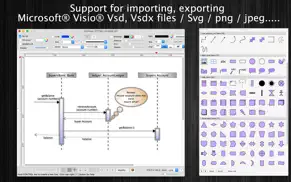
+ Support VISIO formats: VSDX, VSDM (Microsoft Visio Format)
+ IMPORT old VISIO formats: VSD, VSS (Import only)
+ Support many other formats: svg, png, jpeg, multi-pages tiff, pdf...
+ Sync document files to iCloud
+ SMART LINE / CONNECTOR:
Smart Line if attached to a shape will automatically change position every time when the main shape is moved, resized.
+ BASIC SHAPE (new):
There are 92 shapes to add to your diagram. You could add/change text to display inside the shape.
Drawing UML activity diagram will be easier using these shapes.
+ PRE-DEFINED IMAGES (new):
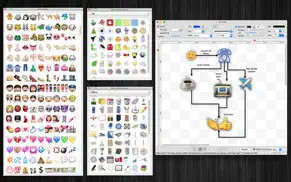
There are 1056 predefined nice images shapes for you to add to your diagram.
Shape types are as following:
- Computer
- Network
- Office
- Life
- Traffic
+ OVER 2000 BEAUTIFUL SYMBOLS:
More than that, there are over 2000 beautiful symbols for you to add to the diagram.
+ ADD IMAGE:
You could add any image file (support file type: gif, jpeg, png, bmp, pict, tiff) to display as an item inside the application.
Image file could be shown in following modes: Stretch / Fit inside bound / Fit outside bound.
The application also allows to DRAG/DROP many image files directly from Finder or pasted image from clipboard to current editing window to add them to the diagram.
+ GENERATE UML CLASS DIAGRAM from C++/JAVA SOURCE:
By dragging C++ header(*.h) or Java files, folders into the diagram window, the application will auto-generate UML class diagram for you. (Accurate rate: 90%)
+ ALIGN MULTIPLE ITEMS:
Select many items then do right-click mouse to select alignment options as following:
(also allow to auto-align with another objects)
- Left
- Right
- Top
- Bottom
- Center (Horizontal or Vertical)
- Distribute ....
+ OPEN/SAVE to "*.UMD3" file:
UMD3 (*.umd3) is the new file type created only for this application.
Press “Cmd + S" to save current diagram to an UMD3 file so that you could load it later for editing.
+ EXPORT TO IMAGE FILE:
Press "Cmd + E" to export current diagram to an image file with format of VSDX, SVG, PDF, TIFF or PNG or JPEG.
+ SUPPORT PRINT:
Press "Cmd + P" to print current document.
+ CAPTURE TO CLIPBOARD:
Press "Cmd + 4" or click on Capture button to export current diagram image to clipboard, then you could paste that image to another application.
Example: Open [Preview] application, press "Cmd + N" to paste above captured image to view or to save to an image file.
Of course, you could paste that image to Excel, Word application too.
-----------------
Other functions:
- Unlimited Undo/Redo (shortcut key: Cmd-Z / Shift-Cmd-Z)
- Copy / Paste (shortcut key: Cmd-C / Cmd-V)
- Duplicate select items (shortcut key: Cmd-D)
- Group / Ungroup Items (shortcut key: Cmd-G / Shift-Cmd-G)
- Lock/Unlock items position (shortcut key: Cmd-L / Shift-Cmd-L)
- Rotate left, rotate right (shortcut key: Cmd-J / Cmd-K)
- Press Cmd+T to move, resize group of items temporary
- Short cut key CMD+B, CMD+I to change text to Bold or Italic
- User could drag right mouse on a current shape to create a new attached object with line
- Double click on the canvas to create a new text box item
- Allow to switch current select object to another shape type
- Allow to change selected items display order
- Scale size of select items
- Path boolean operations supported
- Flip select items
- Shadow supported
- Snap to Grid
- Auto Align with another object when resize or move
- Change display order
- Export to png, jpeg, tiff, pdf image file (shortcut key: Cmd-E)
- Print supported (shortcut key: Cmd-P)
- Customizable color / Font / Size / Line Type
- Support gradient fill to shapes
- Customize measure unit and scale (point, cm, mm, inch….)
- Allow to Export image in 300dpi
- Allow user to select items then save them to Favorites list to reuse later
👋 Wenn dir die XDiagram anwendung gefällt, kannst du sie dann mit deinen freunden teilen?


| Anwendungsname | XDiagram |
| Kategorie | Grafik und Design |
| Entwicklers | Tien Thinh Vu |
| Veröffentlicht | Donnerstag, 19. April 2012 |
| Aktualisiert | Freitag, 5. März 2021 |
| Dateigröße | 81.76 MB |
Kommentare zu den Noten XDiagram
Wir überweisen monatlich über vier milliarden Euro. Wir sorgen dafür, dass privat- und geschäftskonten 4 Millionen Euro an überweisungsgebühren einsparen. Erhalte deine gebührenfreie Überweisung
Wussten sie, dass sie durch ihre anmeldung 25 US-Dollar auf unserer website verdienen können? Verdiene 25$ kostenlos indem du dich bei Payoneer anmeldest!

XDiagram app Facebook-Kommentare werden hochgeladen, bitte warten...
XDiagram Kundendienst
Was halten Sie von der XDiagram-App? Können Sie Ihre Beschwerden, Erfahrungen oder Gedanken zur Anwendung mit dem Unternehmen und den Mitarbeitern von Tien Thinh Vu teilen?


XDiagram Apps Bilder und Bildschirmfoto
XDiagram app iphone, ipad, apple watch ve apple tv app bilder.
| Sprache | German |
| Preis | 14.99 EUR |
| Altersgrenze | 4+ jahre und älter |
| Letzte Version | 5.7 |
| Play Store | com.vutienthinh.macos.xdiagram |
| Kompatibilität | iOS 10.11 und höher |
XDiagram (Version 5.7) Anwendung Herunterladen und Installieren
Die Applikation XDiagram wurde am Donnerstag, 19. April 2012 in der kategorie Grafik und Design veröffentlicht und von Tien Thinh Vu [Developer ID: 393568128] entwickelt. Diese anwendungsdatei hat eine größe von 81.76 MB. Diese App wurde von 17 Benutzern bewertet und hat eine Bewertung von 4,0 von 1. Die neueste auf Freitag, 5. März 2021 veröffentlichte Version von XDiagram ist 5.7. Es funktioniert problemlos auf feräten mit mindestens IOS 10.11 und höher. ID-Nummer des Google Play Store: com.vutienthinh.macos.xdiagram. Von der App unterstützte Sprachen:
CS DA NL EN FI FR DE IT JA KO NB PL PT RU ZH ES SV TH ZH TR VI Installieren und Herunterladen!| Anwendungsname | Score | Kommentare | Preis |
| XScreenplay | 1 | Keine kommentare | 11.99 |
| ShortCut2 | 1 | Keine kommentare | Kostenlos |
| JapanDict2 | 1 | Keine kommentare | Kostenlos |
| FloorDesign2 | 1 | Keine kommentare | Kostenlos |
| SourceCounter | 1 | Keine kommentare | Kostenlos |
- Improve UI - Fix bugs Previous updates: - Support Apple Silicon - Support macOS 11 Big Sur - Support Find/Replace text - Support multi-canvas (multi-tabs) for each document - Improve Grid setting, Snap setting (add minor step setting...) - Improve polyline object (support curve segment...) - "CMD-9" to change zoom to fit to canvas size - Allow to change arrow size of each line - Allow to change theme color of all items inside current document - Support fill setting: Pattern - Add modify functions: Copy/Paste properties - Add modify functions: Apply Gradient fill to multi objects - Unit setting for each document: each document support different unit setting - Allow to resize, move sub-object (which is inside a group) individually - Allow to resize canvas from all directions - User can move, resize object to outside of canvas's printable area - Improve app's performance - Support rich text format - Allow to add hyperlink/description to shapes - Hold SPACE-BAR to maneuver/scroll around document - Hold ALT key then drag items to clone/duplicate - Hold 'A' key then drag mouse to create a new smart connection line - Add "keep proportion ratio" property - Improve ColorWell UI - Support rotated table - Press shortcut key 'F' to edit shape's path, points - Add more text-align setting - Add 'Merge layers' function - Improve UI of "More Shapes" dialog - Support multi-languages: English, Deutsch, Français, 日本語, 한국어, Español, Português, Čeština, Dansk, Suomi, Italiano, Nederlands, Norsk, Polski, Русский, Svenska, ไทย, Türkçe, Tiếng Việt, 中文(中国), 中文(台灣) - Improve print dialog (add Detail controls to print dialog) - Allow users to copy/paste selected layer - Add Decimal Precision setting - Add more arrow types (architectural ticks....) - Support sync to iCloud - Import from Visio's VSD, VSS format - Import multi-pages tiff format
| Anwendungsname | Entwicklers |
| Pixelcut AI Photo Editor | Pixelcut Inc. |
| Microsoft Designer | Microsoft Corporation |
| AI Video - KI-Video-Generator | HUBX |
| Figma | Figma Inc. |
| Retouch Removal Foto Retusche | 煦慧 蒙 |
Überprüfen Sie die Ergebnisse Ihrer SEO-Arbeit? Oder sehen Sie sich einfach Ihr Keyword-Ranking in Google an? Wenn Sie die Daten Ihrer SEO-Arbeit nicht richtig lesen können, verlieren Sie viel!
| Anwendungsname | Entwicklers |
| Inspire | SnowCanoe |
| Image Format Batch Converter | George Sebastian |
| Voxel Max - 3D Modeling | Adrian Andreca |
| Lux Meter for professional | Byungil Park |
| Color Library - Litur | Ephod |
Entdecken Sie, wie verschiedene Kryptowährungen funktionieren, und verdienen Sie einen kleinen Betrag von jeder Kryptowährung, um sie selbst auszuprobieren. Coinbase ist der einfachste Ort, um Krypto zu kaufen und zu verkaufen. Jetzt anmelden, loslegen.
| Anwendungsname | Entwicklers |
| AusweisApp Bund | Governikus GmbH & Co. KG |
| AliExpress Shopping App | Alibaba |
| Doctolib - Die Gesundheits-App | Doctolib |
| Google Chrome | |
| Lidl Plus | Lidl Digital International GmbH & Co. KG |
Jasper ist der Schöpfer künstlicher Intelligenz, der Ihnen und Ihrem Team dabei hilft, kreative Barrieren zu überwinden, um erstaunliche, originelle Inhalte 10x schneller zu erstellen.
| Anwendungsname | Entwicklers |
| Evoland | Playdigious |
| Blitzer.de PRO | Eifrig Media |
| AnkiMobile Flashcards | Ankitects Pty Ltd |
| Football Referee Simulator | Vladimir Pliashkun |
| Babyphone 3G | TappyTaps s.r.o. |
Mind Lab Pro ® ist ein wissenschaftliches Medikament, das die Arbeitsleistung und Produktivität mit Nootropika für Konzentration, Stress-Multitasking, kreative Problemlösung und mehr verbessert. Bringen Sie Ihr Gehirn auf 100% Leistung!
Adsterra ist das bevorzugte Werbenetzwerk für diejenigen, die nach einer Alternative zu AdSense suchen. Adsterra ist die ideale Wahl für neue Websites mit geringem täglichen Traffic. Um auf der Website in Adsterra zu werben, ist wie in anderen Werbenetzwerken ein bestimmtes Traffic-Limit, Domain-Alter usw. erforderlich. Es gibt keine strengen Regeln.
Adsterra ist das bevorzugte Werbenetzwerk für diejenigen, die nach einer Alternative zu AdSense suchen. Adsterra ist die ideale Wahl für neue Websites mit geringem täglichen Traffic. Um auf der Website in Adsterra zu werben, ist wie in anderen Werbenetzwerken ein bestimmtes Traffic-Limit, Domain-Alter usw. erforderlich. Es gibt keine strengen Regeln.