TslaMirror Bewertung
TslaMirror App Beschreibung und Prüfung
Was ist die tslamirror-app? One-week free trial.
TslaMirror is an app designed to mirror your iPhone apps to your Tesla’s built-in browser.
- Supported apps include Waze, Google Maps, Apple Maps, YouTube, TikTok, Plex, and more.
- DRM-protected apps, including but not limited to Netflix, Apple TV, YouTube TV, Amazon Prime Video, and Hulu, are not supported. Some DRM-protected apps may block video mirroring, resulting in a black screen in the Tesla browser.
Instructions for the Tesla built-in browser:
1. If possible, update your Tesla’s infotainment system to the most recent version.
2. Make sure the vehicle is PARKED (0 mph / 0 km/h).
3. Connect your Tesla to your iPhone Personal Hotspot (cellular data required). MCU2 or MCU3 hardware is required: available on Model 3 and Model Y, Model S built after March 2018, Model X built after March 2018, or vehicles upgraded from MCU1 to MCU2/3.
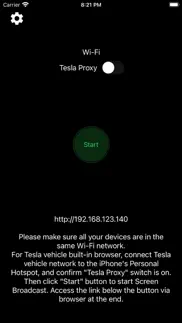
4. Ensure the iPhone is not in Low Power Mode. Launch the TslaMirror app and toggle on “Proxy.”
5. Tap “Start,” then select “Start Broadcast” to begin screen broadcast.
6. In your Tesla’s built-in browser, go to https://TslaMirror.com
7. Pinch in the browser to zoom in or out.
8. In H.264/H.265 mode, lossless audio playback is supported in the browser.
9. In MJPEG mode, only video is mirrored. For audio, use a Bluetooth connection from your iPhone to the Tesla’s speakers.
10. Keep your iPhone unlocked; due to Screen Broadcast API limitations, locking the screen stops casting and requires restarting the broadcast.
Key Features
1. No additional internet traffic is used for mirroring; traffic stays on the iPhone’s Personal Hotspot. However, while the Tesla is connected to the hotspot, the vehicle may use your cellular data for its own internet access.
2. Private: the screencast is only available to devices connected to the iPhone Personal Hotspot Wi-Fi network.
3. A 5 GHz Personal Hotspot (supported from the iPhone 12 series) is highly recommended. Do not enable “Maximize Compatibility” on iPhone 12 models; enabling it forces a 2.4 GHz hotspot.
4. H.264/H.265 mirroring recommendations:
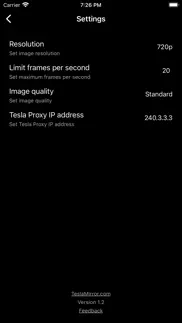
- MCU3 (AMD Ryzen): H.265 mode with 720p@60 fps recommended, as 1080p requires higher bandwidth. MCU3 supports up to 1080p@60fps (H.264 and H.265).
- For Tesla in-car system software version 2025.38.11 and later, H.265 mirroring is now recommended for both MCU2 and MCU3.
- MCU2 (Intel Atom): H.264 mode with 540p@30fps recommended only for very old Tesla in-car system.
FAQ
1. This is not CarPlay.
2. iOS apps that use the AVPlayer framework (e.g., Apple Music, Netflix) are not supported.
3. Netflix is not supported.
Privacy/Security Notice: This app does not collect usage statistics, personal information, or analytics. On iOS 13 and later, it uses Location Services only to read the Wi-Fi network name (SSID). Location data is never stored or collected. No information is stored by us.
Disclaimer: This software and documentation are not affiliated with or endorsed by Tesla, Inc. Use at your own risk. We do not guarantee proper functioning. Some features require specific vehicle options (e.g., MCU2 or newer). The app uses interfaces similar to those used by official Tesla apps, but you are responsible for any changes to your car resulting from use. Use requires the vehicle’s built-in browser. We are not liable for any damages to you, your car, or any other property in conjunction with the use of this app.
Warning and Legal Disclaimer: Use only while PARKED (0 mph / 0 km/h). Local laws may restrict the use of a built-in web browser in a vehicle.
Terms of Use (EULA): https://teslamirror.com/terms.html
Privacy Policy: https://teslamirror.com/privacy.html
👋 Wenn dir die TslaMirror anwendung gefällt, kannst du sie dann mit deinen freunden teilen?


| Anwendungsname | TslaMirror |
| Kategorie | Dienstprogramme |
| Entwicklers | Wuhan TrustComputing IT Co., Ltd. |
| Veröffentlicht | Freitag, 11. Dezember 2020 |
| Aktualisiert | Sonntag, 19. Juli 2026 |
| Dateigröße | 13.94 MB |
Kommentare zu den Noten TslaMirror
Wir überweisen monatlich über vier milliarden Euro. Wir sorgen dafür, dass privat- und geschäftskonten 4 Millionen Euro an überweisungsgebühren einsparen. Erhalte deine gebührenfreie Überweisung
Nur selten hilfreich. Die App ist keinerlei Alternative zur CarPlay-Funktionalität. Bedienung am Tesla-Bildschirm nicht möglich. Für mich und bis auf Ausnahmefälle ist die App nicht hilfreich.
Genau was ich gesucht habe.. Die beste App, der von mir getesteten (es gibt mehrere „AirPlay Apps“ im AppStore -diese hier funktioniert mit einer brauchbaren Übertragungsgeschwindigkeit. Seit dem Tesla WiFi auch im Fahrbetrieb freigegeben hat auch während der Fahrt. ✅ Der Ton wird zwar nicht gestreamt, funktioniert aber, wenn das gleiche iPhone/iPad auch über Bluetooth mit dem Tesla verbunden ist und Bluetooth, als Audio Quelle ausgewählt ist. 😀 Auf diese Weise habe ich auch schon im Testbetrieb Alternative Navi-Apps am iPhone & iPad mit LTE betrieben. ⚠️ Tipp: die entsprechende Web Adresse als Favorit im Tesla speichern. ❌PS: ich verstehe die schlechte Bewertung nicht, die die App abwertet für Features, die gar nicht von der App beworben werden. Nirgendwo sagt der App Anbieter, dass die App CarPlay ersetzt (im Gegenteil), oder dass der Touch Screen bidirektionale funktioniert (das ist mit AirPlay gar nicht möglich).
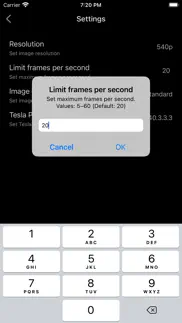
Funktioniert, jedoch massive Verzögerung.. Der Screen wird erfolgreich im Browser angezeigt. Jedoch mit einer massiven Verzögerung. Selbst wenn man die Bilder pro Sekunde auf 60 hebt. So ist es leider nicht zu gebrauchen.
Wussten sie, dass sie durch ihre anmeldung 25 US-Dollar auf unserer website verdienen können? Verdiene 25$ kostenlos indem du dich bei Payoneer anmeldest!
Mind Lab Pro ® ist ein wissenschaftliches Medikament, das die Arbeitsleistung und Produktivität mit Nootropika für Konzentration, Stress-Multitasking, kreative Problemlösung und mehr verbessert. Bringen Sie Ihr Gehirn auf 100% Leistung! Besorgen!
Suchen Sie nach einer alternativen Adsense-Werbeplattform? Adsterra ist das bevorzugte Werbenetzwerk für diejenigen, die nach einer Alternative zu AdSense suchen. Adsterra ist die ideale Wahl für neue Websites mit geringem täglichen Traffic. Um auf der Website in Adsterra zu werben, ist wie in anderen Werbenetzwerken ein bestimmtes Traffic-Limit, Domain-Alter usw. erforderlich. Es gibt keine strengen Regeln. Jetzt registrieren!

TslaMirror app Facebook-Kommentare werden hochgeladen, bitte warten...
TslaMirror Kundendienst
Was halten Sie von der TslaMirror-App? Können Sie Ihre Beschwerden, Erfahrungen oder Gedanken zur Anwendung mit dem Unternehmen und den Mitarbeitern von Wuhan TrustComputing IT Co., Ltd. teilen?


TslaMirror Apps Bilder und Bildschirmfoto
TslaMirror app iphone, ipad, apple watch ve apple tv app bilder.
| Sprache | German |
| Preis | Kostenlos |
| Altersgrenze | 4+ jahre und älter |
| Letzte Version | 9.65 |
| Play Store | com.hustmobile.screencastfortesla |
| Kompatibilität | iOS 16.0 und höher |
TslaMirror (Version 9.65) Anwendung Herunterladen und Installieren
Die Applikation TslaMirror wurde am Freitag, 11. Dezember 2020 in der kategorie Dienstprogramme veröffentlicht und von Wuhan TrustComputing IT Co., Ltd. [Developer ID: 370363169] entwickelt. Diese anwendungsdatei hat eine größe von 13.94 MB. Diese App wurde von 1 Benutzern bewertet und hat eine Bewertung von 4,0 von 5. Die neueste auf Sonntag, 19. Juli 2026 veröffentlichte Version von TslaMirror ist 9.65. Es funktioniert problemlos auf feräten mit mindestens IOS 16.0 und höher. ID-Nummer des Google Play Store: com.hustmobile.screencastfortesla. Von der App unterstützte Sprachen:
EN ZH Installieren und Herunterladen!| Anwendungsname | Score | Kommentare | Preis |
| GoodPlayer | 2.3 | 33 | 2.99 |
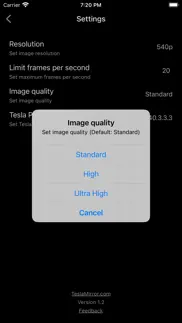
9.65: - Added Software and Hardware decoder selection for H.264 and H.265. Use the controls in the upper-right corner of the Tesla browser streaming page; touch the screen to show them if hidden. - Hardware decoding is generally recommended for smoother playback and better efficiency. If the browser does not support it or the video does not display correctly, try Software decoding. - If Software decoding is not smooth, try lowering the resolution and frame rate in the TslaMirror app settings. 9.64: - Performance improvements. - For Tesla in-car system software version 2025.38.11 and later, H.265 mirroring is now recommended for both MCU2 and MCU3. 9.25: - Added H.265 mirroring mode for improved video quality. - H.265 playback is supported on all MCU3 vehicles, and on MCU2 vehicles running Tesla software 2025.38.11 or later. - To switch modes, tap the Settings button in the top-right corner → “Mirroring mode”. - H.264 remains the default. On MCU3 (and supported MCU2 vehicles), H.265 is recommended. - On MCU3, H.265 enables smooth playback at 1080p@60 fps. - Resolution and frame-rate settings for the H.265/H.264 modes depend on your vehicle’s performance. For older Tesla models, use lower settings; for newer models, increase them gradually to suit your needs. 8.07: Siri Shortcuts support: Start Mirroring, Stop Mirroring, Start Proxy, Stop Proxy. 7.00: After careful investigation, it appears that the recent Tesla 2025.8.4 software update may have inadvertently impacted support for H.264 video streaming. - The updated H.264 mode is now compatible with Tesla’s 2025.8.4 software. - Due to limitations introduced in Tesla 2025.8.4, video playback performance in the new H.264 mode may be somewhat reduced compared with previous versions. - To achieve optimal streaming performance, consider lowering your “Resolution” and “Frames per second” settings. You can adjust these by tapping the Settings button in the top-left corner of the app. - To ensure the Tesla browser uses the latest version of a webpage, clear the vehicle’s browser data (as you would on a computer or phone) via Controls > Service > Clear Browser Data. Thank you for your understanding and patience. 6.00: - Starting with version 6.00, the audio transmission method has been completely updated and is no longer compatible with version 4.00. Tesla software versions 2024.45.32.1 and later no longer support the old method. - The new audio transmission method is comparable to Bluetooth audio and supports lossless audio. - Lossless audio specs: 44.1 kHz, stereo, 16-bit (CD quality). This is typically much better than Bluetooth or low-bitrate streaming audio. - These specs reflect the highest recording quality supported by iPhone. For best results, use music apps configured for lossless or higher-quality audio. - Lossless audio transmission is available only in H.264 mode, which includes a “Lossless Audio” option enabled by default that controls audio transmission to the browser. - Audio transmission depends on DRM restrictions set by third-party apps. If a third-party app allows screen recording and its audio is DRM-free, it can be transmitted normally. - To play audio in the browser, initial manual interaction is required (tap the audio button in the top-left corner). The button hides automatically after 30 seconds and reappears when the screen is touched. - During prolonged audio playback, latency may gradually increase. Tap the audio button in the top-left corner to restart audio and minimize latency. - For optimal transmission performance, we recommend using a 5G or 4G cellular signal along with a 5 GHz iPhone Wi-Fi hotspot (cellular signal and Wi-Fi frequency are separate parameters).
| Anwendungsname | Entwicklers |
| Notan | Tien Do Nam |
| Sticker Maker Studio | Tamara Vardanyan |
| Identity online | Identity Trust Management AG |
| AusweisApp Bund | Governikus GmbH & Co. KG |
| Amazon Fire TV | AMZN Mobile LLC |
Überprüfen Sie die Ergebnisse Ihrer SEO-Arbeit? Oder sehen Sie sich einfach Ihr Keyword-Ranking in Google an? Wenn Sie die Daten Ihrer SEO-Arbeit nicht richtig lesen können, verlieren Sie viel!
| Anwendungsname | Entwicklers |
| ACC Strategist | Sylvain Villet |
| Vinegar - Tube Cleaner | And a Dinosaur |
| WomoSet | Ralf Andrae |
| Overseerr | Sayan Goswami |
| Block Puzzle Helper | Miguel Beltran Sanz |
Entdecken Sie, wie verschiedene Kryptowährungen funktionieren, und verdienen Sie einen kleinen Betrag von jeder Kryptowährung, um sie selbst auszuprobieren. Coinbase ist der einfachste Ort, um Krypto zu kaufen und zu verkaufen. Jetzt anmelden, loslegen.
| Anwendungsname | Entwicklers |
| Google Gemini | |
| AusweisApp Bund | Governikus GmbH & Co. KG |
| Spotify Musik und Podcasts | Spotify |
| Splash - Party Spiele | Cranberry Apps |
Jasper ist der Schöpfer künstlicher Intelligenz, der Ihnen und Ihrem Team dabei hilft, kreative Barrieren zu überwinden, um erstaunliche, originelle Inhalte 10x schneller zu erstellen.
| Anwendungsname | Entwicklers |
| Procreate Pocket | Savage Interactive Pty Ltd |
| EO Guide | EO Guide GmbH |
| AnkiMobile Flashcards | Ankitects Pty Ltd |
| WeatherPro | DTN Germany GmbH. |
| Plague Inc. | Ndemic Creations |
Mind Lab Pro ® ist ein wissenschaftliches Medikament, das die Arbeitsleistung und Produktivität mit Nootropika für Konzentration, Stress-Multitasking, kreative Problemlösung und mehr verbessert. Bringen Sie Ihr Gehirn auf 100% Leistung!
Adsterra ist das bevorzugte Werbenetzwerk für diejenigen, die nach einer Alternative zu AdSense suchen. Adsterra ist die ideale Wahl für neue Websites mit geringem täglichen Traffic. Um auf der Website in Adsterra zu werben, ist wie in anderen Werbenetzwerken ein bestimmtes Traffic-Limit, Domain-Alter usw. erforderlich. Es gibt keine strengen Regeln.
Adsterra ist das bevorzugte Werbenetzwerk für diejenigen, die nach einer Alternative zu AdSense suchen. Adsterra ist die ideale Wahl für neue Websites mit geringem täglichen Traffic. Um auf der Website in Adsterra zu werben, ist wie in anderen Werbenetzwerken ein bestimmtes Traffic-Limit, Domain-Alter usw. erforderlich. Es gibt keine strengen Regeln.