Code App Bewertung
Code App App Beschreibung und Prüfung
Was ist die code app-app? Code App ist ein MIT-lizenzierter Desktop-Code-Editor für iPadOS mit integrierter Node.js-, Python-, C-, C++-, PHP- und Java-Laufzeit.
Wir haben es entwickelt, weil es im App Store nichts anderes gibt, das alle diese Funktionen in einer App bietet:
* Ein robuster, leistungsstarker Texteditor (Monaco Editor von Visual Studio Code)
* Autovervollständigung, statische Codeanalyse und andere Sprachfunktionen für Python und Java
* Erstklassige Unterstützung für lokale Dateisysteme
* Umfangreiche Unterstützung der Landessprache
* SSH/FTP-Remote-Verbindungsunterstützung (Dateien und Terminal)
* Eingebettetes emuliertes Terminal
* Git-Versionskontrolle
* Paketmanager-Unterstützung (pip und npm)
* Markdown, Themes, serverseitige Snippet-Ausführung und mehr
Lesen Sie die Dokumentation von Code App: code.thebaselab.com
Den Quellcode, die Roadmap und die Diskussion des Projekts finden Sie auf GitHub: github.com/thebaselab/codeapp
Senden Sie uns eine E-Mail: [email protected]
Datenschutzrichtlinie: thebaselab.com/privacypolicies
Nutzungsbedingungen (EULA): www.apple.com/legal/internet-services/itunes/dev/stdeula/
👋 Wenn dir die Code App anwendung gefällt, kannst du sie dann mit deinen freunden teilen?


| Anwendungsname | Code App |
| Kategorie | Entwickler-Tools |
| Entwicklers | Thebaselab Ltd |
| Veröffentlicht | Donnerstag, 28. Mai 2020 |
| Aktualisiert | Sonntag, 22. März 2026 |
| Dateigröße | 953.67 MB |
Kommentare zu den Noten Code App
Wir überweisen monatlich über vier milliarden Euro. Wir sorgen dafür, dass privat- und geschäftskonten 4 Millionen Euro an überweisungsgebühren einsparen. Erhalte deine gebührenfreie Überweisung
Absolutely amazing possibility for some code editing on the iPad. I really like the app and as it improves, it is very likely going to become my goto when it comes to some light code editing on the iPad. One thing that should defenitely be changed is the spacing in the file explorer. While it looks quite nice with projects with very few files and folders, even for <20 source code file projects, with a few nested folders, the explorer looks really ridiculous (at least on my 10.5 inch iPad Pro, with a larger one it would probably be better). Another annoyance is, that often the file explorer or the tab bar at the top do not seem to react to clicks with the mouse / finger at all, so e.g. folders do not open...
Feels like a real IDE. I need to write Java at university and don’t want to carry a laptop when I’m already carrying an iPad. This is the only app that lets me run Java while providing a good editing experience and I can even use it with WorkingCopy as my git client. I like that I can run apps that open other apps via the terminals „open“ command but would love either Siri Shortcuts or x-url-callback to be supported by this app. Im also missing some customization ability being spoiled by desktop VSCode. I can’t wait for Java to be able to run locally. I have no idea how to select multiple lines of code to copy or delete at once (-1 star).
Much to be desired. Many bugs, keyboard constantly disappearing until you restart the app. No LSP for any language besides JavaScript. For JavaScript most of npm create xy commands don‘t work which makes setting up projects a major pain. No Support for build systems like CMake for C++ or Maven for Java. Somewhat useful for toying around or when you are learning to program. Stay away if you actually want to get work done.
Apple Watch App. I love the app but I‘m really missing an Apple Watch app. Why are all Texteditors for iOS disregarding this feature? Here is my envisioned Workflow: I go for a run. Suddenly a Realisation strikes me: I finally understand why the united test failed. I pause my workout. Do a couple of quick edits on my Apple Watch, push the new code to git and when I’m back home I can already see whether or not any build or test failed.
Everything you need but with bugs. It’s the only code editor i would recommend. It lets you run npm modules, setting up a python environment and comes with an integrated terminal. Sadly the terminal comes also with bugs concerning keyboard inputs. The 5 star rating is here to give it attention, which hopefully motivates to bring this editor further.
bitte lesen. Sie sollten ein paar plugins rein machen in die appist einfach super clean und sehr gut ich bin ein leidenschaftlicher Dev der für kostenlose Leute Bots auf Discord erstellt Daher braucht hier auch ein terminal wo man Plugins installieren kann oder herunterladen sollte sorry wegen Rechtschreibung
Leider unbrauchbar. Die Tastatur öffnet sich oft nicht, ein Neustart ist nötig, das hält meist 1-2 min. Dann ist die Tastatur wieder verschwunden… Wenn ich im Terminal beispielsweise ein pip-Paket installiere, dann kann ich keine Leerzeichen mehr im Terminal schreiben, das Terminal rutscht pro Leertastendruck um ca. 8 Zeilen nach unten. Somit ist die App leider absolut unbrauchbar da ich nicht mal die Möglichkeit habe vernünftig Eingaben zu machen ohne alle 1 bis 2 min. die App neu zu starten… (Nutze IPhone XR)
Könnte so gut sein.... ...Wenn alles wie angepriesen funktionieren würde. Leider immer noch einige Fehler bzw. merkwürdige Verhaltensweisen im Editor, die einem die Arbeit erschweren. Npm Pakete lassen sich nicht installieren, selbst die Beispiele von der Herstellerseite laufen nicht. Bug reports auf Github werden nicht beantwortet. Alles in allem das Geld leider nicht wert.
Remote-Funktionen (FTP/SFTP) fast nutzlos. Leider werden auf einem Linux-Host weder Softlinks auf Verzeichnisse unterstützt noch kann man auf einem sFTP-Host auf ein beliebiges Verzeichnis außerhalb des User-Homes wechseln (z.B /etc/ und nicht nur /home/user). Das macht das Programm für mich praktisch nutzlos, der Editor scheint sonst ausgereift. Schade!
Super App. Wenn noch die kleinen Probleme mit dem Terminal behoben werden ist dies mit Abstand die beste Programmierer App im Appstore. Besonders wenn man von VSCode kommt. Es ist bestimmt noch Luft nach oben für eigene Themes, Outline und erweiterter Clang Support.
Great app for some local development. First of all, an incredible THANK YOU to the developers for an app that allows you to do a bit of local development without a cloud connection. It's also great that you can simply install TypeScript via npm. However, I would also like to be able to run it locally with one click. Running locally is possible (but a bit cumbersome) with 2 commands on the terminal (an npm script with “&&” somehow doesn't want to work). What I want to say: Custom local build configurations would be awesome. The dream would be completely local React development with Nx, ESLint, Prettier and StyleLint. However, I fully accept that this is likely out of scope for this app :D
Es funktioniert nichts. Auf dem iPad Pro funktioniert nichts npm installiert nichts. Kein npx … Geld Verschwendung.
Noch ein wenig optimierbar. Die Code App ist echt nicht schlecht und hat große Ähnlichkeit mit der bekannten App auf dem normalen Rechner. Leider kann man jedoch noch nicht richtig mit React darauf entwickeln - Wäre toll wenn React Apps damit vollständig entwickelt werden können, dann ist das iPad in Kombination mit der Code App eine gute Alternative zum normalen Laptop.
VSCode for the iPad ?. The Editor looks pretty good. Its a far cry from what VSCode and its countless Plugins can offer, but for the iPad it is defnitly in the upper class of editors. The added SFTP / Remote-Storage support is very welcome. I use a RasPI with Wifi-Access-Point to do all my development on. For that, this App offers a less complicated Workflow then Textastic, while keeping a similar coding experience. If I could make a wish, it would be a Vim control-scheme , like you can create it with plugins under VSCode. Otherwise thumbs up.
Not quite there yet. At it's current stage, this is probably more a proof of cocept than a real IDE. There are a lot of bugs and I couldn't manage to write a simple static web application. I still feel like this has a lot of potential though, I really hope this becomes better over the years.
Node 16 ?. Also hier steht ja das die Node.js 16 unterstützt wird jedoch kann ich machen was ich will local ist es ja so wie es aussieht 12 kann man das irgendwie umstellen ? gibt ja nur den einen Hacken bei 12 lg
Beste App im AppStore. Mit abstand die beste App im App Store
too many bugs. toggling tabs does not work! Die Idee ist super, aber leider klappt es noch nicht einmal, die Tabs ein- und auszublenden, um mehr Platz auf dem Display zu haben. Da nützen mir auch die ganzen Features nichts, wenn Burtons einfach nicht funktionieren, schade!
Super App. Ich finde diese App super. Ich kann damit fast alles machen, wie bei VS Code auf dem PC. Ich verstehe nicht warum die App jetzt „ nur“ 3,8 Sterne hat.
A lot of potential. I can't copy and paste into the terminal and sometimes it crashes when I try to search on github, which does not work. The interface is really nice and I hope that it becomes more refined. Maybe with some apple pencil support too. In the long run vs code plugins would make this a killer app for the iPad for me.
Best Code IDE for IOS!. This is really the best IDE for mobile devices. Great!
Super App. Ich liebe dieses App. Momentan lerne ich Python, und mithilfe von "Code" fühle ich mich wie pro.
Die beste IDE im AppStore. Die IDE ist bei weitem nicht so gut wie ihre Desktop Artgenossen, doch ist sie Gleichzeitig die einzig Sinnvolle Alternative für das iPad. Es kommen stetig Updates und wer nur für die Vorlesung mittippen und keinen Laptop mitschleifen möchte, der wird hier fündig. Es gibt der Zeit nun mal nichts Besseres.
More features please. Very good so far, if it had Python autocompletion, it would be 5*
Text Selection Bug. Text selection does not work you can only select partially one time even the indicator I can’t move it to select what i want
Too many bugs that make the ide unusable. Like if you want to switch between tabs it nearly works. Also selecting code in this ide is LITRAL HELL the blue selection thing jumps all around the Code, skip the code you wanted to select and delegates some bits of the code. Please fix those bugs
nice but,. id possible i would like to host my own dev server
Really loving the app. It makes you feel right at home as far as file management and multi file programming is concerned. It has everything you will ever need. My only complain is that it doesn‘t support CMake. Yes you can create the file but you wont be able to run it as you normally do in VSCode for example. You are only constrained to the run button on the topbar.
Super App + Wunsch. Ich finde die App ist super für den Informatik-Unterricht in der Schule, da sie perfekt für Web-Programmierung geeignet ist. Einen Wunsch bzw. einen Kritikpunkt hätte ich aber trotzdem… Es wäre schön, wenn die App auch Flutter bzw. Dart unterstützen würde, da dies das ist, was mich am Meisten interessiert und was ich am liebsten lernen möchte, jedoch funktioniert es mit dieser App nicht… Ich hoffe, dass der/die Entwickler/in eine Unterstützung von Flutter ermöglicht, weil diese App wirklich super ist. Edit: Java funktioniert nicht richtig… InOut.read funktioniert nicht
Wussten sie, dass sie durch ihre anmeldung 25 US-Dollar auf unserer website verdienen können? Verdiene 25$ kostenlos indem du dich bei Payoneer anmeldest!
Debug mode is missing. This app ist great for people who want a similiar app like VS Code. I would be fantastic to use the Debug mode. I would completely change from the VS Code on my computer to code app on my iPad. Nowadays i have to use my PC to Debug my code, i hope you would integrade this modus. Even this mode isn't integrated, the app deserved 5 Stars.
Great App. This is a great app, runs very fast! The only problem is, that sometimes it is not possible to copy the code in the app and paste it.
Super!. Eine OFFLINE-Coding-App die tatsächlich großteils funktioniert! Super, bis auf den Scanner bei Java.
VSC for iPhone/iPad/Mac. I was looking for a similar app like visual studio code and this app is built and looks exactly like VSC, I freaking love this app! :D 5/5 Stars
Good Editor, but a lot of problems. Installing dependencies often fails with a program interrupted error. The first time you start the editor it crashes and then only the second time you open it, it does not crash. Larger projects cannot be installed because npm crashes before it can download all the dependencies. Often you can't mark anything in the code with the mouse.
It has potential. Exactly what I was looking for, but how do I delete files?
Almost Excellent. Pros: - Highlights and compiles code in many languages - Darkmode and nice VSCode UI Cons: - Needs Autosave and CTRL+S instead of this extra bar that‘s taking up precious vertical space - More functionality would be awesome (offline compilers, debugger, exentions, etc.) Eventhough it lacks some feature, it is still one of the best iOS IDEs and free.
Mind Lab Pro ® ist ein wissenschaftliches Medikament, das die Arbeitsleistung und Produktivität mit Nootropika für Konzentration, Stress-Multitasking, kreative Problemlösung und mehr verbessert. Bringen Sie Ihr Gehirn auf 100% Leistung! Besorgen!
Suchen Sie nach einer alternativen Adsense-Werbeplattform? Adsterra ist das bevorzugte Werbenetzwerk für diejenigen, die nach einer Alternative zu AdSense suchen. Adsterra ist die ideale Wahl für neue Websites mit geringem täglichen Traffic. Um auf der Website in Adsterra zu werben, ist wie in anderen Werbenetzwerken ein bestimmtes Traffic-Limit, Domain-Alter usw. erforderlich. Es gibt keine strengen Regeln. Jetzt registrieren!

Code App app Facebook-Kommentare werden hochgeladen, bitte warten...
Code App Kundendienst
Was halten Sie von der Code App-App? Können Sie Ihre Beschwerden, Erfahrungen oder Gedanken zur Anwendung mit dem Unternehmen und den Mitarbeitern von Thebaselab Ltd teilen?
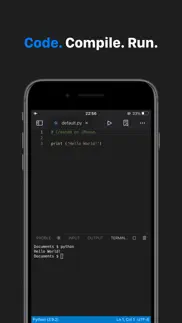
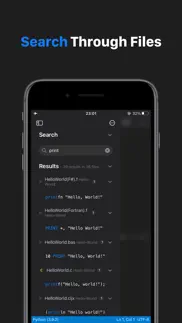


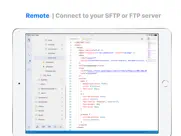

Code App Apps Bilder und Bildschirmfoto
Code App app iphone, ipad, apple watch ve apple tv app bilder.
| Sprache | German |
| Preis | 7.99 EUR |
| Altersgrenze | 4+ jahre und älter |
| Letzte Version | 1.12.1 |
| Play Store | thebaselab.VS-Code |
| Kompatibilität | iOS 16.0 und höher |
Code App (Version 1.12.1) Anwendung Herunterladen und Installieren
Die Applikation Code App wurde am Donnerstag, 28. Mai 2020 in der kategorie Entwickler-Tools veröffentlicht und von Thebaselab Ltd [Developer ID: 1452525755] entwickelt. Diese anwendungsdatei hat eine größe von 953.67 MB. Diese App wurde von 94 Benutzern bewertet und hat eine Bewertung von 4,0 von 4.0. Die neueste auf Sonntag, 22. März 2026 veröffentlichte Version von Code App ist 1.12.1. Es funktioniert problemlos auf feräten mit mindestens IOS 16.0 und höher. ID-Nummer des Google Play Store: thebaselab.VS-Code. Von der App unterstützte Sprachen:
EN DE JA KO RU ZH Installieren und Herunterladen!| Anwendungsname | Score | Kommentare | Preis |
| Finesse Camera | 1 | Keine kommentare | Kostenlos |
| Cards App - Thoughts Memos | 1 | Keine kommentare | Kostenlos |
- Behebt einen Fehler mit SSH-Verzeichnissen
| Anwendungsname | Entwicklers |
| ETicket.app | Sasse Solutions GmbH |
| Docker Manager - WhaleDeck | Florian Seida |
| Userscripts | Justin Wasack |
| Apple Developer | Apple |
| Storm Sniffer - Packet Capture | Hunan Storm Technology Co.,Ltd |
Überprüfen Sie die Ergebnisse Ihrer SEO-Arbeit? Oder sehen Sie sich einfach Ihr Keyword-Ranking in Google an? Wenn Sie die Daten Ihrer SEO-Arbeit nicht richtig lesen können, verlieren Sie viel!
| Anwendungsname | Entwicklers |
| Harbour - Docker Manager | Kacper Kaczmarzyk |
| MermaidEditor | 基伟 徐 |
| Face Mesh | Tech Positive |
| Ruby 2.0-run code,pro | 小文 黄 |
| Text Editor - Document Editor | Supagarn Pattananuchart |
Entdecken Sie, wie verschiedene Kryptowährungen funktionieren, und verdienen Sie einen kleinen Betrag von jeder Kryptowährung, um sie selbst auszuprobieren. Coinbase ist der einfachste Ort, um Krypto zu kaufen und zu verkaufen. Jetzt anmelden, loslegen.
| Anwendungsname | Entwicklers |
| WetterOnline mit RegenRadar | WetterOnline - Meteorologische Dienstleistungen GmbH |
| Komoot - Wandern und Radfahren | Komoot GmbH |
| Doctolib - Die Gesundheits-App | Doctolib |
| Lidl Plus | Lidl Digital International GmbH & Co. KG |
| Telegram Messenger | Telegram FZ-LLC |
Jasper ist der Schöpfer künstlicher Intelligenz, der Ihnen und Ihrem Team dabei hilft, kreative Barrieren zu überwinden, um erstaunliche, originelle Inhalte 10x schneller zu erstellen.
| Anwendungsname | Entwicklers |
| Rebel Inc. | Ndemic Creations |
| ProCamera. RAW Fotografie | Cocologics |
| WeatherPro | DTN Germany GmbH. |
| Age of History 3 | Lukasz Jakowski Games |
| Blitzer.de PRO | Eifrig Media |
Mind Lab Pro ® ist ein wissenschaftliches Medikament, das die Arbeitsleistung und Produktivität mit Nootropika für Konzentration, Stress-Multitasking, kreative Problemlösung und mehr verbessert. Bringen Sie Ihr Gehirn auf 100% Leistung!
Adsterra ist das bevorzugte Werbenetzwerk für diejenigen, die nach einer Alternative zu AdSense suchen. Adsterra ist die ideale Wahl für neue Websites mit geringem täglichen Traffic. Um auf der Website in Adsterra zu werben, ist wie in anderen Werbenetzwerken ein bestimmtes Traffic-Limit, Domain-Alter usw. erforderlich. Es gibt keine strengen Regeln.
Adsterra ist das bevorzugte Werbenetzwerk für diejenigen, die nach einer Alternative zu AdSense suchen. Adsterra ist die ideale Wahl für neue Websites mit geringem täglichen Traffic. Um auf der Website in Adsterra zu werben, ist wie in anderen Werbenetzwerken ein bestimmtes Traffic-Limit, Domain-Alter usw. erforderlich. Es gibt keine strengen Regeln.