OmniFile Pro
OmniFile Pro Appanmeldelser
Hva er OmniFile Pro-appen? OmniFile is a powerful, intuitive, and secure file transfer client designed for macOS professionals. Experience seamless file management with an advanced dual-pane interface, multiple tabs, and comprehensive multi-protocol support.
Key Features:
• All Major Protocols: Connect via FTP, FTPS (Implicit & Explicit SSL), SFTP, Dropbox, Google Drive, Onedrive, Amazon S3, Backblaze B2, Wasabi, DigitalOcean Spaces, and other S3-compatible cloud services.
• Real Multi-Tab & Multi-Session: Easily work with several connections at once. Each tab remembers its own state, folder, queue, and sync actions.
• Dual-Pane & Drag & Drop: Effortlessly transfer files between panels, tabs, or Finder. Drag and drop is fully supported across all local and remote panels—just like Mac users expect.
• Powerful Sync & Compare: Synchronize entire folders, preview changes, handle conflicts smartly, and perform one-way or bi-directional syncs—now with even faster comparison and filtering.
• Next-Gen Transfer Queue: Batch upload, download, and sync across local, remote, and cloud with automatic retries, transfer resume, and cloud-to-cloud support (S3, B2, Wasabi). Visual queue lets you monitor every operation in real time.
• Cloud Storage Made Easy: Native support for S3 and other leading cloud storage services—explore, upload, move, and sync cloud folders like any other drive.
• Smart Automation: Save time with folder bookmarks, queue persistence across restarts, and “resume all” after accidental disconnects or app restarts.
• Duplicate & Visual Similarity Detection: Instantly scan for duplicate files or visually similar images across your drives and connected servers.
• Site Manager & History: Organize your connections in folders, browse history, and launch with one click. Import/export server settings for teams.
• Uncompromising Security: All credentials stored in the macOS Keychain, optional Touch ID unlock, and full SSL/TLS for every connection.
• macOS Native: Full support for light/dark modes, keyboard shortcuts, Quick Look integration, familiar context menus, and fast, fluid UI built for Apple Silicon.
• Pro File Operations: Copy, move, batch rename, bulk CHMOD, metadata preview—works everywhere, locally and remotely.
• Integrated Logging: See all transfers, history, and errors in a single place. Monitor activity live or export logs for auditing.
Whether you’re a developer, sysadmin, designer, or anyone managing cloud and servers, OmniFile gives you a professional, secure, and efficient file workflow on macOS.

OmniFile Pro Kommentarer 2026
| Appens Navn | OmniFile Pro |
| Kategori | Verktøy |
| Utvikler | ERLEND JOHNSRUD VAAGE |
| Publisert | 18 November 2025, Tuesday |
| Oppdatert | 16 June 2026, Tuesday |
| Filstørrelse | 8.79 MB |
😍 Elsker du appen OmniFile Pro? Del med vennene dine!


OmniFile Pro 2.2 Tips, Triks, Jukser og Regler
Vennligst vent! OmniFile Pro app kommentarer laster inn...
OmniFile Pro 2.2 App Skjermbilder og Bilder
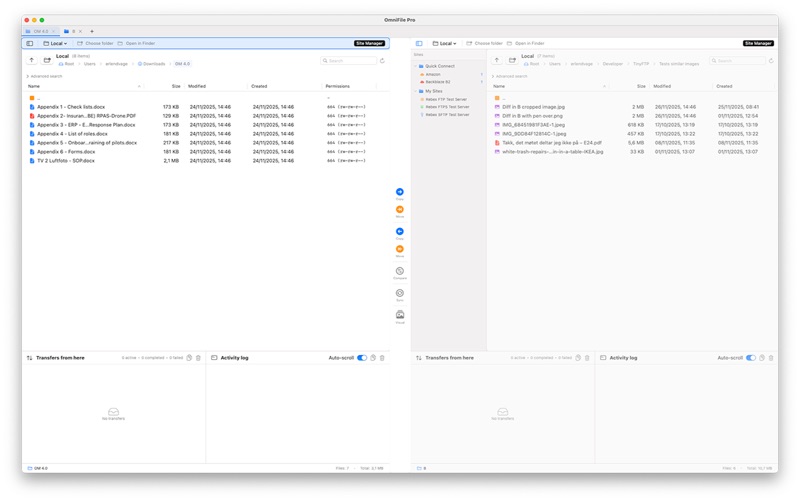


OmniFile Pro (versjon 2.2) Installasjon og Nedlasting
| Språk | Norsk |
| Pris | Gratis |
| Voksenvurdering | 4+ år og eldre |
| Siste Versjon | 2.2 |
| Play Store | com.avimedia.omnifilepro |
| Kompatibilitet | IOS 14.6 eller nyere |


