EpocCam Webcamera for Computer
EpocCam Webcamera for Computer Appanmeldelser
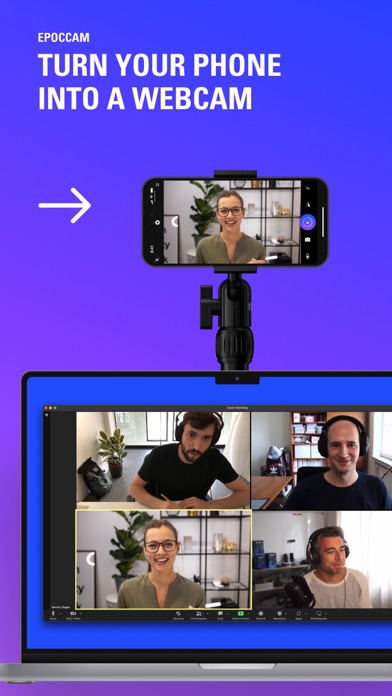
Hva er EpocCam Webcamera for Computer-appen? Gjør enkelt din telefon om til et høyoppløselig webkamera for Mac eller PC.
Perfekt for bedrifter, opplæring på nett, livestrømming og mer. EpocCam fungerer sømløst med populære programvarer for videosamtaler og kringkasting. Koble til med USB eller strøm kamerabilder til PC over Wi-Fi og beveg deg fritt mens du kringkaster uansett hvor du er innen ditt lokale nettverk.
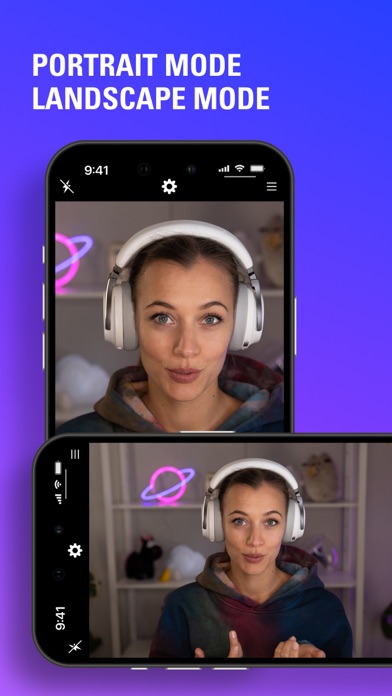
Ta bilder i stående eller liggende modus med uskarphet i bakgrunnen eller forbedret chroma-tast. Legg enkelt til en andre kameravinkel til ditt eksisterende oppsett. Når driverne for EpocCam er installert på datamaskinen din, vil telefonen automatisk dukke opp som et webkamera i apper som OBS Studio, Zoom og Microsoft Teams (kun Windows PC ).
Ta i bruk EpocCam for å øke telefonens gode yteevner, og se like bra ut på nett som du gjør ansikt til ansikt.
Høydepunkter:
- App for webkamera: endre din telefon til et høyoppløselig webkamera for datamaskinen.
- Profesjonell kvalitet: Utfør konferansetelefoner og strøm i 1080p, HDR og mer.
- Programvarevennlig: OBS Studio, Zoom, Microsoft Teams (kun Windows PC) og mer.
- Modi og effekter: portrett, landskap, uskarp bakgrunn, chroma-tast.
- Perfekt til fjernarbeid: bedrifter, opplæring på nett, innholdsskaping og mer.
- Enkel løsning for flere kamera: legg til et kamera til for å vinkle oppsettet.
- Trådløs frihet: koble til Wi-Fi for ubegrenset bevegelighet.
- Engangsoppsett: telefonen vises automatisk som et webkamera i programvaren til datamaskinen.
- Kompatibilitet: fungerer sammen med Mac og Windows PC.
Gjør telefonen din om til et webkamera på få minutter:
1. Hent EpocCAM-appen
2. Last ned og installer driverne
3. Koble telefonen til PC via Wi-Fi eller USB
4. Angi EpocCam som webkamera på din datamaskin
Krav:
- EpocCam App: iOS 13 eller senere
- EpocCam-drivere: macOS 10.14 eller senere / Windows 10
- Wi-Fi nettverk eller USB-kabel
Finn ut mer: https://elgato.com/epoccam

EpocCam Webcamera for Computer Kommentarer 2026
| Appens Navn | EpocCam Webcamera for Computer |
| Kategori | Foto og video |
| Utvikler | Corsair Memory, Inc. |
| Publisert | 18 May 2011, Wednesday |
| Oppdatert | 05 August 2024, Monday |
| Filstørrelse | 59.58 MB |
Good. It works
Curious. Have good expectations as I’ve heard good things
Highly unstable after the new update.. Stops working after a few minutes. Please downgrade asap. I use it every day, and now it is almost useless...
Ok. Ok
Nekter å gå full hd. Kameraet vil ikke gå full hd, kun hd
I would like to use the front camera. Camera
So far so good. But have to rate before tested
OK. OK kamera
Bra!. Bra!
Camera wont work. Connects to the computer. but the camera is only dark and is locked at the first image.
Good. Good
Bug after update. After the latest version was released, the app doesn’t prevent the phone going to auto lock, stops webcam function after phone turns off screen
Great. Great
oK. Couldve had more features. But works OK
Lett å bruke. Mett å innstsllere og bruke
Greit nok. Gjør det den skal
Crashing. It crash after using for how many minutes
Yhcgjcjlfoyr. Oufoføxgipgågæg
Yes. Yes
Good q, but slow. Slow, even with USB connection
Easy. So easy install
Wait and see. Wait and see
Nice but forcing review. The app looks nice and works as expected. However I don’t like being forced to give a review to enable front camera after paying for the pro version. Therefore only 4*.
Good. Vergood
Skuffende og villedende. Funker ikke med FaceTime, funker ikke med Photobooth, funker ikke i Safari, funker kun som mikrofon med Teams. I Zoom funker det fint. Dette burde man selvfølgelig bli opplyst om FØR man kjøper og ikke skjule det langt bak på en supportside. Regner denne appen som svindel.
Topp. Topp
Betale 85 kr og så må jeg rate for å bruke frontkamera?. Appen fungerer bra, men utpressing for at jeg skal rate fortjener 1 stjerne.
Emiks 2020. Topp
Doesn’t work with FaceTime!!. Pros: excellent utilisation of light-sensitive iPhone camera. Efficient WiFi connection. Con: I wouldn’t have paid for this if I had realised it doesn’t work with FaceTime or Skype!!! Tested it against pc with teams and it worked well so I bought the app. Wish they had been more clear in description about limitations. I’ve bought Elgato products since the early 2000’s. This is the first time I’m frustrated and disappointed. Whatever the technical reason, i feel tricked by selective marketing. Can’t use it for my intended use. Wasted money.
Mic not working. iPhone mic not working on pc. Can’t find out why. I have chosen Kinoni mic as standard mic on pc.
Great app. Works really good
Good connection bad lightning. It should inlude the feature to adjust camera lightning, my face is white!
Jaha. Rotete tilkobling, dyr app og må i tillegg skrive review for å få bruke frontkamera? Mystisk
Jjhgujgihkg. Hhjghhyc
I have to rate it to start using front cam. :-). The app is great so far, works with my Hackintosh via Wifi, 1080p, no lag.
This look good. Frist time user and already up.
Visual works fine!. Visual works fine. Havent tried the mic, because I had to write this review, and will need some time to check it out.
Kantoren. Bra
Havent trued it yet. 👍🏻
It works!!. Started with free version and upgraded once I confirmed it works with Microsoft Teams. With paid version you can use mobile’s microphone as opposed to free version.
Ok. Fun to use
Epoccam er brukbar. Kan vera buggy å kobla til, men fungerar deretter overraskande bra
Seems decent. Bit hard to set up though.
Ok. Ok
Works-ish. Works somewhat, but stuttery, low frame rate and terrible latency; even on a USB-C connection. Not worth the Pro upgrade at all.
Lol. Nfbfk
Great App. Great app!
Good, må skrive omtale for å få tilgang til frontkamera. 😊
Great. Looks great so far!
Ok. Have been using this with zoom. It will stop working when switching back and forth between Epoccam and built in camera. The app have to be restarted for it to connect to the mac again. If you use only the EpocCam it’ll work just fine. Just updated to the newest zoom version and now the EpocCam does not show up in camera choices. Please fix..
Bra. Kjempebra kvalitet
Amazing. Thanks for making this incredible app! I'm really satisfied. 😄👍😄
Funker fint. -og har alltid gjort det for meg :)
Great. Its a really great app, but there is a little lag sometimes... but the better phone you have the better it gets!
USB not working. I just purchased the app. The first thing i noticed when i added it in Streamlabs was that the quality was really good, but then it started to lag. I figured out that it lagged because it was connected through the wifi, and not USB. I cant Get the USB to work at all. I have connected my phone to the PC with an USB-cable, but in Streamlabs there is only a photo of a wifi on a black screen (when i added video capture). In the app i tried to change the connection method from «automatic» to «USB» only, but it just keeps on loading forever.
Hehe. Hhe
Its okey. 👍🏼
Hisika. Hi
Supert. Fungerer kjempebra
Goof. Good
Kan brukes. Funker bra når det fyst funker
Frontcamera. Have to rate the app for start using the front camera???
Goood. Vert Nice
Well worth the price. 😊👍
Bra. Bra
Bra. Bra kvalitet.
Bra. Bra app!!
Trump. Very cool epocam
:). :)
please update app. good app. great cam. but needs update for iOS 11
Bra. Veldig bra
Great software. This gave me Good quality videoes
Bra. Bra. Litt duse farger ellers ok ✅
Front camera. Front camera is good
Annefales. A+
Very nice. Good;)
Does not work. This app does not work on my iPhone 7plus, when I get to the first page and have read everything and press OK as it says nothing happens... can I have my money back please?
God. Very Nice. Prefer
Good. Very good quality if you buy the upgraded version
Helt ok. Fungerer bra men er litt vell avhengig av wifi kvalitet
Don’t work on windows 10. I’ve only ever gotten this to work on 7
Meh. Ey
Taralds. Nice
Hopefull. Gode sakeb
:). Megafett
Free version works perfect, paid crashes instantly at start up.. nice. Fix please
4 stars. ..as the HD-version now supports USB-connection. Great.
Great. Great
Nice. Nice
Bra. Ok
Works fine.. Does what is says.
hj. hhh
Yey. Yey
Bra. Bra
Thanks for front camera. Thanks for front camera
Hhkkj. Vjnghb
Ff. Ddd
Loopessi. Love IT
OK app.. Appen kan vise OK bilder i opp til 720p oppløsning. Derimot er ikke 720p oppløsning tilgjengelig hvis du ønsker å streame med f.eks OBS. Appen hindrer heller ikke telefonens Autolås noe som gjør den ganske ubrukelig.
G. H
😍 Elsker du appen EpocCam Webcamera for Computer? Del med vennene dine!


EpocCam Webcamera for Computer 2024.2 Tips, Triks, Jukser og Regler
Vennligst vent! EpocCam Webcamera for Computer app kommentarer laster inn...
EpocCam Webcamera for Computer 2024.2 App Skjermbilder og Bilder

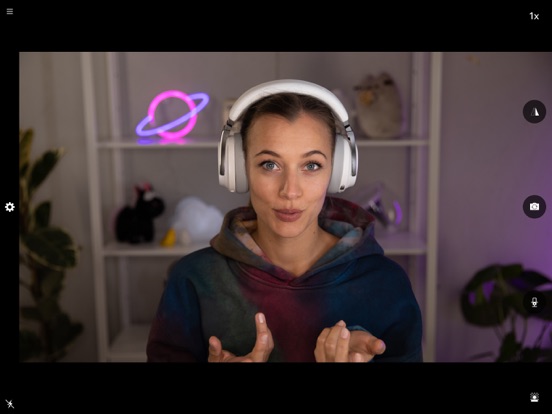
EpocCam Webcamera for Computer (versjon 2024.2) Installasjon og Nedlasting
| Språk | Norsk |
| Pris | 99 NOK |
| Voksenvurdering | 4+ år og eldre |
| Siste Versjon | 2024.2 |
| Play Store | com.kinoni.epoccamhd |
| Kompatibilitet | IOS 15.0 eller nyere |


