SimpleMindMap
SimpleMindMap Appanmeldelser
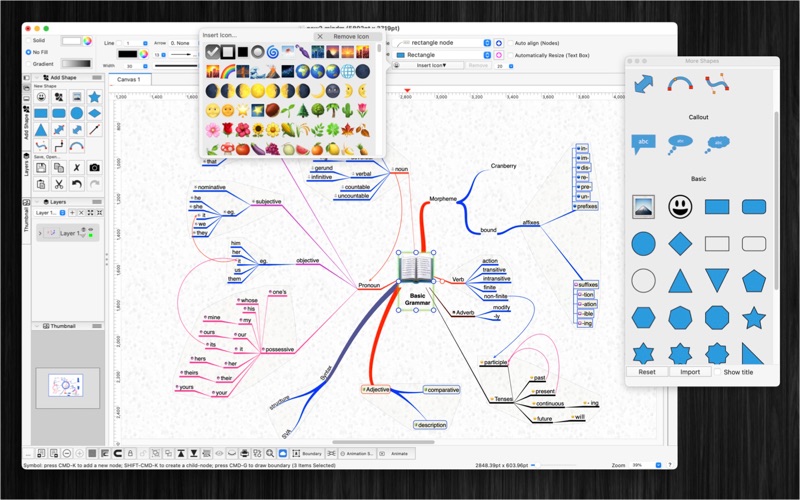
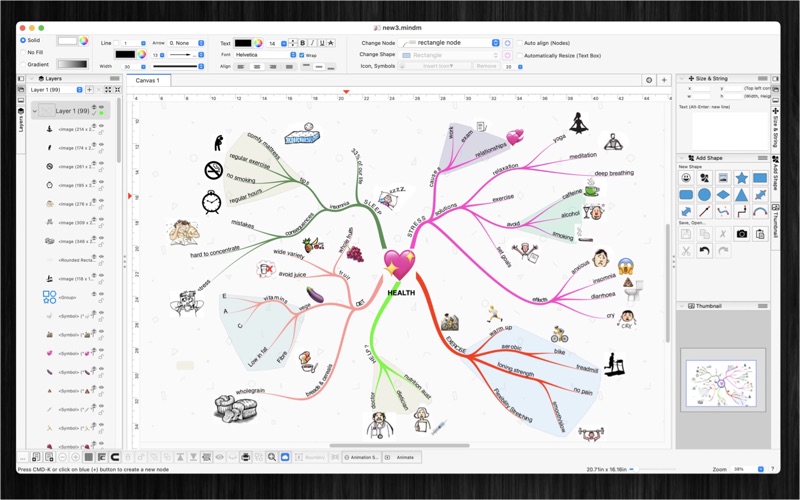
Hva er SimpleMindMap-appen? SimpleMindMap is an easy-to-use mind mapping app for writing your ideas down.
Highlights
+ Auto arrange layout or free layout
+ Can be used in many applications: Business, Education, Brainstorming, Project planning, Task lists, Summarizing
+ Support multi-languages: English, Deutsch, Français, 日本語, 한국어, Español, Português, Čeština, Dansk, Suomi, Italiano, Nederlands, Norsk, Polski, Русский, Svenska, ไทย, Türkçe, Tiếng Việt, 中文(中国), 中文(台灣)
+ Easy to use
+ Add image file or colorful emoji symbols
+ Change and customize the appearance of shapes, nodes, topics.
The application could record knowledge, helping you in learning, brainstorming, memory, visual thinking, and problem solving.
- To create main-note: just double-clicking anywhere on the canvas and then typing
- To create child-notes: select a parent node then press key CMD-K
- To draw connection between notes: hold CONTROL key then draw connection or hold right mouse button then drag drop
- To add text to a connection: just press ENTER or SPACE or double-click on the connection line
FEATURES:
- Create new topic, node by press key CMD-K , or new child-node by key CMD-Shift-K
- Connect notes using right mouse with drag and drop
- Write notes anywhere on the virtual paper
- Support multi-canvas (multi-tabs) for each document
- Generate/Import mind map from plain text
- Export mind map to plain text
- Include 2000 beautiful Symbols
- Allow to insert image by drag image to the canvas
- Allow to Animate your drawing
- Move and arrange notes easily
- Support custom background
- OPEN/SAVE to “*.mindm” file so that you could load it later for editing
- Export to png, jpeg, tiff, pdf image file (shortcut key: CMD-E)
- Capture To Clipboard: Press "CMD-4” or click on Capture button
- Print supported (shortcut key: CMD-P)
- Unlimited Undo/Redo (shortcut key: CMD-Z / Shift-CMD-Z)
- Copy / Paste (shortcut key: CMD-C / CMD-V)
- Duplicate select items (shortcut key: CMD-D)
- Group / Ungroup Items (shortcut key: CMD-R / Shift-CMD-R)
- Lock/Unlock items position (shortcut key: CMD-L / Shift-CMD-L)
- Scale size of select items
- Snap to Grid
- Auto Align with another object when resize or move
- Change display order
- Customization color / Font / Size / Line Type
- Allow to Export image in 300dpi
- Allow user to select items then save them to template list to reuse later
SUPPORT
If you have any questions or feedback, you can contact us by email on [email protected]

SimpleMindMap Kommentarer 2026
| Appens Navn | SimpleMindMap |
| Kategori | Grafikk og design |
| Utvikler | Tien Thinh Vu |
| Publisert | 19 January 2018, Friday |
| Oppdatert | 09 February 2023, Thursday |
| Filstørrelse | 14.25 MB |
😍 Elsker du appen SimpleMindMap? Del med vennene dine!


SimpleMindMap 1.6 Tips, Triks, Jukser og Regler
Vennligst vent! SimpleMindMap app kommentarer laster inn...
SimpleMindMap 1.6 App Skjermbilder og Bilder


SimpleMindMap (versjon 1.6) Installasjon og Nedlasting
| Språk | Norsk |
| Pris | Gratis |
| Voksenvurdering | 4+ år og eldre |
| Siste Versjon | 1.6 |
| Play Store | com.vutienthinh.macos.MindmapDesign2 |
| Kompatibilitet | IOS 10.11 eller nyere |