Linea Sketch
Linea Sketch Appanmeldelser
Hva er Linea Sketch-appen? Draw and take notes with ease.
Linea Sketch gives you the right balance of power and control to capture thoughts and ideas effortlessly. The focus stays where it belongs: on your creations, not on the tools.
Why Linea Sketch?
⁕ Minimal UI - Every control is designed to stay out of your way until you need it. Linea's elegant interface puts the focus on your creations.
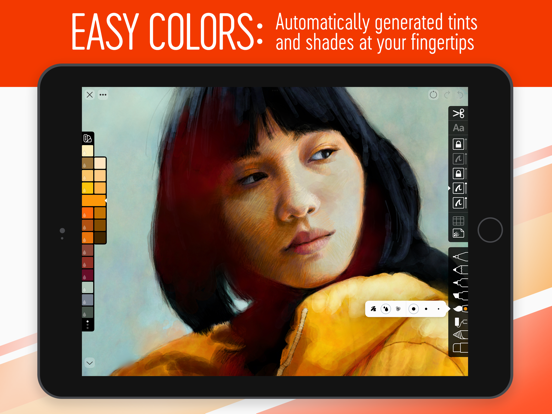
⁕ Easy Colors - Choose from a wide range of pre-defined colors, or create your own with a single tap. Autogenerated tints & shades save time and effort.
⁕ Elegant Layers - Simplified set of layers that can be easily rearranged, merged, locked, or adjusted. Use the file browser and photo library to import images for reference and tracing.
⁕ ZipShapes & ZipLines - Simply hold still for a moment after drawing a line, rough square, circle, or triangle and ZipShape automatically creates a perfect version for you. You can then adjust final size, placement, and corner radius.
⁕ Move / Transform - Lasso part of your sketch, then move, rotate, flip, or resize. Transform one or more layers quickly & easily.
⁕ Watercolor Brush - Create rustic & artistic effects by painting with organic pigment in three modes: Simple, Wet, and Cloud.
⁕ Annotations - Add labels, notes, and callouts to your sketches using iOS Scribble or a keyboard. Fonts, colors, placement, and more can be adjusted effortlessly.
⁕ Time-Lapse - Record your creative process as you sketch! Save a video of the result as either a compressed 30 second clip or a full length movie.
⁕ Grids & Templates - A wide range of traditional grids, 3D isometric lines, storyboards, and templates for iOS screen or icon design.
⁕ Universal App - Linea Sketch is a universal app for iPad and iPhone. Your sketches seamlessly sync via iCloud to all of your devices, wherever you go.
……………………………………
What do you get?
Tools:
• Technical Pencil - Hard lead, thin lines
• Art Pencil - Soft lead, thick lines
• Felt Tip Pen - Thin solid lines that vary in opacity
• Marker - Fat solid lines
• Watercolor Brush - Paint with organic, artistic pigment
• Fill - Roll out wide areas of color or tap to flood fill
• Blend - Smudge or soften strokes
• Eraser - Clean up with your finger or Pencil
• Pencil Plus! - Create additional effects using Apple Pencil pressure and tilt
Colors:
• Always on-screen & easily available
• Tints and shades are automatically generated in six variations
• 11 predefined color sets for various types of drawing
• Create custom colors for branding and consistency
• Drag & drop color swatches with other apps
Layers:
• Five flexible layers that can be dragged, merged, or cleared
• Import any image from Files, Photo Library, or clipboard
• Lockable to prevent accidental changes
• Adjust opacity or double tap to toggle visibility on/off
Templates:
• Traditional grids displayed with lines & dots
• Hexagonal, circular, and isometric (3D) grids
• Notepads, to-do lists, and sheet music
• App user interface and icon design
• Storyboards in 16:9, 1.85:1, and 2.35:1 ratios
• Adjustable intensity and can be hidden quickly
Backgrounds & Paper Textures:
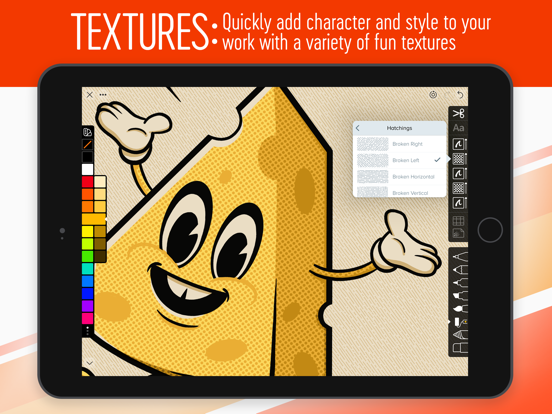
• White Bond, Butcher’s Paper, Black Construction, Blueprint & many more
• Adjustable custom background colors
• Paper grain can be toggled on or off
Exporting:
• Save as PNG, JPEG, PSD, and PDF
• Save entire sketch or crop a portion
• Export to Slack, Dropbox, AirDrop & more
• Presentation Mode shows just the canvas via AirPlay - perfect for classrooms
Projects:
• Organize drawings in project folders
• Share, rename, or move drawings within projects
• Thumbnail previews of drawings save time
• Export PDF of entire project
General:
• Two-finger tap for Undo, three-finger tap for Redo
• Pinch to zoom and rotate canvas
• Tap Compass to lock, flip, or reset your canvas
• Supports portrait & landscape orientations
• Supports split screen and drag & drop
Terms and Conditions: https://linea-app.com/terms
Privacy Policy https://linea-app.com/privacy

Linea Sketch Kommentarer 2026
| Appens Navn | Linea Sketch |
| Kategori | Produktivitet |
| Utvikler | The Iconfactory |
| Publisert | 31 January 2017, Tuesday |
| Oppdatert | 06 May 2026, Wednesday |
| Filstørrelse | 133.3 MB |
Great for scetches!. And now with iCloud support! 👍
Like real sketching. Rediscovered this app and totally love it. Feels almost like sketching in my sketchbook. The gallery is also nice. Sync with desktop via companion app works smoothly as well.
Really nice, lot of potential. The app is, as said, really nice. I love all the features and simplicity behind it, however I would love more templates (like for example more storyboard options). I would also love to see a list off features you get with the paid version, as a one-time pay is quite steep. I’m not saying the price is unreasonable, just that I want to know exactly what I get for that amount of money, you know? Other than that I love this app, and it has so much growth potential. I’m giving it 5 stars despite the «complaints» because either has a big impact on experience to the point it deserves less stars.
Kjempe!. Ser frem til utvikklingen!
😍 Elsker du appen Linea Sketch? Del med vennene dine!


Linea Sketch 4.4 Tips, Triks, Jukser og Regler
Vennligst vent! Linea Sketch app kommentarer laster inn...
Linea Sketch 4.4 App Skjermbilder og Bilder




Linea Sketch (versjon 4.4) Installasjon og Nedlasting
| Språk | Norsk |
| Pris | Gratis |
| Voksenvurdering | 4+ år og eldre |
| Siste Versjon | 4.4 |
| Play Store | com.iconfactory.Graphite |
| Kompatibilitet | IOS 18.0 eller nyere |